
Cooling fan
- Make
- Rover
- Model
- 100 Repair Manual Supplement
- Year
- 1996–1998
- Section
- Repairs › Cooling fan
Cooling system - MEMSCooling fan · page 1 of 2
COOLING FAN
Service repair no - 26.25.22
Remove
- Remove air cleaner assembly. See ENGINE MANAGEMENT SYSTEM - MEMS, Repairs.
- Raise front of vehicle.
WARNING: Support on safety stands.
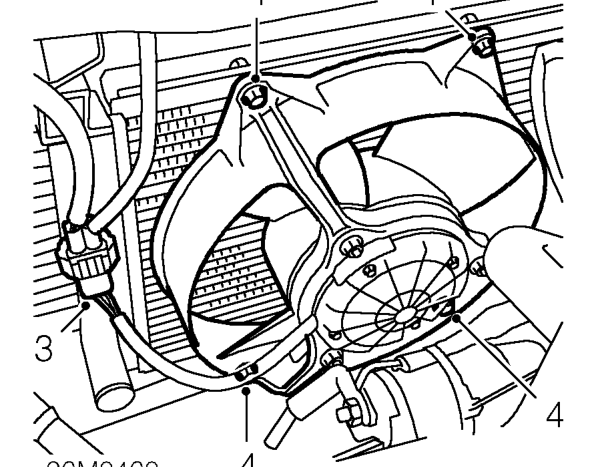
- Release fan motor multiplug from bracket and disconnect multiplug.
- Remove 4 bolts securing fan cowl to radiator.
- Remove fan and cowl assembly.
Refit
- Position fan and cowl assembly.
- Fit and tighten bolts securing cowl.
- Connect multiplug and secure to bracket.
- Remove stand(s) and lower vehicle.
- Fit air cleaner assembly. See ENGINE MANAGEMENT SYSTEM - MEMS, Repairs.
RADIATOR BLOCK
Service repair no - 26.40.04
Remove
- Remove cooling fan and cowl assembly. See COOLING SYSTEM - ’K’ SERIES, Repairs.
- Position container below radiator.
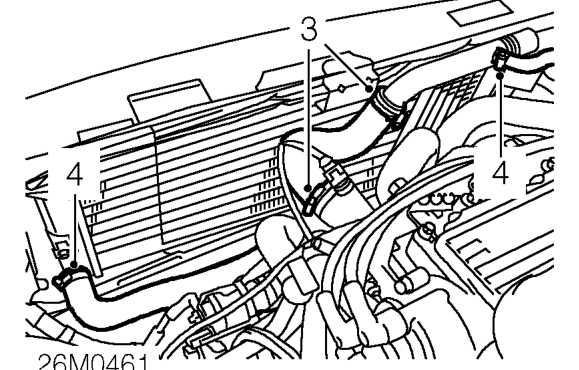
- Loosen top hose clips, disconnect hose from radiator and remove hose from engine.
- Loosen bottom and expansion tank hose clips and disconnect hoses from radiator.
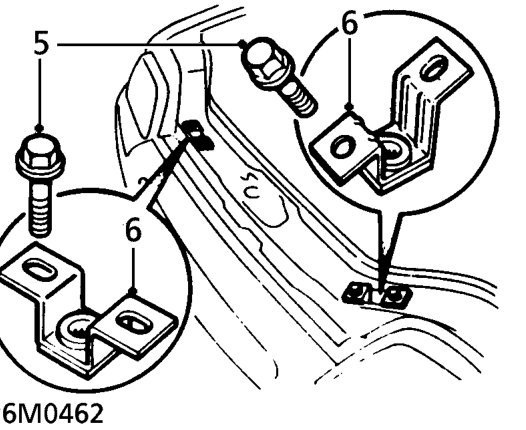
- Remove 4 bolts securing radiator top mounting brackets.
- Remove 2 mounting brackets.
Parts & tools for this job For 1996 Rover 100
- FLUIDCoolantSearch: Rover coolant antifreeze
- PARTThermostatSearch: Rover 100 1996 thermostat
- TOOLCooling system pressure testerSearch: cooling system pressure tester
Links open Amazon search results in a new tab. As an Amazon Associate I earn from qualifying purchases.