
Fascia veneered panel
- Make
- Rover
- Model
- 400 Body Repair Manual
- Year
- 1995–2000
- Section
- Interior trim components › Fascia veneered panel
BodyFascia veneered panel · page 1 of 2
Do not carry out further dismantling if component is removed for access only.
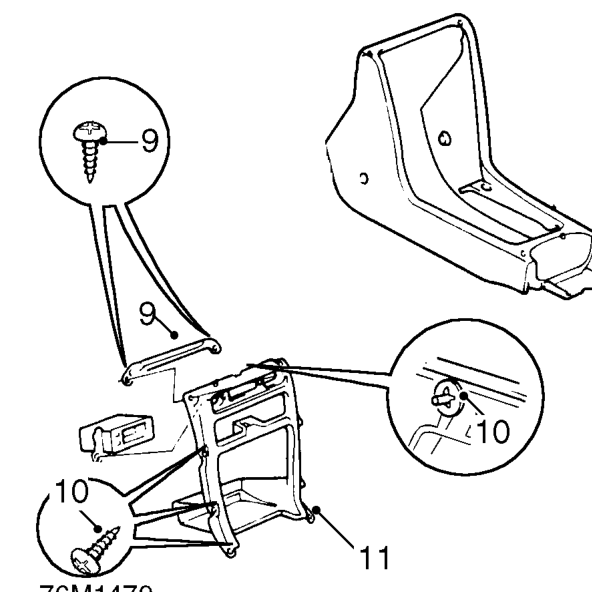
- Remove 2 screws and remove upper support bracket.
- Remove 3 spire clips and 6 screws securing radio aperture panel.
- Remove radio aperture panel.
Refit
- Fit radio aperture panel and secure with 6 screws and 3 spire clips.
- Fit upper support bracket and secure with 2 screws.
- Fit front console and align to fascia.
- Fit 5 screws securing console to fascia.
- Position hazard and heated rear screen switches, connect multiplugs and secure switches to console.
- Fit radio mounting socket.
- Fit trim panel to gear selector housing.
- Fit radio/CD player. See ELECTRICAL, Repairs.
- Fit rear console. See this section.
FASCIA VENEERED PANEL
Service repair no - 76.46.24
Remove
- Remove front console. See this section.
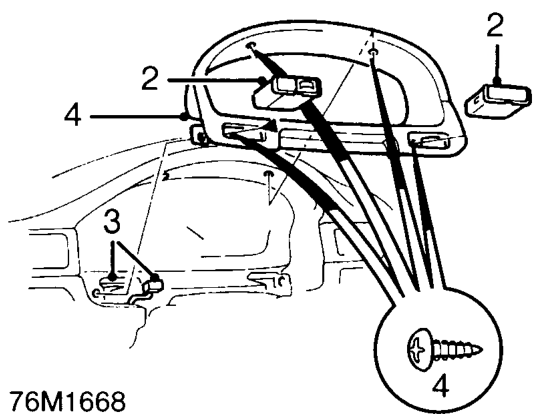
- Remove switch blank and release fog lamp switch from instrument panel surround.
- Disconnect fog lamp switch multiplug.
- Remove 4 screws and remove instrument panel surround.
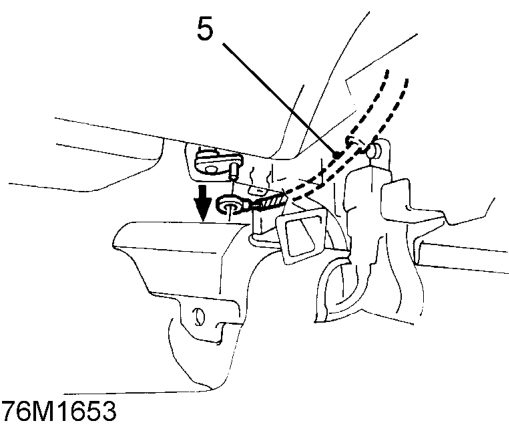
- Disconnect air vent cable from heater.
CAUTION: Fit protection to fascia before removing veneered panels.
Parts & tools for this job For 1995 Rover 400
- TOOLTrim removal tool kitSearch: trim removal tool kit
- PARTTouch-up paintSearch: Rover touch up paint
- PARTPanel clip assortmentSearch: Rover panel clips assortment
Links open Amazon search results in a new tab. As an Amazon Associate I earn from qualifying purchases.