
Brake light switch
- Make
- Mini
- Model
- Mini Workshop Manual
- Year
- 1996–2000
- Section
- Repairs › Brake light switch
BrakesBrake light switch · page 1 of 2
BRAKE LIGHT SWITCH
Service repair no - 70.35.42
Remove
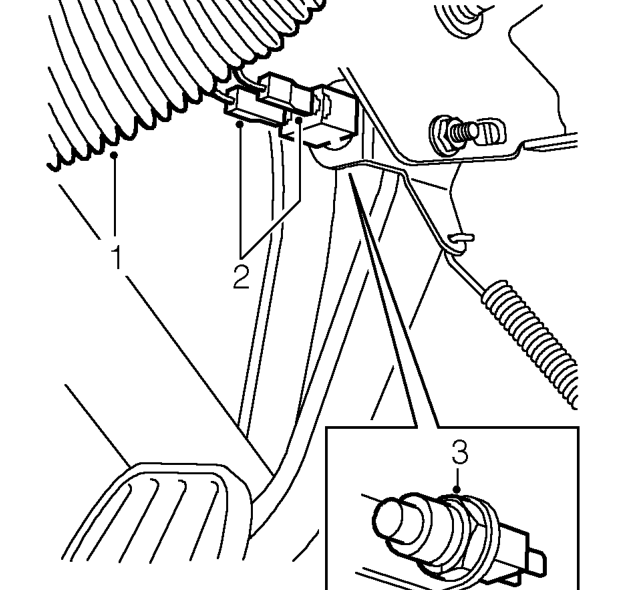
- Remove heater air intake hose.
- Disconnect Lucars from brake light switch.
- Loosen locknut securing brake light switch to pedal box bracket and remove switch
Refit
- Fit brake light switch and tighten locknut.
- Adjust brake light switch. See Adjustments.
MASTER CYLINDER
Service repair no - 70.30.08
Remove
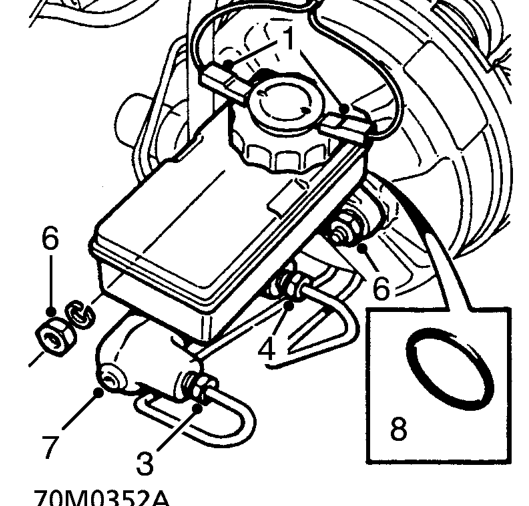
- Disconnect 2 Lucars from fluid reservoir filler cap.
- Position cloth under master cylinder to absorb spilled fluid.
CAUTION: Do not allow brake fluid to contact paint finished surfaces as paint may be damaged. If spilled, remove fluid and clean area with clean warm water.
- Loosen union and disconnect secondary system pipe from master cylinder.
- Loosen union and disconnect primary system pipe from master cylinder.
- Move brake pipes aside.
- Remove 2 nuts securing master cylinder to servo.
- Remove master cylinder.
- Remove and discard ’O’ ring from master cylinder.
Parts & tools for this job For 1996 Mini Mini
- TOOLOBD2 scannerSearch: OBD2 scanner
- TOOLDigital multimeterSearch: automotive digital multimeter
- TOOLBack-probe test leadsSearch: back probe test leads
Links open Amazon search results in a new tab. As an Amazon Associate I earn from qualifying purchases.