
Performing vehicle system test
- Make
- Volkswagen
- Model
- Amarok 2H
- Year
- 2010–2020
- Section
- Fuel pump › Performing vehicle system test
Performing vehicle system test
Connect vehicle diagnosis, testing and information system VAS 5051B or vehicle diagnosis and service information system VAS 5052 AChapter.
Note
- Observe current operating instructions for vehicle diagnosis, testing and information system VAS 5051B or vehicle diagnosis and service information system VAS 5052 A, which are shown on display after selecting the functions Administration and Operating manual.
Warning
- If the vehicle diagnosis, testing and information system VAS 5051B or the vehicle diagnosis and service information system VAS 5052 A is placed in the range of action of an airbag during a test or measuring run,
- there is a risk of severe or fatal injury should an airbag be triggered!
- During the road test take another person with you who can operate the vehicle diagnosis, testing and information system VAS 5051B or vehicle diagnosis and service information system VAS 5052 A from the rear seat.
- Always secure testing and measuring equipment on the rear seat during a road test.
Note
- If faults are stored, the respective event memory must not be cleared.
If the subsequent fault finding (repair measure) is performed using vehicle diagnosis, testing and information system VAS 5051B or vehicle diagnosis and service information system VAS 5052 A in operating mode Guided fault finding, the device reads the event memories again. The vehicle diagnosis, testing and information system VAS 5051B or vehicle diagnosis, testing and information system VAS 5052 A can generate a test plan for “Guided fault finding” but only if the faults are still stored in the event memory.
Pull on handbrake.
Manual gearbox: gear lever in neutral
Switch on ignition.
Select Guided functions operating mode (arrow) on display of vehicle diagnosis, testing and information system VAS 5051B or vehicle diagnosis and service information system VAS 5052 A.
Indicated on display:
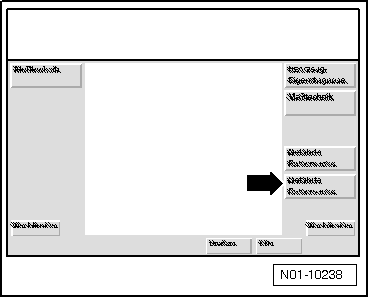
Then perform vehicle identification on vehicle diagnosis, testing and information system VAS 5051B or vehicle diagnosis and service information system VAS 5052 A.
Select one after another:
- Brand
- Type
- Model year
- Version
- Engine code
Confirm vehicle identification.
If the vehicle identification has been performed correctly, confirm with > button.
Indicated on display:
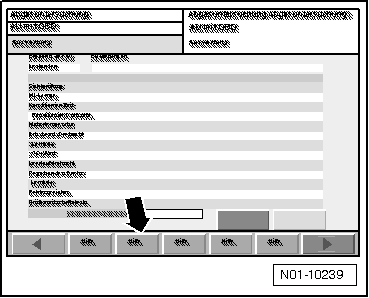
Select Vehicle system test function (arrow) on display of vehicle diagnosis, testing and information system VAS 5051B or vehicle diagnosis and service information system VAS 5052 A.
Start system test by selecting function Start system test on display of vehicle diagnosis, testing and information system VAS 5051B or vehicle diagnosis and service information system VAS 5052 A.
Now the event memories of all control units for this type of vehicle are automatically read and any faults stored will be listed.
Note
- If any stored faults are listed, it is useful at this point to change to the Guided troubleshooting mode
- in order to continue working with the vehicle diagnosis, testing and information system VAS 5051B or vehicle diagnosis and service information system VAS 5052 A and avoid the tester having to perform a second vehicle identification check.
- When the system test indicates the need for a repair measure (fault finding) and this is to be performed immediately, change to operating mode Guided fault finding.
- If the repair measure is to be carried out at a later date, e.g. after completing servicing, end operating mode Guided functions. The event memory will not be cleared.
- Follow the instructions of the vehicle diagnosis, testing and information system VAS 5051B or vehicle diagnosis and service information system VAS 5052 A for further procedure for “Guided fault finding” or “Guided functions”.
End the system test via function GoTo and End or continue “Guided fault finding” after changing the operating mode.
Warning The vehicle must always be delivered to the customer with event memory cleared.
If one or more static faults have been stored in the event memory,
it is advisable to rectify these faults with the help of “Guided troubleshooting” in consultation with the customer.
If only sporadic faults or notes have been stored in the event memory
and the customer makes no complaints regarding an electronic vehicle system, the event memory is to be erased.
Start operating mode Vehicle self-diagnosis in system start screen of vehicle diagnosis, testing and information system VAS 5051B or vehicle diagnosis and service information system VAS 5052 A.
- Clearing event memory by selecting individual control units:
Select control unit in question individually in overview, select Read event memory and then press Delete event memory.
- Clearing event memory via function Collection services:
Call up Collection services on display,
and then select Delete event memory function.
Note
- If all faults have been cleared, it is shown on display.
- The diagnosis log can be sent automatically »online«.
The vehicle system test is completed.
Parts & tools for this job For 2010 Volkswagen Amarok
- PARTFuel filterSearch: Volkswagen Amarok 2010 fuel filter
- TOOLFuel pressure test kitSearch: fuel pressure test kit
- TOOLFuel line disconnect toolSearch: fuel line disconnect tool
As an Amazon Associate we earn from qualifying purchases.