
Service interval display: resetting
- Make
- Volkswagen
- Model
- Amarok 2H
- Year
- 2010–2020
- Section
- Fuel pump › Service interval display: resetting
Service interval display: resetting
The service interval display must be reset (adapted) for:
- Delivery inspection
- Every oil change service (fixed/flexible)
- Every interval service (fixed/flexible ► 2013)
- Every inspection (2014 ►)
reset (adjusted)!
Note
- Observe the current operating instructions for the vehicle diagnosis system that are shown on the display when the Administration and Operating Manual functions are selected.
- The procedure for resetting the service interval display without the vehicle diagnostic tester is described in the instruction booklet of the vehicle's manuals.
- It is also possible to reset the service interval display (SID) manually. However, bear in mind that the SID of vehicles with flexible-interval coding will be coded to fixed intervals. This also modifies the adaptation channel for oil quality.
Resetting service interval display using VAS vehicle diagnostic tester software
Note
- If the information indicated in the working procedure is not shown on the display ⇒ Operating instructions for vehicle diagnostic tester
| VAS service |
|---|
| Connecting vehicle diagnostic tester → Chapter |
| Switch on ignition. |
| Select »Guided functions« on the screen and carry out vehicle identification. |
| Select one after another:BrandTypeModel yearVersionEngine code |
| Confirm vehicle identification. |
| If vehicle identification has been carried out correctly, confirm with the > button. |
| Select one after another:“Dash panel insert.”“Resetting the service interval display” |
| Carry out adaptation according to the information given in “Guided functions”. |
| Select the »GoTo« function on the display and then select »End«. |
| Switch off ignition and separate diagnosis connections. |
After the ignition is switched on, the type of service is no longer displayed in the distance display in the dash panel insert.
Resetting service interval display using vehicle diagnostic tester program Offboard Diagnostic Information System
Note
- It is not necessary to log in in order to enter or call up vehicle data.
- If the options indicated in the working procedure are not shown on the display ⇒ Operating instructions for vehicle diagnostic tester
| ODIS service |
|---|
| Establish a connection to the vehicle and switch on the ignition. |
| Select »Start diagnosis« on the display. |
| Identify »Basic characteristics of vehicle«. |
| Deactivate »Work with guided fault finding« and confirm with »Accept«. |
| Select control unit, dash panel insert and select »Guided functions« with right mouse click. |
| Select the respective service which is to be reset. |
| Carry out adaptation according to the instructions in Guided functions. |
Resetting service interval display without vehicle diagnostic tester
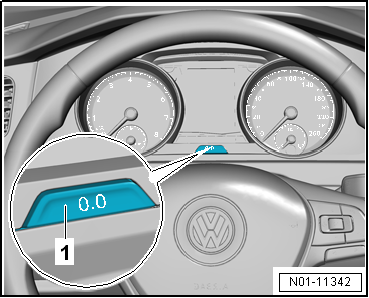
Function button on dash panel insert:
With ignition switched off, press and hold button -1-.
Switch on ignition.
Wait until “Reset oil change service?” appears on the display.
Release button -1-.
The service interval display is now in the resetting mode.
Briefly press button -1- once.
After a short time the display switches back to the original display.
With function button on dash panel insert:
With ignition switched off, press and hold button -1-.
Switch on ignition.
Wait until “Reset inspection service?” appears on the display.
Release button -1-.
The service interval display is now in the resetting mode.
Briefly press button -1- once.
After a short time the display switches back to the original display.
Parts & tools for this job For 2010 Volkswagen Amarok
- PARTOil filterSearch: Volkswagen Amarok 2010 oil filter
- TOOLOil filter wrenchSearch: oil filter wrench
- FLUIDEngine oilSearch: Volkswagen Amarok engine oil
As an Amazon Associate we earn from qualifying purchases.