
Battery Charging
- Make
- Aston Martin
- Model
- DB7 Factory Workshop Manual Volume 2: Electrics, Body and Air Conditioning
- Year
- 1994–1998
- Section
- Installation instructions › Battery Charging
Battery Charging
The PDU is fitted with internal NICAD batteries which allow the PDU to be transported whilst retaining programs. The batteries are not designed to be used as a general power source. A special circuit monitors the amount of charge in the batteries so that they cannot be overcharged.
From the time when first operating the system or a PDU fitted with substitute batteries, it will take up to 36 hours to achieve full charge. In the meantime, the PDU can be used whilst connected to the base station or to the vehicle battery. Keep transit times to and from the vehicle as short as reasonably possible to preserve battery charge.
Subsequent battery charges should take six to seven hours from fully discharged. The PDU must always be left connected to the base station when not in use in order to keep the batteries fully charged.
CAUTION: The rechargeable NICAD batteries fitted to the PDU are of a special type and must only be replaced with GenRad approved parts. Do not substitute the batteries with any other type. Always dispose of old batteries in compliance with local recycling regulations. The procedure for changing the battery pack is described later in this installation guide.
Using the PDU on the Vehicle
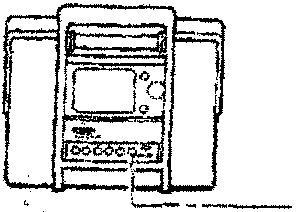
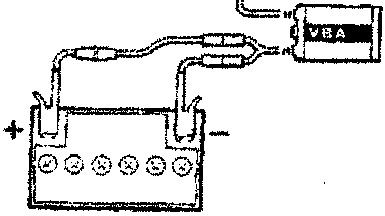
At the vehicle, the PDU may be removed from its carrying case if required. The PDU should always be connected to the vehicle using the Vehicle Battery Adaptor (VBA) (0024). The PDU will continue to charge from the vehicle battery.
Vehicle Battery Adaptor
This unit transforms battery voltage to the correct level for the PDU. The VBA (Fig 13) also contains electrical filters to protect the PDU from any voltage spikes or other interference from the vehicle which could affect PDU operation.
Operating Procedures
Refer to the Aston Martin Diagnostic System Users Guide for detail on each of the PDU software options
Selecting Diagnostics
- Switch on the PDU, the main menu will be displayed.
- Select 'Run Diagnostic' from the main menu and confirm the selection by pressing the 'tick' icon. A sequence of menus will be displayed requesting identification of the vehicle under test.
- The system will load the appropriate software.
- On completion of software loading, disconnect the PDU from the base station and transfer it in its carrying case to the vehicle. The additional pockets in the carrying case may be used for carrying any interface cables required.
- If the VIA is required, also transfer it in its carrying case to the vehicle together with any vehicle interface cable required.
Vehicle Interface Adaptor
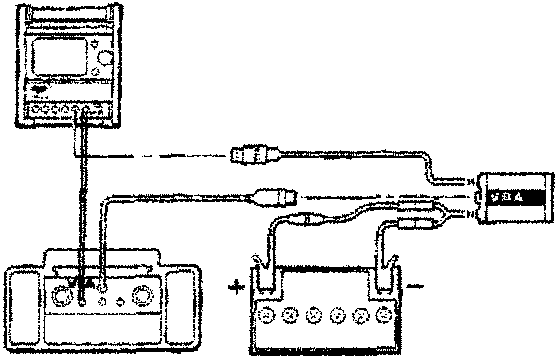
When the software requires the Vehicle Interface Adaptor to be used, it is powered from the vehicle battery (Fig 14). The Vehicle Battery Adaptor incorporates a socket into which the VIA to VBA cable (0028) is inserted. The opposite end of this cable is inserted into the connector on the VIA panel.
Parts & tools for this job For 1994 Aston Martin DB7
- TOOLBattery testerSearch: car battery tester
- TOOLDigital multimeterSearch: automotive digital multimeter
- TOOLBattery terminal cleanerSearch: battery terminal cleaner
Links open Amazon search results in a new tab. As an Amazon Associate I earn from qualifying purchases.