
Component Identification
- Make
- Aston Martin
- Model
- DB7 Factory Workshop Manual Volume 2: Electrics, Body and Air Conditioning
- Year
- 1994–1998
- Section
- Installation instructions › Component Identification
Component Identification
Base Station (Fig 1-16)
The Base Station is a wall or bench mounted steel unit on which up to two Portable Diagnostic Units and a Vehicle Interface Adaptor can be stored.
Portable Diagnostic Unit (PDU) (Fig 1-15)
The PDU is a hand held diagnostic tool utilising a touch sensitive screen and serial communications capability
Electronics Module
The Electronics Module is located behind the base station door (Fig 1-17) and facilitates the charging of the PDU battery. Also contained in the module is the CD-ROM drive (Fig 1-23) for the storage of all system software. The PDU must be connected to the electronic module whenever it is located on the base station.
Vehicle Interface Adaptor (VIA) (Fig 1-14)
The VIA enables the PDU to interface with vehicle systems not equipped with serial communications.
Vehicle Battery Adaptor (VBA)
The VBA provides the correct voltage to power the PDU from the vehicle battery and also protects the PDU from any interference from the vehicles electrical systems.
Controls
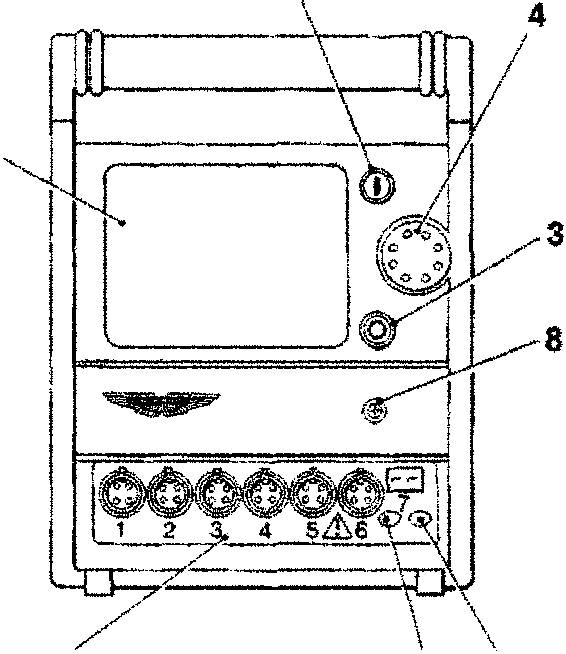
The Touching the Power On button (Fig 2-2) will switch on the unit and bring on the screen backlight. Also note that the Power On Indicator (Fig 2-6) will illuminate.
Touching the Power Off button (Fig 2-3) will turn off the unit, screen backlight and power on indicator.
The Touch Sensitive Screen (Fig 2-1) is used to display information in digital or in graphic forms. Program options are also displayed and may be selected by touching the appropriate area of the screen.
CAUTION: The use of sharp pointed implements will damage the touch sensitive screen. Use only light finger pressure to operate the PDU.
To adjust the screen contrast, rotate the contrast control (Fig 2-4) to the required position.
In order to preserve the battery charge, the power to the screen backlight is automatically switched off after 5 minutes of inactivity. In this state, the Power On indicator (Fig 2-6) remains illuminated to indicate that the PDU is in stand-by mode. Touching the screen will return the PDU to normal operating mode.
Diagnostic System Cables
Cables
The cables connecting the diagnostic system elements together and to the electronic units of the vehicle are identified in the following illustrations.
The cables should be stowed in the base station drawer or in the pockets of the PDU and VIA carrying cases.
CAUTION: Care must be taken when using the vehicle cables since they are capable of passing high currents. Short Circuits are a fire risk.
- [illegible]
- [illegible]
- [illegible]
- [illegible]
- [illegible]
- [illegible]
- [illegible]
- [illegible]
Parts & tools for this job For 1994 Aston Martin DB7
- TOOLOBD2 scannerSearch: OBD2 scanner
- TOOLDigital multimeterSearch: automotive digital multimeter
- TOOLBack-probe test leadsSearch: back probe test leads
Links open Amazon search results in a new tab. As an Amazon Associate I earn from qualifying purchases.