
Bench Mounting
- Make
- Aston Martin
- Model
- DB7 Factory Workshop Manual Volume 2: Electrics, Body and Air Conditioning
- Year
- 1994–1998
- Section
- Installation instructions › Bench Mounting
Bench Mounting
The base station may also be mounted on a bench, which must be in a safe position, stable and protected form hazards and impacts. The base station must be mounted at the back of the bench. 'Z' clips are provided for permanent mounting. The bench surface must be kept free from dust at all times.
CAUTION: A gap under the base station must be maintained free from obstructions to allow a flow of air under the unit for cooling.
Electronic Module Installation
WARNING: The base station electronic module must be disconnected from the mains supply prior to installation/removal from the base station assembly. DO NOT reconnect to the mains supply until the module is safely fitted into the base station. This unit must be earthed.
Note: Users in North America are advised to replace the ceramic mains fuse in the electronic module with the glass fuse supplied.
Procedure
- Unlock the base station door
- Pull the right spring-loaded hinge (Fig 4-1) and remove the door.
- Remove the electronics module from the packaging and place it on a firm surface.
- Remove the two screws and washers from the front of the module (Fig 4-3).
- Insert the mains power lead into the socket at the rear of the module Fig 4-4), DO NOT CONNECT TO THE MAINS SUPPLY.
- Insert the two guide pins on the sides of the module (Fig 4-5) into the base station slots.
- Slide the module into the base station until fully home, raise the front so that it is level and draw it slightly forward.
- The two connectors on the front of the module will appear through the matching holes in the base station. Support the module whilst refitting the two retaining screws and washers (Fig 4-6).
- Secure the mains lead to the underside of the base station using the two cable ties provided (Fig 4-7).
- If bench mounting, the base station will need to be turned on its back to install and secure the mains lead.
- Refit the base station door.
CAUTION: Take care to avoid the sharp edges of the module whilst installing. Take care to support the module from the underside until the mounting screws are secured.
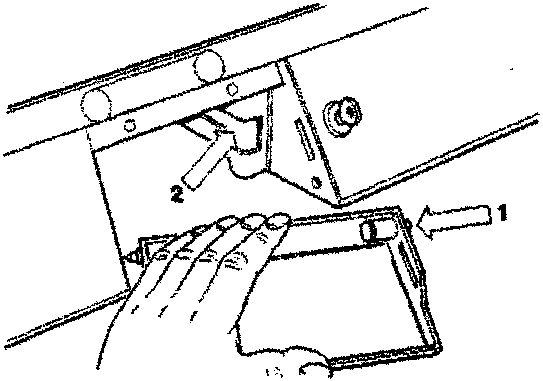
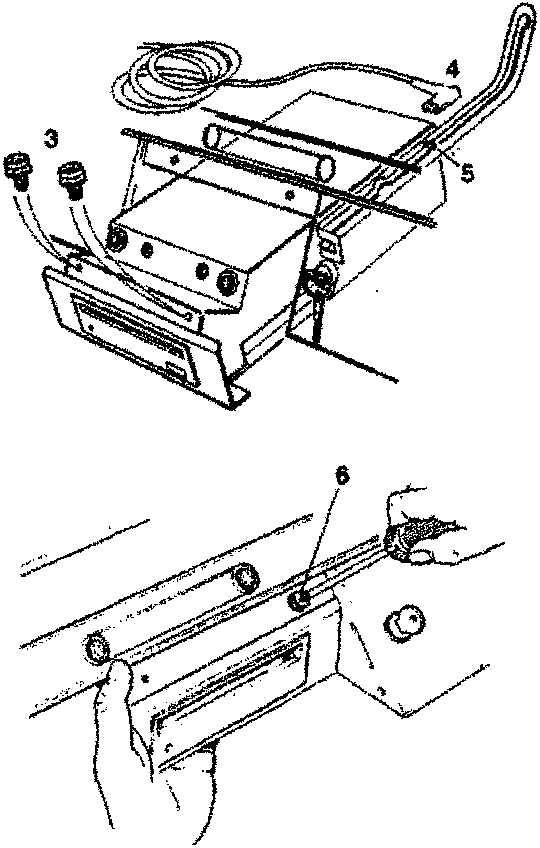
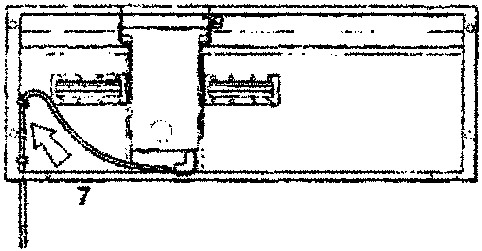
Figure 4. Electronic Module Installation
Parts & tools for this job For 1994 Aston Martin DB7
- TOOLOBD2 scannerSearch: OBD2 scanner
- TOOLDigital multimeterSearch: automotive digital multimeter
- TOOLBack-probe test leadsSearch: back probe test leads
Links open Amazon search results in a new tab. As an Amazon Associate I earn from qualifying purchases.