
Introduction - on board instruments
- Make
- Fiat
- Model
- 500 Factory Service Manual
- Year
- 2007–2024
- Section
- Instruments › Introduction - on board instruments
INTRODUCTION - ON BOARD INSTRUMENTS
INTRODUCTION
The control panel is fitted behind the flywheel and is connected to the CAN.
The instrument panel is essentially subdivided into four specific areas of operation:
1. Area for warning lights display
2. Area for electronic speedometer
3. Area for electronic rev counter
4. Central area for alphanumeric display
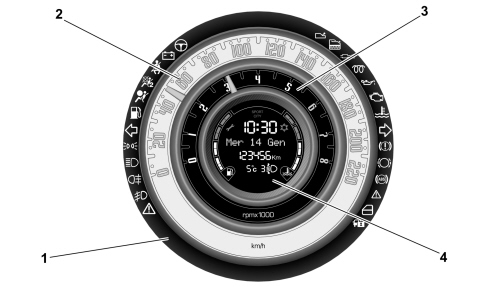
The type and background colour of the instruments can vary between different versions.
The car can be equipped with a multifunction (Comfort) / reconfigurable multifunction (Matrix) display to provide the user with useful information, according to previous settings, whilst driving the vehicle.
COMFORT and MATRIX control panel versions have different display technology.
Comfort version
The figure below shows the multifunction display standard screen.
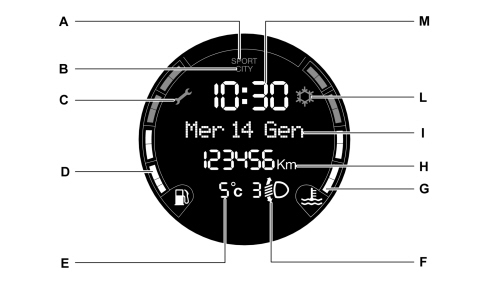
A. Sport driving mode (where present) indication
B. Dualdrive electric power steering engagement
C. Scheduled service interval
D. Fuel level digital gauge
E. External temperature gauge
F. Headlamp alignment position (only with dipped headlamps on)
G. Engine coolant temperature digital gauge
H. Mileometer (display of kilometres or miles travelled).
I. Date
L. Ice on road warning
M. Time
The Comfort alphanumeric display shows the following functions:
| FUNCTIONS | Always present | At Key On | Event-driven | On request |
|---|---|---|---|---|
| Clock | X | |||
| Date | X (default) | |||
| Mileometer | X | |||
| Headlamp alignment corrector | X (at +lights) | |||
| Outside temperature | X | |||
| Signalling of danger of ice | X | |||
| Function activation message | X | |||
| Fault/warning messages | X | |||
| CITY function | X | |||
| SPORT function | X | |||
| Automatic transmission of information | X(OPT) | |||
| Trip Computer | X | |||
| Service (Planned maintenance) | X | X | ||
| AUDIO Information Repetition | X | |||
| Convergence (status bar) | X | |||
| SMS (reception) | ||||
| Navigation with pictograms | ||||
| Destination information | ||||
| Route information | ||||
| Position information | ||||
| Set-up menu function | X | |||
| AGENDA/MEMORANDUM functions | ||||
| Follow me | X |
The SPORT function is activated by pressing a key on the dashboard. It adds a sporty function to the following systems:
- Engine management
- Robotized gearbox
- Electric Steering
Matrix version
The figure below shows the reconfigurable multifunction display standard screen.
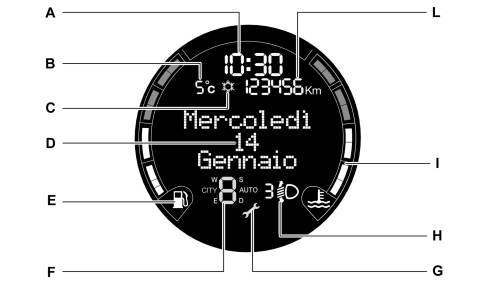
A. Time
B. External temperature gauge (where applicable)
C. Ice on road warning
D. Date
E. Fuel level digital gauge
F. Dualogic gearbox associated instructions (where applicable)
G. Scheduled service interval
H. Headlamp alignment position (only with dipped headlamps on)
I. Engine coolant temperature digital gauge
L. Mileometer (display of kilometres or miles travelled).
Matrix version central dot-matrix area
At the centre of the Matrix version display is a 128 x 64 pixel dot-matrix area.
The central area of the display is subdivided into thematic zones as illustrated below:
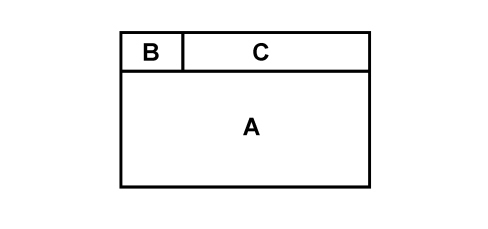
A. Area for displaying messages / information / settings, etc.
B. Identification symbol for function displayed
C. Function displayed
Information displayed in area A:
- Audio repetition
- Trip
- Menu
- Dimming
- Feedback
- Convergence
- Other remarks
The symbols and titles for guidance are displayed in areas B and C respectively.
Information displayed in area of groups A+B+C:
- Fault (high/low priority)
- Feedback
- Information
- Standard screen (date)
The Matrix alphanumeric display shows the following functions:
| FUNCTIONS | Always present | At Key On | Event-driven | On request |
|---|---|---|---|---|
| Clock | X | |||
| Date | X (default) | |||
| Mileometer | X | |||
| Headlamp alignment corrector | X (at +lights) | |||
| Outside temperature | X | |||
| Signalling of danger of ice | X | |||
| Function activation message | X | |||
| Fault/warning messages | X | |||
| CITY function | X | |||
| SPORT function | X | |||
| Robotized Gearbox information | X(OPT) | |||
| Trip Computer | X | |||
| Service (Planned maintenance) | X | X | ||
| AUDIO Information Repetition | X | |||
| Convergence (status bar) | X | |||
| SMS (reception) | ||||
| Navigation with pictograms | ||||
| Destination info | ||||
| Route information | ||||
| Position information | ||||
| Set-up menu function | X | |||
| AGENDA/MEMORANDUM functions | ||||
| Follow me | X |
Warning lights
The figure below shows a diagram of the warning lights.
Dimming the panel lights does not affect the brightness of the warning lights (brightness intensity always at 100%). The amount of dimming is transmitted from the instrument panel on the CAN.
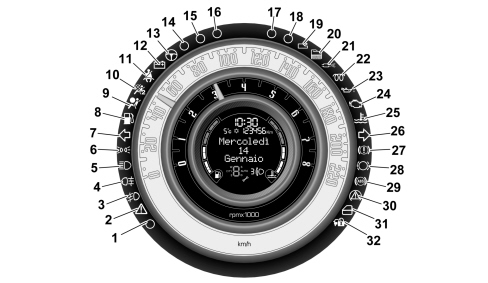
| N° | DESCRIPTION | Comfort | Matrix | COLOUR |
|---|---|---|---|---|
| 1 | Wiring (brightness sensor) | |||
| 2 | General failure | X | amber | |
| 3 | Fog lights | X | X | green |
| 4 | Rear fog lamps | X | X | amber |
| 5 | Main beam headlamps | X | X | blue |
| 6 | Side lights | X | X | green |
| 7 | Left direction indicators | X | X | green |
| 8 | Fuel reserve | X | X | amber |
| 9 | Airbag fault | X | X | red |
| 10 | Passenger air bag deactivation | X | X | amber |
| 11 | Seat belts not fastened | X | X | red |
| 12 | Alternator failure | X | X | red |
| 13 | Electric steering failure (Servotronic) | X | red | |
| 14 | Wiring | |||
| 15 | Wiring | |||
| 16 | Wiring | |||
| 17 | Wiring | |||
| 18 | Wiring | |||
| 19 | Robotized/automatic gearbox fault (where applicable) | X | red | |
| 20 | Water in diesel filter sensor | X | amber | |
| 21 | DPF particulate filter | X | amber | |
| 22 | Heater plugs | X | X | amber |
| 23 | Minimum engine oil pressure | X | X | red |
| 24 | EOBD and engine management system failure | X | X | amber |
| 25 | Max. engine coolant temp. | X | X | red |
| 26 | Left direction indicators | X | X | green |
| 27 | Handbrake applied / insufficient brake fluid level / EBD failure | X | X | red |
| 28 | Brake pad wear | X | amber | |
| 29 | ABS failure | X | X | amber |
| 30 | ESP engagement/ failure | X | X | amber |
| 31 | Doors open warning | X | red | |
| 32 | Vehicle protection system failure | X | X | amber |
The general fault warning light (2) includes the following information/faults:
- FIS intervention
- Engine oil pressure sensor failure
- Exterior lighting failure
- Parking sensors failure
- Engine oil pressure sensor failure
- Robotized gearbox safety signals
- Fuel locking operation
- Fuel locking not available
- ABS, ASR, and ESP fault
Brightness sensor
The control panel is equipped with a brightness sensor that detects day conditions and night conditions so that the car display illumination is managed accordingly. (see wiring n° 1 of Instrument panel)
Use of the key (+15) signal
The control panel receives:
- Key signal from the network (+15 from BCM, CAN "KeySts" signal)
- physical Key signal (from the pawl)
The instrument panel only uses the network key signal to switch off, while the physical key signal is needed to switch it on.
All the instrument panel system modules (Network, WakeUp, Diagnosis) only use the physical key.
Under BCM recovery conditions, the control panel no longer uses the network key and manages its operations using the physical key alone.
The figure below shows the rear view of the instrument panel, where the connector for the car wiring connection is located.
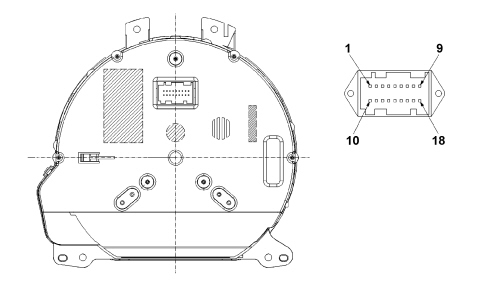
The following table shows the instrument panel pinout.
| Pin | Description |
|---|---|
| 1 | Earth - GND |
| 2 | + 30 Batt ( from NBC ) |
| 3 | + 15 Key on ( from NBC ) |
| 4 | n.c. |
| 5 | B-CAN (A) |
| 6 | B-CAN (B) |
| 7 | Headlamp alignment corrector control signal |
| 8 | + Low beam from NBC (switch-on control icon on headlamp alignment display) |
| 9 | TRIP control from steering wheel interface |
| 10 | n.c. |
| 11 | n.c. |
| 12 | n.c. |
| 13 | n.c. |
| 14 | n.c. |
| 15 | n.c. |
| 16 | n.c. |
| 17 | n.c. |
| 18 | n.c. |
The pin 7 signal is a percentage of the pin 8 power supply.
Menu function
There are three keys on the control panel, one to enter menu mode or to confirm choice of the selected option and two for navigation within the menu.
The setup menu can be activated with a short press (< 1s) on the button (2) in two different ways:
- Full menu (With vehicle speed below 4 Km/h)
- Basic menu (With vehicle speed above 4 Km/h)
Pressing the button (2) for more than 1 second stores changes confirmed with a short press, however if no operations are carried out for more than 60 seconds, the standard screen is displayed again.
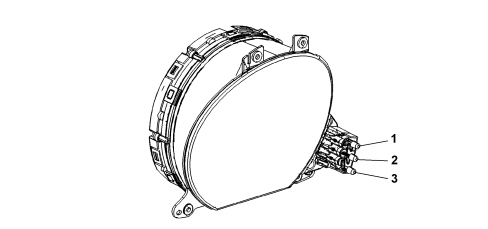
1. Menu (+)
2. Menu/ESC
3. Menu (-)
Control buttons
The button: + scrolls upwards on the display and the options or increases the displayed value.
The button: MENU ESC has a dual function:
- short press: accesses the menu and/or moves to the next screen or confirms the chosen option.
- one press: returns to the standard screen.
The button: - scrolls downwards on the display and the options or decreases the displayed value.
The buttons + and - activate different functions according to the following situations: scrolling up or down inside the menu, increasing or decreasing during the setting operations.
When one of the doors is opened, the display is activated showing the time and km/mileage (where available) for a few seconds.
Setup menu
The menu is made up of a series of functions arranged in a circular way; using the buttons + and - to select it allows access to different choices and setting (setup) operations that are shown below. There is a submenu for some items (clock adjustment and units of measurement). The setup menu can be activated by pressing the MENU ESC button briefly. It is possible to move along the set up menu list by pressing buttons + or - once.
At this point, management modes differ from each other according to the characteristics of the option selected. The menu comprises the following functions:
- LIGHTING
- SPEED BEEP
- TRIP B DATA
- TIME ADJUSTMENT
- DATE ADJUSTMENT
- SEE RADIO
- AUTOCLOSE
- MEASUREMENT UNIT
- LANGUAGE
- WARNINGS VOLUME
- VOLUME KEYS
- BELT BUZZER
- SERVICE
- PASSENGER AIRBAG
- DAYTIME LIGHTS
- MENU EXIT
Selection of an option from main menu without submenu:
- by means of a short press on MENU ESC button, the setting to be modified can be selected from the main menu;
- press buttons + or - (with a single press) to select the new setting;
- a short press on button MENU ESC will store the setting and then return to the same main menu option that was first selected.
Selection of an option from main menu with submenu:
- a short press on MENU ESC button will display the first submenu option;
- press buttons + or - (with a single press) to scroll through the submenu options;
- a short press on MENU ESC button will select the displayed submenu option and enter the associated setting menu;
- press buttons + or - (single press) to choose a new setting for this submenu option;
- a short press on button MENU ESC will store the setting and then return to the same submenu option that was first selected.
Menu functions
Lighting (car internal lighting adjustment)
This function is available:
- with multifunction display: with lights on and in night conditions, to regulate the brightness intensity of the instrument panel, the radio display, and the automatic climate control system (for night conditions);
- with reconfigurable multifunction display:
The function is always available and adjusts the brightness of the instrument panel during daytime conditions, and the brightness of the instrument panel, radio display, and automatic climate control system (for night conditions) during night-time conditions.
With lights on, in daytime conditions, the instrument panel display is switched on (to the maximum brightness for the multifunction display, or to the selected value in daytime mode for the reconfigurable multifunction display), the keys and the radio display, and automatic climate control system are switched on.
With lights on, in night-time conditions, the instrument panel display, the keys, the radio display and automatic climate control system are switched on according to the intensity level chosen.
To adjust the light intensity, proceed as follows:
- press the MENU ESC button briefly to make the display flash the previously stored level;
- press the button + or - to adjust the light intensity level;
- press the MENU ESC button briefly to return to the menu screen or give the button a long press to return to the standard screen without storing.
Speed beep (speed limit)
This function allows the car speed limit to be set (km/h or mph) and the driver will be notified when it is exceeded (see chapter "Warning lights and messages").
To set the desired speed limit, proceed as follows:
- briefly press the MENU ESC button to make the display show the words (Speed Beep);
- press the + or - button to select speed limit On or Off;
- when the function is activated (On), press buttons + or - to select the desired speed limit and press MENU ESC to confirm the choice.
Setting is possible between 30 and 200 km/h, or 20 and 125 mph, according to the previously stored unit. See paragraph "Measurement unit adjustment (Measurement unit)" described below. Each press on the +/- button causes an increase/decrease of 5 units.
Keeping the +/- button pressed obtains an automatic speed increase/decrease. When the desired value is reached, end adjustment with a single press.
- Press the MENU ESC button briefly to return to the menu screen or give the button a long press to return to the standard screen without storing.
To cancel the setting, proceed as follows:
- press the MENU ESC button briefly to make the display flash (On);
- press the - button to make the display flash (Off);
- press the MENU ESC button briefly to return to the menu screen or give the button a long press to return to the standard screen without storing.
Trip b data (trip b enablement)
This function allows display of Trip B (partial trip) to be activated (On) or deactivated (Off).
For more information see paragraph "Trip computer".
For activation/deactivation, proceed as follows:
- press the MENU ESC button briefly to make the display flash On or Off, according to the previously stored level;
- press + or - button to confirm the choice;
- press the MENU ESC button briefly to return to the menu screen or give the button a long press to return to the standard screen without storing.
Time adjustment (clock adjustment)
This function allows adjustment of the clock through two submenus: Time and Format.
To carry out the adjustment, proceed as follows:
- briefly press the MENU ESC button and two submenus (Time and Format) are displayed.
- press the + or - button to move between the two menus;
- once the submenu to be modified has been selected, briefly press the MENU ESC button;
- when entering the Time submenu: briefly press the MENU ESC button and the display flashes the hours;
- press + or - button to confirm the adjustment;
- briefly press the MENU ESC button, which makes the display flash the minutes;
- press + or - button to confirm the adjustment.
Each press on the buttons + or - causes an increase or decrease of one units. Keeping the button pressed causes an automatic speed increase/decrease. When the desired value is reached, end adjustment with a single press.
- When entering the Format submenu: briefly press the MENU ESC button, which makes the display flash the display mode;
- press the button + or - to carry out the selection in 24h or 12h mode.
Once the adjustment has been made, press the MENU ESC button briefly to return to the submenu screen or give the button a long press to return to the main menu screen without storing.
- Again, a long press on the MENU ESC button will return to the standard screen or to the main menu according to where you are in the menu.
Adjust date (date adjustment)
This function allows updating of the date (day - month - year).
Proceed as follows to update:
- briefly press the MENU ESC button and the display flashes year;
- press button + or - to confirm the adjustment;
- briefly press the MENU ESC button and the display flashes month;
- press button + or - to confirm the adjustment;
- briefly press the MENU ESC button and the display flashes day;
- press button + or - to confirm the adjustment.
Each press on the buttons + or - causes an increase or decrease of one units. Keeping the button pressed causes an automatic speed increase/decrease. When the desired value is reached, end adjustment with a single press.
- Press the MENU ESC button briefly to return to the menu screen or give the button a long press to return to the standard screen without storing.
See radio (audio information repetition)
This function allows radio information to be displayed.
- Radio: frequency or RDS message from the selected station, automatic search activation or AutoSTore;
- CD audio, CD MP3: track number;
- CD Changer: CD number and track number.
To show the radio information on the display (On) or clear it (Off), proceed as follows:
- briefly press the MENU ESC button, making the display flash On or Off according to the previously stored level;
- press button + or - to confirm the choice;
- press the MENU ESC button briefly to return to the menu screen or give the button a long press to return to the standard screen without storing.
Autoclose (automatic central locking with the car moving) (where applicable)
After activation (On) this function allows the automatic locking of the doors to be activated when the speed exceeds 20 km/h.
Proceed as follows to activate or deactivate this function:
- briefly press the MENU ESC button, which displays a submenu;
- briefly press the MENU ESC button, which makes the display flash On or Off according to the previously stored level;
- press button + or - to confirm the choice;
- press the MENU ESC button briefly to return to the submenu screen or give the button a long press to return to the main menu screen without storing.
- Again, give the MENU ESC button a long press to return to the standard screen or to the main menu, according to where you are in the menu.
Measurement unit (measurement unit adjustment)
This function allows the setting of a unit of measurement via three submenus: Distance, Consumption and Temperature.
To set the desired measurement unit, proceed as follows:
- briefly press the MENU ESC button, displaying three submenus;
- press the button + or - to move between the three menus;
- once the submenu to be modified has been selected, briefly press the MENU ESC button;
- when entering the Distance submenu: give the MENU ESC button a short press, which makes the display show km or mi according to what was previously stored;
- press button + or - to confirm the choice;
- When entering the Consumption submenu: briefly press the MENU ESC button, which makes the display show km/l, l/100km or mpg, according to what was previously stored.
If the distance unit of measurement stored is km, the display allows the setting of the measurement unit (km/l or l/100km) referring to the amount of fuel consumed.
If the distance unit of measurement stored is mi, the display shows the amount of fuel consumed in mpg.
- press button + or - to confirm the choice;
- when entering the Temperature submenu: briefly press the MENU ESC button, which makes the display show °C or °F, according to what was previously stored;
- press button + or - to confirm the choice.
Once the adjustment has been made, press the MENU ESC button briefly to return to the submenu screen or give the button a long press to return to the main menu screen without storing.
- Again, give the MENU ESC button a long press to return to the standard screen or to the main menu, according to where you are in the menu.
Language (language selection)
The display can be shown, previously set, in the following languages: Italian, English, German, Portuguese, Spanish, French, Dutch, and Polish.
To set the desired language, proceed as follows:
- briefly press the MENU ESC button, making the display flash the language previously stored;
- press button + or - to confirm the choice;
- press the MENU ESC button briefly to return to the menu screen or give the button a long press to return to the standard screen without storing.
Warnings volume (warnings/faults acoustic signal volume adjustment)
This function allows the volume of the buzzer which accompanies the display of failures / warnings to be adjusted (8 levels).
To set the desired volume, proceed as follows:
- press the MENU ESC button briefly, making the display flash the previously stored volume level;
- press button + or - to confirm the adjustment;
- press the MENU ESC button briefly to return to the menu screen or give the button a long press to return to the standard screen without storing.
Key volume (key volume adjustment)
This function allows the volume of the sound that accompanies the pressing of the MENU ESC, + and - buttons to be adjusted (8 levels).
To set the desired volume, proceed as follows:
- press the MENU ESC button briefly, making the display flash the previously stored volume level;
- press button + or - to confirm the adjustment;
- press the MENU ESC button briefly to return to the menu screen or give the button a long press to return to the standard screen without storing.
Buzz. belt (reactivation of buzzer for s.b.r. signal)
The function is displayed only after deactivating the S.B.R. system.
See descriptions 7065 SEAT BELTS AND ACCESSORIES
Service (planned maintenance):
This function allows the mileage intervals for services to be displayed.
To consult this display, proceed as follows:
- briefly press the MENU ESC button, which makes the display show the service interval in km or mi according to the previous setting (see paragraph "Distance units of measurement");
- press the MENU ESC button briefly to return to the menu screen or give the button a long press to return to the standard screen.
The "Planned maintenance plan" ensures car servicing every 30,000 km (or 18,000 miles). This is automatically displayed when the ignition key is in the MAR position, from 2,000 km (or the equivalent in miles) before the service and reappears every 200 km (or the equivalent in miles). Below 200 km the signals become more frequent. The display will be in km or miles according to the unit of measurement set.
When the next service is close, when the ignition key is turned to MAR, the word "Service" appears in the display followed by the remaining number of kilometres/miles.
Passenger air bag activation/deactivation of the chest/pelvis protection front and side passenger air bag (side bag) (where present)
This function allows the passenger air bag to be activated / deactivated.
Proceed as follows:
- press the MENU ESC button and, after the display shows the message (Bag pass: Off) (for deactivation) or the message (Bag pass: On) (to activate) via pressure on the buttons + and -, press the MENU ESC again;
- the confirmation message will appear on the display;
- use the + or - menu buttons to select (Yes) (to confirm the activation/deactivation) or (No) (to cancel);
- press the MENU ESC button briefly, and a message confirming the selection will be displayed and you will return to the menu screen, or by pressing the button for longer you will return to the standard screen with storing the selection.
Daytime lights (d.r.l.)
This function activates/deactivates the daytime lights.
Proceed as follows to activate or deactivate this function:
- press the MENU ESC button briefly to display a submenu;
- press the MENU ESC button briefly to make the display flash On or Off according to the previously stored level;
- press button + or - to confirm the choice;
- press the MENU ESC button briefly to return to the submenu screen or give the button a long press to return to the main menu screen without storing;
- again, give the MENU ESC button a long press to return to the standard screen or to the main menu according to where you are in the menu.
Menu exit
This function closes the cycle of settings listed in the menu screen.
Pressing the MODE button briefly will return the display to the standard screen without storing.
Pressing the button will return the display to the first menu option (Speed Beep).
Diagnosis
If the instrument panel is to be replaced, the Proxy Alignment procedure must be followed.
The control panel stores and transmits the status (ON/OFF) of the following warning lights (where present) as well as whether or not there is a fault, via the CAN:
- Handbrake applied / insufficient brake fluid level / EBD failure
- ABS failure
- ESP system intervention / failure
- Electric steering failure
- AIR BAG failure
- Passenger AIR BAG deactivation
- Seat belts not fastened
Parts & tools for this job For 2007 Fiat 500
- TOOLDigital multimeterSearch: automotive digital multimeter
- PARTAssorted fuse kitSearch: car fuse assortment kit
- TOOLWire crimper and connector kitSearch: wire crimper connector kit
Links open Amazon search results in a new tab. As an Amazon Associate I earn from qualifying purchases.