
Radiophone
- Make
- Fiat
- Model
- Bravo Factory Service Manual
- Year
- 2007–2014
- Section
- Accessories › Radiophone
RADIOPHONE
“BLUE&ME”
BLUE&ME based on Windows Mobile is a personal telematic system which allows the use of applications for communication and entertainment, specially designed for use in vehicles.
The BLUE&ME system is available in two versions:
- standard version, with hands-free function for Bluetooth mobile phones with voice commands, SMS voice player and media player with USB port
- BLUE&ME Nav de-luxe version which, in addition to the previous functions, includes a satellite navigation system which uses the USB port, with map pre-loading and shows the navigation information on the control panel reconfigurable multifunction display.
The BLUE&ME Nav de-luxe version is described in
See descriptions 5580M ON-BOARD NAVIGATOR
"BLUE&ME" HANDS-FREE SYSTEM
The BLUE&ME system includes the hands-free function for Bluetooth mobile phones with voice commands, SMS voice player and media player with USB port.
Thanks to its complete integration with the voice commands, the controls on the steering wheel and the information in the on board multifunction display information, the Blue&Me system allows Customers who have a mobile phone with Bluetooth to use it even if it is in their jacket pocket or handbag without ever having to take their hands off the steering wheel.
In order to use the voice commands the voice recognition system does not require any preparation process. The system is capable of recognizing the voice commands given, irrespective of gender, by the tone of voice and intonation of the person giving the instructions.
It is possible to listen to music stored on a USB device, selecting the tracks and play modes using either the controls on the steering wheel or voice commands.
The C1 v2 version control unit includes the following modules:
- Bluetooth receiver
- integrated voice recognition module
- Text to Speech integrated module
- USB interface
- SMS voice reader.
The alphanumerical display used for text messages is the one for the control panel.
See descriptions 5560 INSTRUMENTS
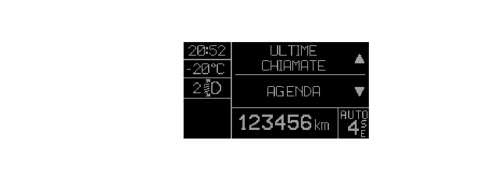
An example of a screen for the telephone input function is shown below:
The control unit is then connected to the controls on the steering (in addition to the radio control buttons there are 2 specific buttons for this function).
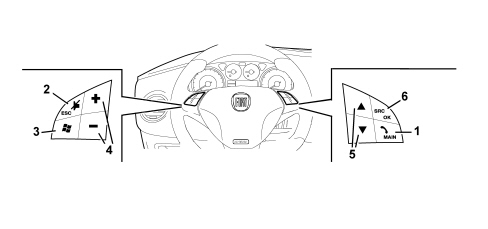
List of controls on the steering wheel functions
| Key | Short press (less than 1 second) | Prolonged press (longer than 1 second) |
|---|---|---|
| 1 | - Activation of Blue&Me Main Menu - Confirmation of menu option selected - Accept incoming phone call - Change from one telephone conversation to another in second call mode (call notification) - Selection of message displayed | - Refuse incoming phone call - Ending of phonecall in progress |
| 2 | - Deactivation of voice recognition - Interruption of voice message - Interruption of SMS message reading - Exit from Blue&Me Main Menu - Exit from a sub menu and return to the previous menu option - Exit from the current selection with memorizing - Deactivation/reactivation of the microphone during a phone conversation - Resetting the volume of the call tone for the incoming phonecall - Activation/Deactivation of multimedia player pause function | |
| 3 | - Activation of the voice recognition - Interruption of the voice message in order to give a new voice command | Repetition of the last voice message given by the system |
| 4 | - Adjustment of audio volume for Blue&Me functions: hands-free, SMS reader, multimedia player, voice announcements | |
| 5 | - Scrolling through Blue&Me menu items - Selection of multimedia player tracks - Scrolling through SMS messages in the list | |
| 6 | - Confirmation of menu option selected during manual interaction - Transfer of the telephone conversation in progress from the hands-free system to the mobile phone and vice versa - Audio source selection (Radio, CD, CD Changer, Multimedia Player) - Selection of SMS message displayed |
For many functions, the controls on the steering wheel 6 and 1 are interchangeable and the preferred button can be selected.
For both operating modes for the controls on the steering wheel (short or prolonged press), the function is activated when the button is released.
Connection with bluetooth telephone
The system is connected to a mobile phone with a Bluetooth interface and hands-free profile.
The first connection between the mobile phone and the device (pairing procedure) is regulated by a password; the user connects by keying in the password into their own mobile phone in the menu for Bluetooth connections.
It is possible to memorize up to 5 users who are connected automatically at subsequent keys on without manual intervention on behalf of the actual user.
In each case, only one mobile phone can be connected to the control unit via Bluetooth.
The operation of the control unit is linked to the availability of the user''s mobile phone for Bluetooth hands-free profiles, in particular:
- the Bluetooth system comes on independently at the Key on and starts the search for Bluetooth (mobile) devices to connect with immediately.
- the equipment switches off independently at the Key off releasing any Bluetooth connection that may be activated: there is a delay of 30 seconds (provisional figure) to suppress accidental switching off of the engine (in traffic, at traffic lights, etc.).
- if a phonecall is in progress, the conversation is kept activated (except for the display in the control panel) even after the car is switched off; the control unit and the radio finally switch off at the end of the conversation.
List of compatible mobile phones
The current hands-free system with Bluetooth technology is compatible with all mobile phones that support Bluetooth 1.1 and a 1.0 hands-free probile (refer to the Bluetooth connection specifications in the mobile phone user manual).
As a result of the different possible software versions available on the market for different models of mobile phone, some additional functions (e.g.: second call management, call transfer from hands-free system to mobile phone and vice versa, etc.) may not correspond exactly to the description in the mobile phone user manual.
In any case, the possibility of carrying out a hands-free conversation will not be compromised.
The table below lists the mobile phones which, at the time this manual was updated, have undergone a full test on operation with the Bluetooth hands-free system; there are also other models listed for which full operation has not been tested.
| Make | Models compatible with Blue&Me | Other models potentially compatible |
|---|---|---|
| Asus | P505 | |
| Audiovox | SMT 5600/Orange (HTC) C500 | |
| BlackBerry | 7100, 7290, 8700i | |
| Hewlett Packard | iPAQ 63xx, iPAQ 6515 | |
| i-Mate | SP3, SP5/SP5m | JAM, Jamin, Jasjar, K-Jam, PDA2K, Smartphone 2, SP3i |
| LG | U880, U8550 | U8210, U8360, Chocolate |
| Motorola | A830/A835, E398, Razr K1/Capri, MPX 220, V3 Razr, V500, V501, V525, V535, V600, V635 | A780, A1000, E550, E680, E1000, PEBL V6, ROKR E1, V80, V545, V547, V557, V600i, V620 |
| Nokia | 3230, 3600/3620/3650/3660, 6230/6230i, 6280, 6310/6310i, 6600, 6620, 6630, 6680/6681, 6810/6820/6822, 7600, 7610, 8800, 8910/8910i, 9500, N70, N-Gage | 3250, 6021,, 6260, 6650, 6670, 7280, 7710, 9300, N90, N-Gage, N-Gage QD |
| Palm | Treo 650 | |
| Panasonic | P341i, X11, X70, X88 | |
| Qtek | 8010, 8300/8310, 9100, S200 | 8080, 8020, 8100, 8200, 9000, 9090, S100 |
| Sagem | MYX-8, MYV-76 | |
| Samsung | SGH-D600, SGH-D820, SGH-E770, SGH-i300, SGH-i750 | SGH-D500, SGH-E340, SGH-E620, SGH-E720, SGH-E860, SGH-E880, SGH-S500i, SGH-Z130, SGH-Z140/SGH-140V, SGH-Z500 |
| Sendo | X, X2 | |
| Sharp | GX15/GZ100, GX25, GX30i/GX31/GX32, TM 200 | |
| Siemens | SL75 | CX75/M75, S65, S66, SX1, SK65, SL55 |
| Sony Ericsson | K700/K750i, P910i, T68/T68i, T606/T608/T610/T616/T618/T628/T630/T637, V800, Z600/Z608, Z1010 | K600i/V600i, K608i, S700/S700i/S710, W800/W800i, Z520i, W600i |
| SPV | C500, C600 | |
| Telit | Neo |
The FIAT official website (www.fiat.com), in the Blue&Me window, contains an up to date list of mobile phones that are compatible with the Blue&Me system.
We wish to point out that because of the different possible software versions available on the market for the different models of mobile phones, some functions may not correspond exactly to the description.
Operating procedures
Incoming call:
- when a signal of an incoming call reaches the phone: the radio is turned to mute, the ringing of the mobile phone is produced through the speakers and the number/name of the caller (if available) is shown on the instrument panel display
- at this point the user can accept or reject the call
- during the conversation the user listens to the other person on the radio audio system and speaks via the microphone
- when the conversation is over the radio returns to its status prior to the call (volume, mode, etc.)
When a conversation is in progress, the user can carry out the following operations:
- alter the volume of the conversation using the radio Vol + and Vol - buttons. The level set can be reset at the end of the conversation: the next one will be at the radio default volume.
- move the conversation in progress from the Bluetooth control unit to the mobile phone on (and vice versa) to speak in private (local privacy)
- momentarily interrupt the conversation with the remote user (keeping them on hold) to talk privately with any passenger in the vehicle without being overheard by the user on the line (remote privacy)
- answer another incoming call and switch from one conversation to the other
- refuse another incoming call.
The last 2 functions in the list are linked to the presence on the GSM network, the user profile and the mobile phone of the necessary specifications and authorizations to manage 2 calls simultaneously.
Outgoing call
The user can make a call in 4 ways
- using their own mobile phone keypad
- using the list of recent calls
- using their own mobile phone list
- dictating the number they wish to call.
Media player
The Blue&Me multimedia player makes it possible to play digital audio stored on a USB device via your vehicle sound system simply by connecting it to the USB port on the vehicle at the base of the centre console next to the current socket/cigar lighter.
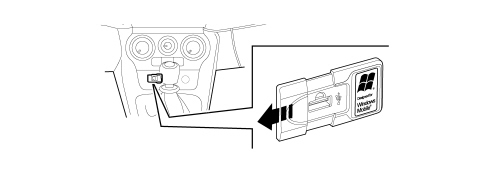
The following operations can be carried out using the multimedia player:
- reproduction of digital audio: it is possible to reproduce all digital audio files (.mp3 - .wma - .wav) or a personalized playlist (in .m3u or.wpl format);
- selection of audio depending on the category: it is possible to reproduce all digital audio that belongs to a certain category, for example an album, an artist or a musical genre;
- use the reproduction functions: it is possible, whilst playing tracks, to use certain functions such as Play, Stop, Next track, Previous track, Random and Continuous play.
The multimedia player does not support audio files compressed with other formats (e.g. .aac files downloaded from itunes for ipods) and DRM protected audio files (Digital Right Management). If there are audio files on the USB device that are not supported, they will be ignored.
The multimedia player supports the reproduction of digital audio files in the following formats:
| Extension | Audio extension |
|---|---|
| .wma | It supports WMA standards version 1 and WMA version 2.(WMA2 = 353, WMA1 = 352). It supports WMA Voice audio formats |
| .mp3 | MPEG–1 Layer 3 files (sampling frequencies 32 kHz, 44.1 kHz and 48 kHz) and MPEG–2 layer 3 (16 kHz, 22.05 kHz and 24 kHz). The following bit rates are supported: 16 kbps, 32 kbps, 64 kbps, 96 kbps, 128 kbps, and 192 kbps. It also supports the Frunhofer MP2.5 extension (sampling frequencies 8 kHz, 11.025 kHz e 12 kHz). |
| .wav | Audio in digital format, without data compression. |
Sms voice player
If the telephone supports this function, the system includes the SMS messages voice player. it involves an application that allows the Customer to listen to the automatic reading of the incoming message on their mobile phone via the vehicle audio system.
The Blue&Me SMS message reader allows the Customer to:
- be informed, by means of a warning message in the instrument panel multifunctiondisplay, of the arrival of a new SMS message on their mobile phone giving the name/number of the sender and Blue&Me can also read the message
- manage the SMS messages received list on a mobile phone connected to the Blue&Me system
- reread SMS messages already received and memorized.
- make a voice call, using the controls on the steering wheel or voice commands, to the sender of the SMS message received.
- delete individual SMS messages or the entire list of SMS messages received using the controls on the steering wheel or voice commands.
The Blue&Me system is also capable of recognizing and reading any abbreviations (for example, "TVB" will be read as "Ti voglio bene" - I love you) and interpreting the most frequently used symbols (e.g. :-) will be read as "Smile") in text messages.
The table below lists the mobile phones which, at the time this manual was updated, have undergone a full test on operation with the Bluetooth hands-free system and manage the SMS voice player function correctly.
| Make | Models with SMS voice player function |
|---|---|
| Motorola | V3 Razr, V525, V600, V635 |
| Nokia | 6230, 6230i, 6822a, |
| Samsung | SGH-i750 |
| Sony Ericsson | K700i, K750i, T610, T630, T637, Z600, S710a |
Some mobile phones in the list may not support the transmission of interlinked SMS messages (with more than 160 characters). Therefore, refer to the user manual for the mobile phone.
System components
The main components of the C1 - v2 version system with Bluetooth mobile phone management are:
- Bluetooth electronic control unit
- microphone
- steering wheel controls
- USB port for connection of Media Player and software update
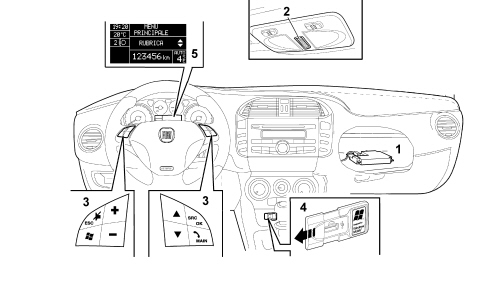
1 - electronic control unit
2 - microphone
3 - controls on the steering wheel
4 - USB port
5 - Instrument panel display
Control unit connections
The control unit is connected via the B-CAN to the radio node and the Body Computer which, in turn, is connected to the controls on the steering wheel.
Each piece of equipment responds to its own commands depending on the button activated and the operating mode activated at the time (in this case the Bluetooth control unit prevents the radio from carrying out commands from the CAN when the hands-free function is activated).
Bluetooth control unit pin out
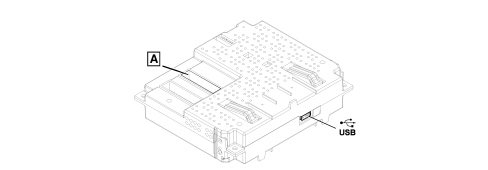
- USB: USB port that can be used as an alternative to the one located at the base of the centre console.
- Connector A:
| PIN | SIGNAL |
|---|---|
| 3 | D+ signal for USB |
| 4 | reference earth for USB |
| 5 | left AUX signal |
| 8 | -+ microphone |
| 14 | B-CAN A |
| 15 | earth |
| 16 | direct power supply |
| 19 | D- signal for USB |
| 20 | 5V power supply for USB |
| 21 | AUX earth |
| 22 | right AUX signal |
| 24 | - microphone screened earth |
| 30 | B-CAN B |
| 31 | - screening for USB |
| 32 | ignition-operated power supply |
Service operations for the system
Fault diagnosis
The control unit is connected via the B-CAN to the radio node and the Body Computer; therefore the diagnostic activities are carried out, in the same way as for all the other CAN "nodes", via the special diagnostic socket and the Examiner equipment.
For other types of repair operations to the system, a special operating system must be temporarily installed on the Examiner, following the instructions given below and a USB "pen" must be inserted in the special control unit socket or in the external one located at the base of the centre console.
ALTERNATIVELY, THESE OPERATIONS CAN BE CARRIED OUT USING A PERSONAL COMPUTER, USING "WINDOWS XP" or "WINDOWS 2000".
The following operations can be carried out using this method:
- language change for voice messages;
- software update.
USB pen: The USB "pen" to be used should have the following specifications: USB standard version 1.0, 1.1 or 2.0 with minimum memory of 256 MB, compatible with "WINDOWS XP" or "WINDOWS 2000".
Whilst this "pen" is being used for the above mentioned operations, it will be "formatted" and therefore all data stored in it previously will be lost !
Languages
The following languages are available, both for the text strings displayed (menu) and for voice recognition and text to speech messages:
- French
- English
- German
- Italian
- European Spanish
- Dutch
- Polish
- European Portuguese
- Brazilian Portuguese
As far as the messages shown on the display are concerned, the languge selected is the one set for the control panel
See descriptions 5560 INSTRUMENTS
As far as the voice recognition and text to speech messages are concerned, the language should be set separately using the Examiner diagnostic equipment, inserting a USB "pen" in the special socket.
Proceed following the instructions below.
Software update
Similarly, any control unit software updates should be entered using the Examiner diagnostic equipment with a USB "pen" to be inserted in the special socket.
Proceed following the instructions below
Never disconnect the battery terminals during the software updating or language updating procedure.
Control unit replacement
The battery terminals must be disconnected before removing the old control unit.
Order a new control unit from the Parts Dept. who will send a pristine component. once fitted; the initial default data must be transferred to it by carrying out the "PROXI ALIGNMENT" procedure using the Examiner.
Once a new control unit is installed it is necessary to:
- update the software;
- check and, if necessary, set the voice message language correctly;
- carry out the pairing operation for the telephones to be connected.
Op. 5570T49 BLUETOOTH ELECTRONIC CONTROL UNIT - R.R.
Operations using the examiner
To carry out the language change operations for voice messages and software updating, a special operating system must be temporarily installed on the Examiner, using the special "WINDOWS MOBILE FOR AUTOMATIVE EXAMINER CD" CD-ROM supplied together with the traditional Examiner software updates.
In addition, as already pointed out, a USB "pen" is required for transferring the data to the system control unit.
The pen should have the following specifications: USB standard version 1.0, 1.1 or 2.0 with minimum memory of 256 MB, compatible with "WINDOWS XP" or "WINDOWS 2000".
Whilst this "pen" is being used for the above mentioned operations, it will be "formatted" and therefore all data stored in it previously will be lost !
Never disconnect the vehicle battery terminals during any of the operations indicated
Always follow the sequence described below (for all of the operations):
- switch on the Examiner following the traditional operating methods
- insert the "WINDOWS MOBILE FOR AUTOMOTIVE EXAMINER CD"
- switch off the Examiner
- insert the USB "pen" in the special port at the back of the Examiner
Warning: the "pen" is NOT "recognized" if it is inserted with the Examiner on.
- restart the Examiner.
At this point the Examiner will work temporarily with the special operating system and it is capable of transferring the data necessary for the following operations to the USB pen:
- individual language setting
- multi language setting
- software update
Only one of these three operations can be carried out at a time; in order to carry out two operations on the same system (e.g. language change and software update) the instructions illustrated previously must be repeated twice separately.
- follow the instructions until the pen preparation operations are completed (the Examiner will advise you)
- remove the USB "pen"
- extract the WINDOWS CD
- switch off the Examiner
ALTERNATIVELY, THESE OPERATIONS CAN BE CARRIED OUT USING A PERSONAL COMPUTER, OPERATING "WINDOWS XP"
- take the USB "pen" to the vehicle
- with the ignition OFF, insert the USB "pen" in the special USB port in the control unit or in the external one, located at the base of the centre console next to the current socket/cigar lighter.
- turn the ignition key ON
At this point the control unit will carry out the operation requested (language change or software update):
- at the end a display message in the control panel will advise that the operation is over
- check that the operation has been successful (e.g. check the voice message language by giving an instruction).
Never disconnect the vehicle battery terminals during any of the operations indicated
Warnings on the use of the system software
This system contains software under licence from Fiat Auto S.p.A. in accordance with a licensing contract.
Any removal, reproduction, reverse engineering or other unauthorized use of the software for this system in violation of the licensing contract is strictly prohibited.
Tampering inside the Blue&Me device or installing unauthorized software can lead to the cancelling of the warranty and adversely affect the security of the information stored.
Read all the warnings relating to the "LICENCE CONTRACT" on the pages at the end of the "BLUE&ME" appendix to the handbook very carefully.
* Microsoft is a registered make of the Microsoft Corporation.
* Sony is a registered make of the Sony Corporation.
* Ericsson is a registered make of Telefonaktiebolaget LM Ericsson.
* Motorola is a registered make of Motorola, Inc.
* Nokia is a registered make of the Nokia Corporation
* Siemens is a registered make of Siemens AG.
* Orange is a registered make of Orange Personal Communications Services Limited
* Audiovox is a registered make of the Audiovox Corporation.
* Bluetooth is a registered make of Bluetooth SIG, Inc.
Parts & tools for this job For 2007 Fiat Bravo
- TOOLDigital multimeterSearch: automotive digital multimeter
- PARTAssorted fuse kitSearch: car fuse assortment kit
- TOOLWire crimper and connector kitSearch: wire crimper connector kit
Links open Amazon search results in a new tab. As an Amazon Associate I earn from qualifying purchases.