
ABS sensor - rear - models with disc brakes
- Make
- Rover
- Model
- 200 Workshop Manual
- Year
- 1995–1999
- Section
- Repairs › ABS sensor - rear - models with disc brakes
BrakesABS sensor - rear - models with disc brakes
ABS SENSOR - REAR - MODELS WITH DISC BRAKES
Service repair no - 70.65.31
Remove
- Raise rear of vehicle.
WARNING: Support on safety stands.
- Remove rear road wheel.
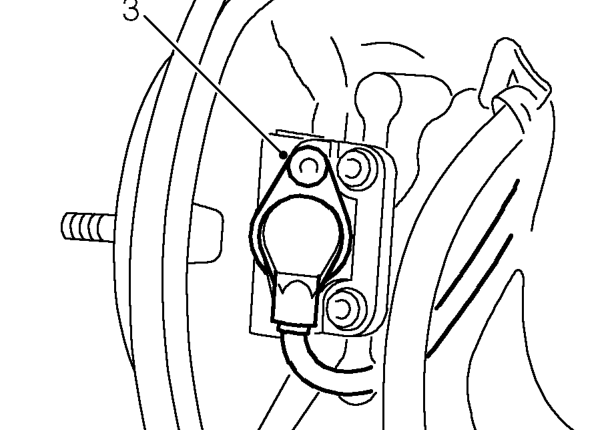
- Remove Tx30 screw securing ABS sensor to hub and release sensor.
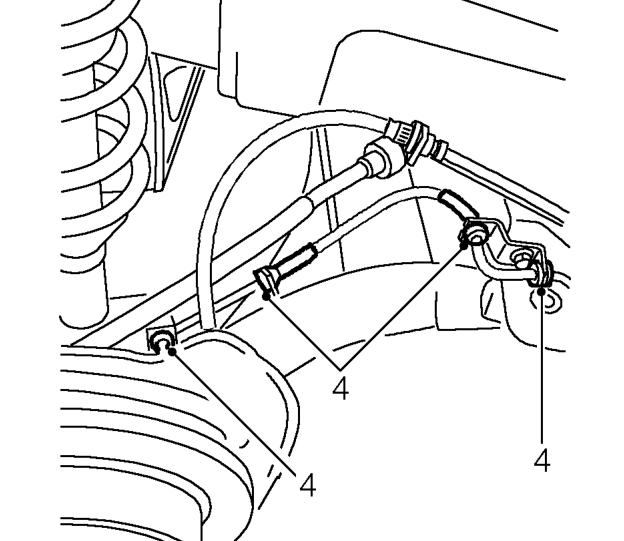
- Release sensor harness from 4 clips on ’H’ frame.
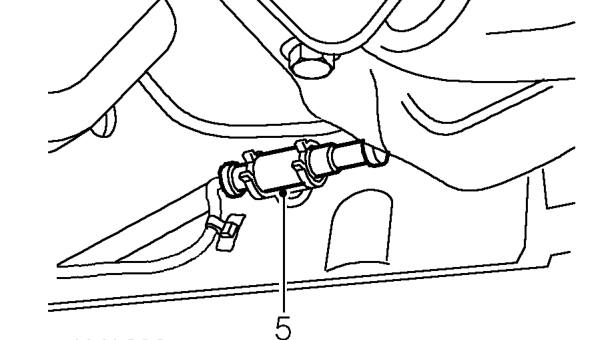
- Release sensor multiplug from mounting clip.
- Disconnect sensor multiplug and remove sensor.
Refit
- Fit ABS sensor to hub and secure with screw. Tighten screw to 6 Nm.
- Secure sensor harness to clips on ’H’ frame.
- Connect harness multiplug and secure to clip.
- Fit road wheel(s) and tighten nuts to correct torque. See INFORMATION, Torque wrench settings.
- Remove stand(s) and lower vehicle.
Parts & tools for this job For 1995 Rover 200
- PARTRear brake padsSearch: Rover 200 1995 rear brake pads
- TOOLCaliper piston rewind toolSearch: brake caliper piston rewind tool
- FLUIDBrake fluidSearch: brake fluid
Links open Amazon search results in a new tab. As an Amazon Associate I earn from qualifying purchases.