
Fluid level switch
- Make
- Rover
- Model
- 200 Workshop Manual
- Year
- 1995–1999
- Section
- Repairs › Fluid level switch
BrakesFluid level switch
FLUID LEVEL SWITCH
Service repair no - 70.25.08
Remove
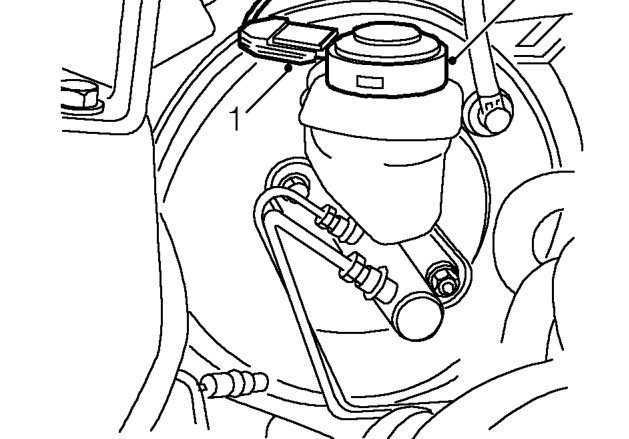
- Disconnect switch lead.
- Clean area around reservoir cap.
- Remove cap/switch assembly.
CAUTION: Do not allow brake fluid to contact paint finished surfaces as paint may be damaged. If spilled, remove fluid and clean area with clean warm water.
Refit
- Check and top-up fluid level.
- Fit cap/switch assembly.
- Connect switch lead.
HANDBRAKE LEVER
Service repair no - 70.35.08
Remove
- Remove rear console. See BODY, Interior trim components.
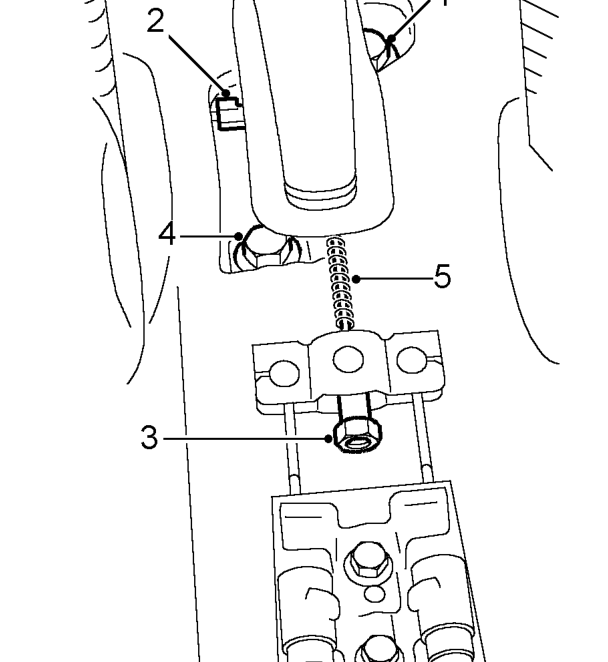
- Disconnect Lucar from handbrake warning switch.
- Remove cable adjusting nut.
- Remove 2 bolts securing handbrake lever assembly.
- Remove spring from adjusting rod.
Refit
- Fit spring to adjusting rod.
- Position handbrake. Fit and tighten bolts to 22 Nm.
- Fit cable adjusting nut.
- Connect Lucar to handbrake warning switch.
- Adjust handbrake cable. See Adjustments.
- Fit rear console. See BODY, Interior trim components.
Parts & tools for this job For 1995 Rover 200
- TOOLOBD2 scannerSearch: OBD2 scanner
- TOOLDigital multimeterSearch: automotive digital multimeter
- TOOLBack-probe test leadsSearch: back probe test leads
Links open Amazon search results in a new tab. As an Amazon Associate I earn from qualifying purchases.