
Automatic intelligent search tuning
- Make
- Fiat
- Model
- Bravo /Brava (182) Factory Service Manual
- Year
- 1995–2001
- Section
- Radio equipment (98 range) › Automatic intelligent search tuning
Automatic intelligent search tuning
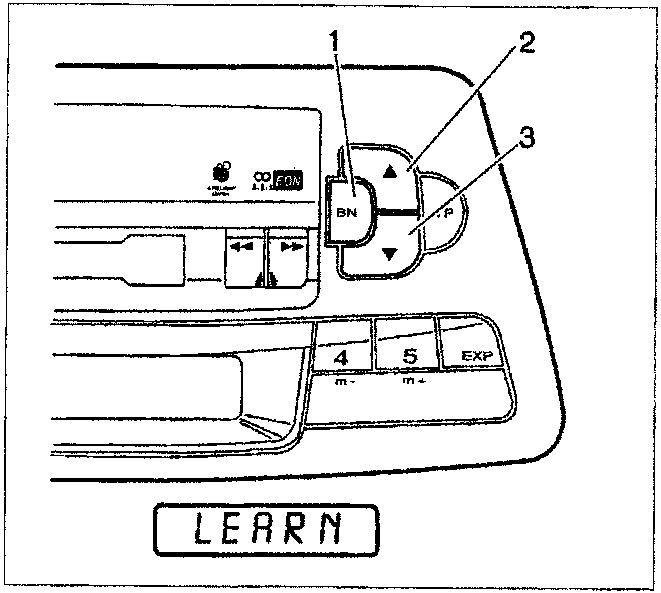
Using the BN button (1), select the "FM1", "FM2" or "FM3" band.
Press the BN button (1) for about 3 seconds to activate the saerch; the message "LEARN" will appear on the display.
At the end of the search first the RDS pro-grammes and then the transmitters according to their transmission power in the radio IS memory are programmed. The IS memory can store up to 30 transmitters.
If no reception is possible, the reception does remain continuously activated; to interrupt it, press one of the station selection buttons (1,2,3,4,5,).
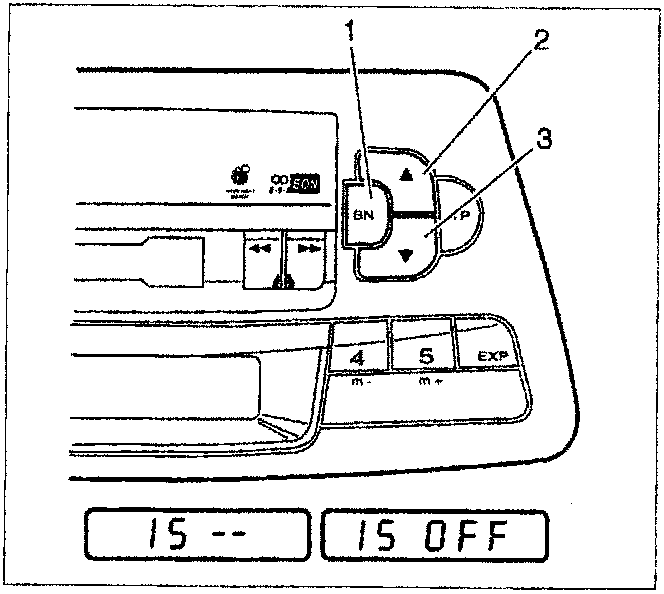
To recall transmitters programmed in the IS memory, select the IS operating mode by pressing one of the "▲" "▼" buttons (2,3) for about 3 seconds until the message "IS - -" appears on the display, followed by "IS ON". By pressing one of the "▲" "▼" buttons briefly it is possible to recall the transmitters pro-grammed.
To deactivate the IS function, press one of the "▲" "▼" buttons briefly until the message "IS OFF" appears on the display.
RDS transmitters automatic search tuning
Select the FM or AM frequency desired using the BN button (1).
The IS function should not be activated for this type of selection.
If the IS function is switched on, press either button "▲" (2) or "▼" (3) for about 3 sec-onds until the message "IS - -" appears on the display followed by "IS OFF".
Pressing one of the buttons "▲" (2) or "▼" (3) briefly starts the automatic search. When a transmitter with an identification code is found (RDS transmitter) it is shown on the display. If the transmitter is going to be pro-grammed in a selector button (1,2,3,4,5), press the pre-selected button for about 2 sec-onds. The radio audio function will be inter-rupted until the programming has been com-pleted.
Parts & tools for this job For 1995 Fiat Bravo
- TOOLDigital multimeterSearch: automotive digital multimeter
- PARTAssorted fuse kitSearch: car fuse assortment kit
- TOOLWire crimper and connector kitSearch: wire crimper connector kit
Links open Amazon search results in a new tab. As an Amazon Associate I earn from qualifying purchases.