
Possible error messages
- Make
- Fiat
- Model
- Bravo /Brava (182) Factory Service Manual
- Year
- 1995–2001
- Section
- Radio equipment (98 range) › Possible error messages
Possible error messages
If the loader has not been introduced or has not been inserted correctly in the Compact Disc player, the word "MAGAZINE" will appear on the display.
If the loader does not contain any Compact Discs, the words "NO CD" will appear on the display.
If a Compact Disc is damaged or has been introduced incorrectly into the loader, the word "SURFACE" will appear on the display.
If there is a break in the connection with the Compact Disc player, the words "NO COMMU" will appear on the display.
In the case of a mechanical fault with the CD player, the word "MECHANIC" will appear on the display.
If the Compact Disc player has overheated, the words "TOO HOT" will appear on the display
If the last condition mentioned above occurs, it is advisable to switch off the CD player for a while.
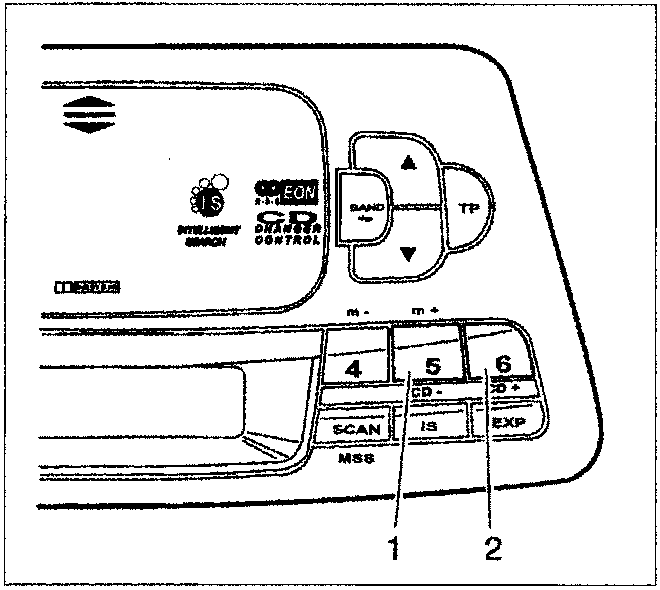
Disc selection
Press the station selection button 5 (1) or 6 (2) briefly and repeatedly until the number of the desired CD appears on the display.
Using station selection button 6 it is possible to move on to the next CD, whilst button 5 locates the previous one.
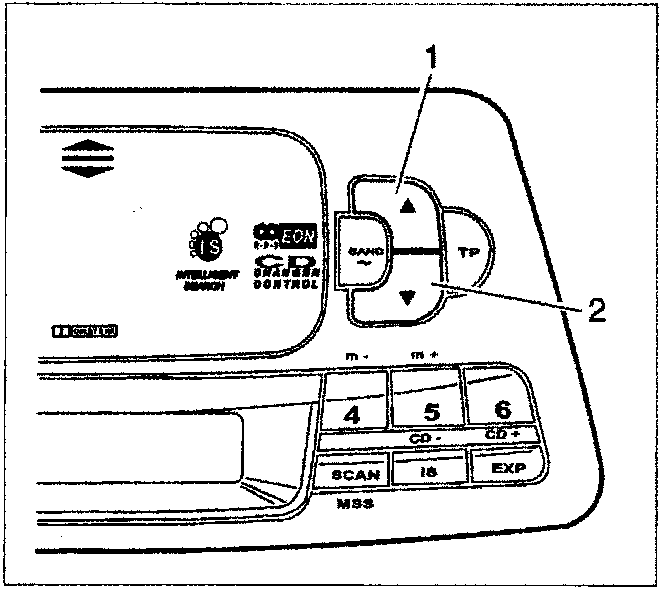
Track search (forwards/backwards)
Press button "▲" (1) or "▼" (2) repeatedly until the number of the desired track appears on the display.
Button "▲" is used for selecting the next track, whilst button "▼" is used for listening to the same track again or, if pressed repeatedly, for selecting previous tracks.
Parts & tools for this job For 1995 Fiat Bravo
- TOOLDigital multimeterSearch: automotive digital multimeter
- PARTAssorted fuse kitSearch: car fuse assortment kit
- TOOLWire crimper and connector kitSearch: wire crimper connector kit
Links open Amazon search results in a new tab. As an Amazon Associate I earn from qualifying purchases.