
Body computer - r.r
- Make
- Fiat
- Model
- 500 Factory Service Manual
- Year
- 2007–2024
- Section
- Instrument/gauge electrical circuits › Body computer - r.r
BODY COMPUTER - R.R
Removing
Before working on the Air Bag system, follow the safety instructions for working on the system very carefully
- Disconnect the battery terminals.
| Description | Connector | |
|---|---|---|
| Battery | See A001 BATTERY |
Op. 7040A49 CONNECTOR HOLDER TRIM FOR EOBD - R.R.
- For vehicles equipped with knee bags, carry out the following operation:
Op. 5580C23 DRIVER'S KNEE BAG - R.R.
- For vehicles not equipped with knee bags, carry out the following operation:
Op. 7040A30
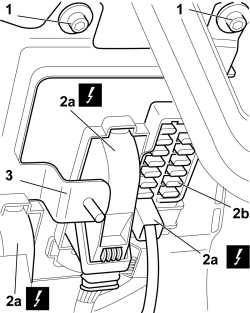
1. Unscrew the bolts securing the Body Computer.
2. Disconnect the front and rear electrical connections (2a) for the Body Computer (2b).
| Description | Connector | |
|---|---|---|
| 2a | Body computer | See M001 BODY COMPUTER |
3. Slightly distort the front bracket, taking care not to damage any of the components, and remove the Body Computer from its housing.
Refitting
If the Body Computer is being replaced, an identical copy of the Body Computer must be obtained from the Parts Dept. as a V.O.R. order, quoting the vehicle chassis number: this copy will contain all the default settings entered when the vehicle was new which are stored in the Parts Dept. database for the vehicle chassis number.
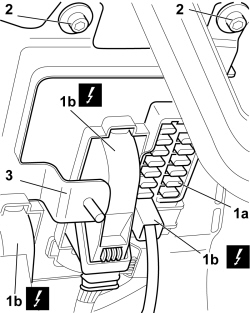
1. Place the Body Computer (1a) in position and connect the front and rear electrical connections (1b).
| Description | Connector | |
|---|---|---|
| 1b | Body computer | See M001 BODY COMPUTER |
2. Tighten the bolts securing the Body Computer.
3. Distort the front bracket so that it is in the correct position once again
- For vehicles equipped with knee bags, carry out the following operation:
Op. 5580C23 DRIVER'S KNEE BAG - R.R.
- For vehicles not equipped with knee bags, carry out the following operation:
Op. 7040A30
Op. 7040A49 CONNECTOR HOLDER TRIM FOR EOBD - R.R.
- Connect the battery terminals.
| Description | Connector | |
|---|---|---|
| Battery | See A001 BATTERY |
Using the Examiner check that no errors have been introduced into the Body Computer.
Removing
Before working on the Air Bag system, follow the safety instructions for working on the system very carefully
- Disconnect the battery terminals.
| Description | Connector | |
|---|---|---|
| Battery | See A001 BATTERY |
Op. 7040A49 CONNECTOR HOLDER TRIM FOR EOBD - R.R.
- For vehicles equipped with knee bags, carry out the following operation:
Op. 5580C23 DRIVER'S KNEE BAG - R.R.
- For vehicles not equipped with knee bags, carry out the following operation:
Op. 7040A30
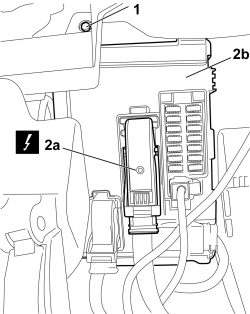
1. Undo the bolts fixing the Body Computer.
2. Disconnect the front and rear electrical connections (2a) and remove the Body Computer (2b).
| Description | Connector | |
|---|---|---|
| 2a | Body computer | See M001 BODY COMPUTER |
Refitting
If the Body Computer is being replaced, an identical copy of the Body Computer must be obtained from the Parts Dept. as a V.O.R. order, quoting the vehicle chassis number: this copy will contain all the default settings entered when the vehicle was new which are stored in the Parts Dept. database for the vehicle chassis number.
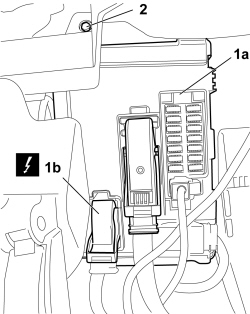
1. Place the Body Computer (1a) in position and connect the front and rear electrical connections (1b).
| Description | Connector | |
|---|---|---|
| 1b | Body computer | See M001 BODY COMPUTER |
2. Tighten the bolts fixing the Body Computer.
- For vehicles equipped with knee bags, carry out the following operation:
Op. 5580C23 DRIVER'S KNEE BAG - R.R.
- For vehicles not equipped with knee bags, carry out the following operation:
Op. 7040A30
Op. 7040A49 CONNECTOR HOLDER TRIM FOR EOBD - R.R.
- Connect the battery terminals.
| Description | Connector | |
|---|---|---|
| Battery | See A001 BATTERY |
Using the Examiner, check that no errors have been introduced into the Body Computer.
Parts & tools for this job For 2007 Fiat 500
- TOOLTrim removal tool kitSearch: trim removal tool kit
- PARTTouch-up paintSearch: Fiat touch up paint
- PARTPanel clip assortmentSearch: Fiat panel clips assortment
Links open Amazon search results in a new tab. As an Amazon Associate I earn from qualifying purchases.