
Console closing panel
- Make
- MG
- Model
- TF Factory Workshop Manual
- Year
- 2002–2005
- Section
- Interior trim components › Console closing panel
BodyConsole closing panel
CONSOLE CLOSING PANEL
Service repair no - 76.25.31
Remove
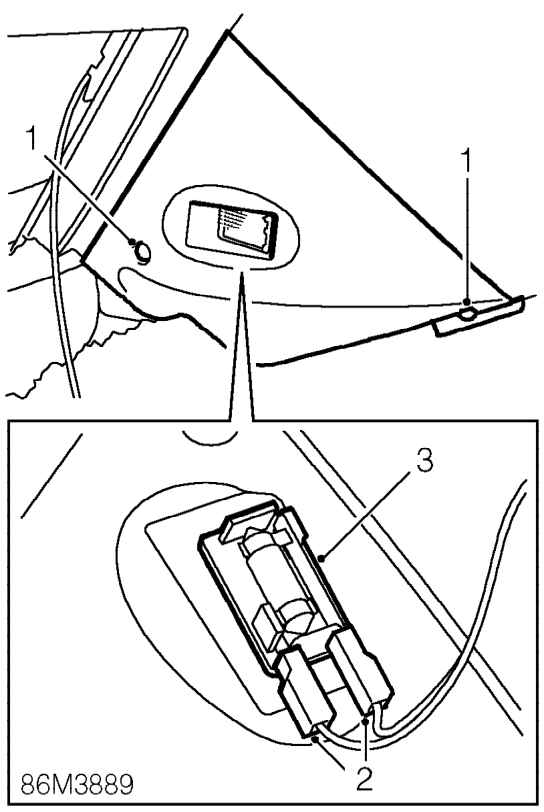
- Remove 2 screws securing panel to console.
- Release panel and disconnect 2 Lucars from lamp.
- Remove lamp from panel.
Refit
- Fit lamp to panel and connect Lucars.
- Position panel and secure with screws.
FASCIA PANEL
Service repair no - 76.46.23
WARNING: See GENERAL INFORMATION, SRS Precautions.
Remove
- Make SRS system safe.See GENERAL INFORMATION, SRS Precautions.
- Remove front console. See this section.
- Remove steering column switch pack. See ELECTRICAL, Repairs.
- Remove instrument pack. See INSTRUMENTS, Repairs.
- Remove glovebox. See this section.
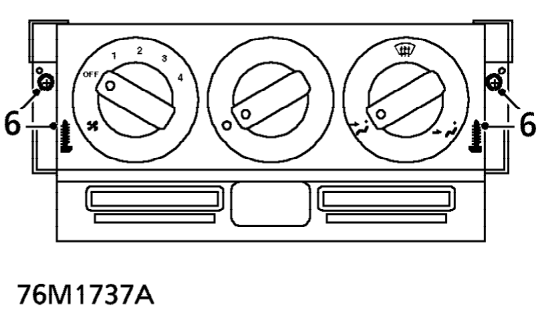
- Remove 4 screws securing heater controls to fascia and position aside.
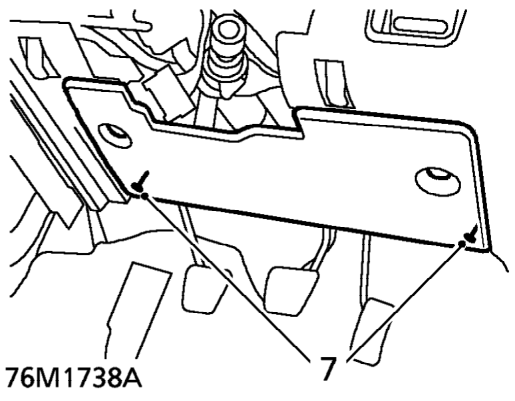
- Loosen 2 screws securing fuse box cover to fascia and remove cover.
- Release both screen heater ducts from fascia and position aside.
Parts & tools for this job For 2002 MG TF
- TOOLTrim removal tool kitSearch: trim removal tool kit
- PARTTouch-up paintSearch: MG touch up paint
- PARTPanel clip assortmentSearch: MG panel clips assortment
Links open Amazon search results in a new tab. As an Amazon Associate I earn from qualifying purchases.