
Alternator - non air conditioning
- Make
- MG
- Model
- TF Factory Workshop Manual
- Year
- 2002–2005
- Section
- Repairs › Alternator - non air conditioning
ElectricalAlternator - non air conditioning
ALTERNATOR - NON AIR CONDITIONING
Service repair no - 86.10.02
Remove
- Disconnect battery earth lead.
- Remove engine cover, See ENGINE, Repairs.
- Raise rear of vehicle.
WARNING: Support on safety stands.
- Remove road wheel(s).
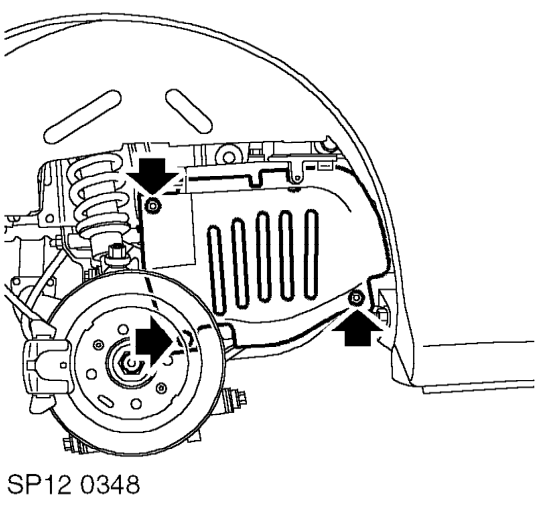
- Remove 2 scrivets and Torx screw securing closing panel.
- Remove closing panel.
- Remove alternator drive belt. See this section.
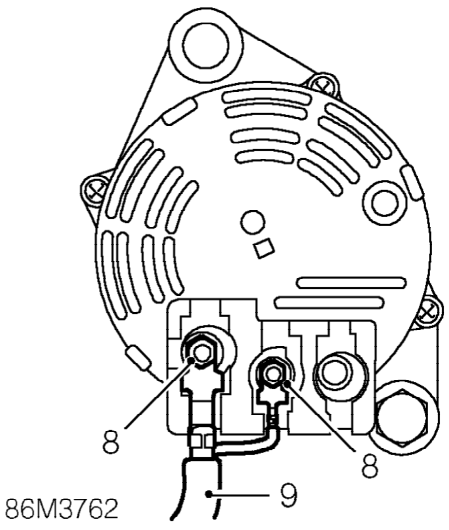
- Loosen 2 nuts securing cables to alternator.
- Disconnect cables from alternator.
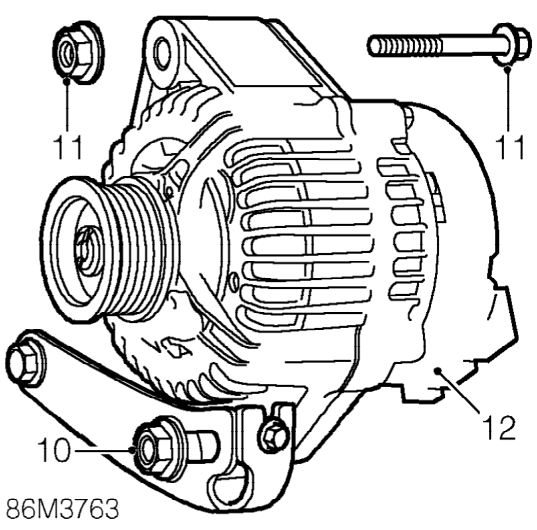
- Remove nut and bolt securing alternator to adjustment bracket.
- Remove nut and bolt securing alternator to engine.
- Remove alternator. Do not carry out further dismantling if component is removed for access only.
- Restraining the alternator shaft with an 8 mm Allen key, remove nut securing pulley to alternator shaft using tool 18G 1653.
- Remove pulley from alternator.
- Clean pulley and alternator shaft.
Parts & tools for this job For 2002 MG TF
- TOOLBattery testerSearch: car battery tester
- TOOLDigital multimeterSearch: automotive digital multimeter
- TOOLBattery terminal cleanerSearch: battery terminal cleaner
Links open Amazon search results in a new tab. As an Amazon Associate I earn from qualifying purchases.