
Head unit - kenwood audio systems
- Make
- MG
- Model
- TF Factory Workshop Manual
- Year
- 2002–2005
- Section
- Repairs › Head unit - kenwood audio systems
‹ Prev Auto changer - kenwood audio systemsNext › Head unit and auto changer - kenwood audio systems - renew
ElectricalHead unit - kenwood audio systems
Refit
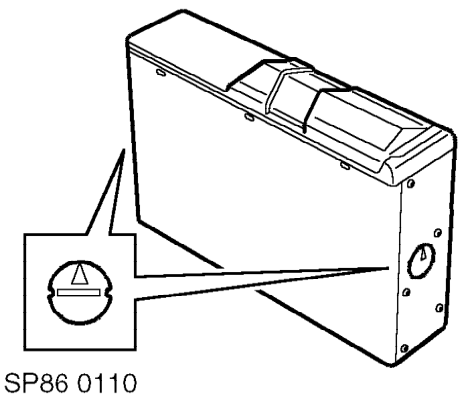
- Set the angle adjustment switches on the auto changer to 90° .
- Attach brackets to auto changer with 4 screws and secure to vehicle with 4 bolts. Tighten bolts to 5 Nm.
- Connect auto changer multiplug to auto changer.
- Check head unit and auto changer for correct operation.
HEAD UNIT - KENWOOD AUDIO SYSTEMS
Service repair no - 86.50.81
Remove
- Disconnect battery earth lead.
- Remove audio unit escutcheon.
- Insert Kenwood removal tools into slots either side of head unit. Push removal tools upwards and pull head unit out of aperture.
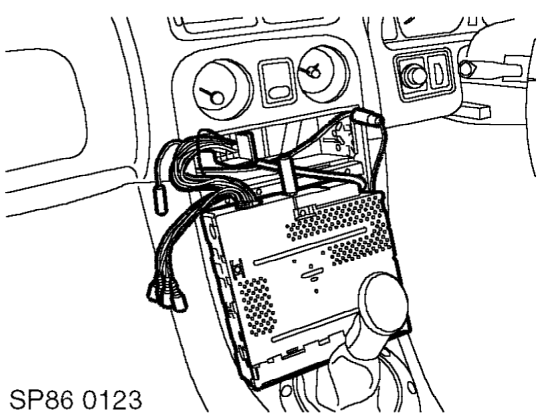
- Disconnect multiplugs, aerial cable and auto changer data cable (if fitted). Remove head unit.
- Release retaining tags and remove cage from centre console.
Refit
- Position audio unit cage to centre console and secure with retaining tags.
- Position audio unit, fit threaded rubber bung, connect aerial cable, CD auto changer data cable (if fitted) and multiplugs.
- Slide audio unit into cage until retaining clips engage. Ensure that rubber support stud locates in rear support plate.
‹ Prev Auto changer - kenwood audio systemsNext › Head unit and auto changer - kenwood audio systems - renew
Parts & tools for this job For 2002 MG TF
- TOOLDigital multimeterSearch: automotive digital multimeter
- PARTAssorted fuse kitSearch: car fuse assortment kit
- TOOLWire crimper and connector kitSearch: wire crimper connector kit
Links open Amazon search results in a new tab. As an Amazon Associate I earn from qualifying purchases.