
Head unit and auto changer - kenwood audio systems - renew
- Make
- MG
- Model
- TF Factory Workshop Manual
- Year
- 2002–2005
- Section
- Repairs › Head unit and auto changer - kenwood audio systems - renew
ElectricalHead unit and auto changer - kenwood audio systems - renew · page 1 of 2
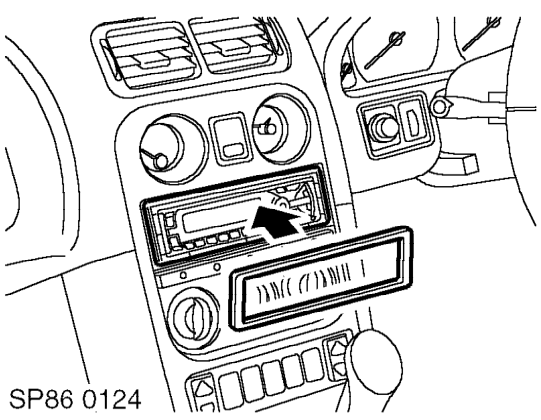
- Fit audio unit escutcheon, ensuring that the felt strip is located on the bottom inner edge. Locate the top edge lugs and then push the bottom edge in until the retaining tags click into position.
- Connect battery earth lead.
- Check audio unit including CD auto changer for correct operation and program suitable radio stations on all pre-sets.
HEAD UNIT AND AUTO CHANGER - KENWOOD AUDIO SYSTEMS - RENEW
Service repair no - 86.50.93
Remove
- Lower both windows and release both hood catches but do not lower hood.
- Release rear edge of hoodwell carpet and release 5 clips.
- Unzip top edge or rear window and lay window in hoodwell.
- Fold rear of hood up to release from body.
- Disconnect battery earth lead.
- Remove head unit. See this section.
- Remove centre console closing panel.
- Release lower section of LH door seal to release carpet.
- Remove 5 trim clips securing carpet to LH side of vehicle.
- Pull back carpet from sill to access harness.
- Fold back carpet and sound deadening in LH footwell.
- Release cable ties securing auto changer data cable to harness.
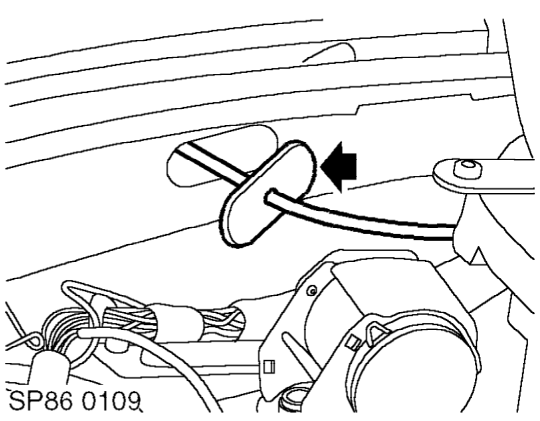
- Release grommet from body. Remove grommet from auto changer data cable.
Parts & tools for this job For 2002 MG TF
- TOOLDigital multimeterSearch: automotive digital multimeter
- PARTAssorted fuse kitSearch: car fuse assortment kit
- TOOLWire crimper and connector kitSearch: wire crimper connector kit
Links open Amazon search results in a new tab. As an Amazon Associate I earn from qualifying purchases.