
Crankshaft position (ckp) sensor
- Make
- Rover
- Model
- 100 Repair Manual Supplement
- Year
- 1996–1998
- Section
- Repairs › Crankshaft position (ckp) sensor
Engine management system - MEMSCrankshaft position (ckp) sensor
CRANKSHAFT POSITION (CKP) SENSOR
Service repair no - 18.30.12
Remove
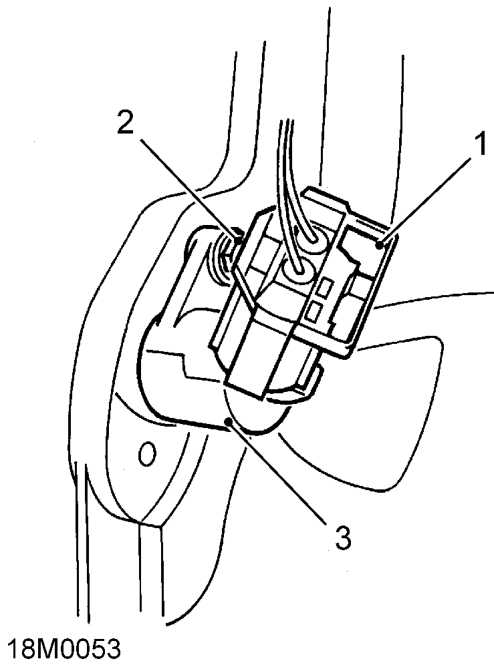
- Disconnect multiplug from CKP sensor.
- Remove bolt securing CKP sensor to flywheel housing.
- Remove CKP sensor.
Refit
- Clean CKP sensor and mating face on flywheel housing.
- Position CKP sensor, fit bolt and tighten to 6 Nm.
- Connect multiplug to CKP sensor.
THROTTLE POSITION (TP) SENSOR
Service repair no - 18.30.17
Remove
- Disconnect battery earth lead.
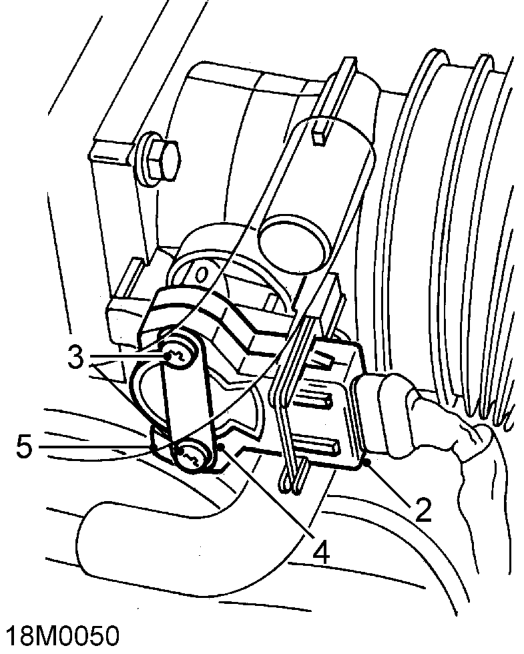
- Disconnect multiplug from TP sensor.
- Remove and discard 2 TX20 Torx screws and wave washers securing TP sensor to throttle housing.
- Remove TP sensor specification plate.
- Pull TP sensor from throttle spindle.
CAUTION: Do not twist or apply leverage to TP sensor.
Refit
- Clean mating faces of throttle housing and TP sensor.
- Fit TP sensor to throttle spindle. Ensure that during fitting, the machined flat on the throttle spindle is aligned with the mating portion of the TP sensor.
Parts & tools for this job For 1996 Rover 100
- TOOLOBD2 scannerSearch: OBD2 scanner
- TOOLDigital multimeterSearch: automotive digital multimeter
- TOOLBack-probe test leadsSearch: back probe test leads
Links open Amazon search results in a new tab. As an Amazon Associate I earn from qualifying purchases.