
Crankshaft position (ckp) sensor
- Make
- Rover
- Model
- 200 Workshop Manual
- Year
- 1995–1999
- Section
- Repairs › Crankshaft position (ckp) sensor
Engine management system - EDCCrankshaft position (ckp) sensor
CRANKSHAFT POSITION (CKP) SENSOR
Service repair no - 18.30.12
Remove
- Disconnect battery earth lead.
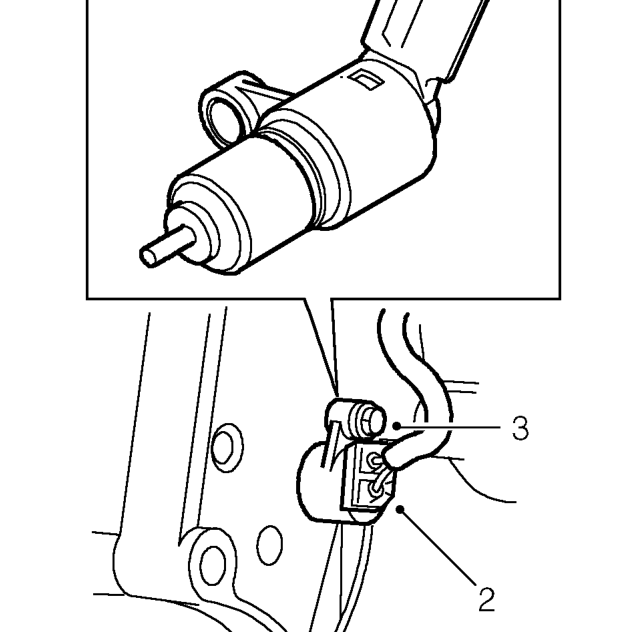
- Disconnect multiplug from CKP sensor.
- Remove bolt securing CKP sensor to gearbox adaptor plate.
- Remove CKP sensor.
Refit
- Clean CKP sensor and mating face of gearbox adaptor plate.
- Fit CKP sensor, fit bolt and tighten to 6 Nm.
- Connect multiplug to CKP sensor.
- Connect battery earth lead.
THROTTLE POSITION (TP) SENSOR - MODELS WITH INTERCOOLER
Service repair no - 18.30.17
Remove
- Disconnect battery earth lead.
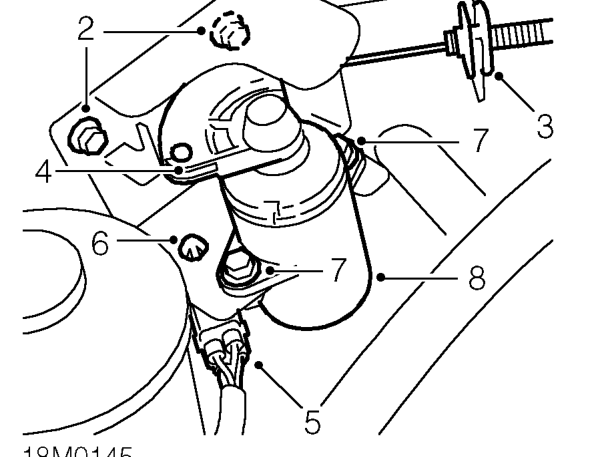
- Remove 2 bolts securing TP sensor assembly to body.
- Release throttle cable adjusting nut from abutment bracket.
- Disconnect throttle cable from cam on TP sensor.
- Disconnect engine harness from TP sensor.
- Release TP sensor multiplug from clip on bracket.
- Remove 2 bolts and nuts securing TP sensor to mounting bracket.
- Remove TP sensor.
Refit
- Position TP sensor to mounting bracket.
- Fit 2 nuts and bolts securing TP sensor to mounting bracket and tighten to 4 Nm.
- Secure TP sensor multiplug to clip on bracket.
- Connect engine harness to TP sensor.
- Connect throttle cable to cam on TP sensor.
- Locate throttle cable adjusting nut in abutment bracket.
- Position TP sensor assembly to body, fit bolts and tighten to 10 Nm.
- Adjust throttle cable. See Adjustments.
- Connect battery earth lead.
Parts & tools for this job For 1995 Rover 200
- TOOLOBD2 scannerSearch: OBD2 scanner
- TOOLDigital multimeterSearch: automotive digital multimeter
- TOOLBack-probe test leadsSearch: back probe test leads
Links open Amazon search results in a new tab. As an Amazon Associate I earn from qualifying purchases.