
Thermostat - ’k’ series
- Make
- Rover
- Model
- 400 Workshop Manual
- Year
- 1995–2000
- Section
- Repairs › Thermostat - ’k’ series
Cooling systemThermostat - ’k’ series
THERMOSTAT - ’K’ SERIES
Service repair no - 26.45.09
Remove
- Disconnect battery earth lead.
- Drain cooling system. See Adjustments.
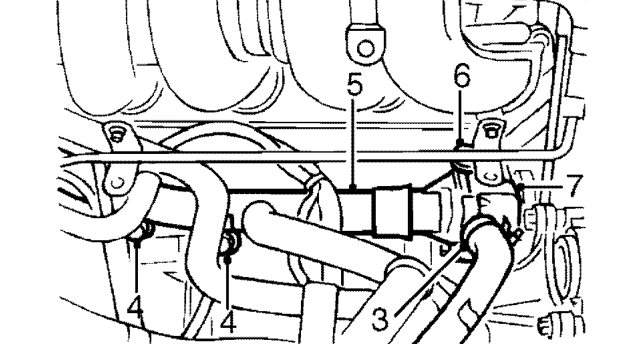
- Loosen clip and disconnect heater hose from thermostat housing.
- Remove 2 bolts securing coolant rail to cylinder block.
- Release coolant rail from thermostat housing.
- Remove bolt securing thermostat housing to cylinder block.
- Release thermostat housing from coolant pump and remove thermostat housing.
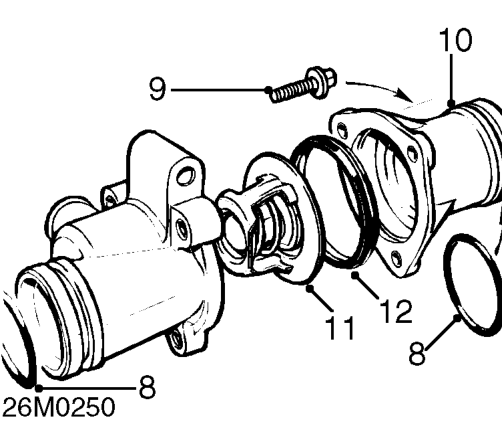
- Remove and discard 2 ’O’ ring seals from thermostat housing outlets.
- Remove 3 bolts securing cover to thermostat housing.
- Remove thermostat housing cover.
- Remove thermostat from housing.
- Remove rubber seal from thermostat.
Refit
- Examine thermostat rubber seal for signs of deterioration or damage, renew if necessary.
- Fit rubber seal to thermostat.
- Clean mating faces of thermostat and cover.
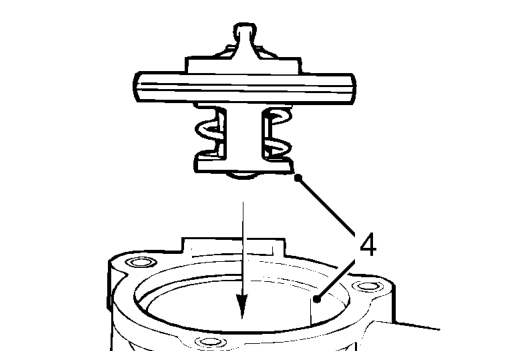
- Align thermostat to shoulder in thermostat housing.
- Fit thermostat housing cover and tighten bolts to 9 Nm.
- Clean ’O’ ring seal grooves on thermostat housing outlets.
- Lubricate new ’O’ ring seals with rubber grease and fit to thermostat housing outlets.
- Position thermostat housing to coolant pump and push to secure into place.
- Align dipstick tube bracket to thermostat housing.
- Fit bolt securing thermostat housing to cylinder block and tighten to 9 Nm.
- Connect coolant rail to thermostat housing.
- Align coolant rail to cylinder block, fit bolts and tighten to 9 Nm.
- Connect heater hose to thermostat housing and tighten clip.
- Refill cooling system. See Adjustments.
- Connect battery earth lead.
Parts & tools for this job For 1995 Rover 400
- FLUIDCoolantSearch: Rover coolant antifreeze
- PARTThermostatSearch: Rover 400 1995 thermostat
- TOOLCooling system pressure testerSearch: cooling system pressure tester
Links open Amazon search results in a new tab. As an Amazon Associate I earn from qualifying purchases.