
LHD illustrated
- Make
- Rover
- Model
- 600 Rover 600 Repair Manual - Volumes 1 and 2 - 2nd Edition
- Section
- Brakes: repairs › LHD illustrated
Brakes and ABSLHD illustrated
- Remove the master cylinder.
- RHD only: Remove the under – hood fuse/relay box.
- M/T only: Remove the clutch reservoir and reservoir bracket. Do not disconnect the clutch hose from the reservoir.
- Disconnect the vacuum hose from the booster and remove the vacuum hose bracket.
- Remove the throttle cable bracket, then remove the throttle cable grommet from the engine compartment bulkhead.
- Remove the intake air temperature sensor from the intake manifold.
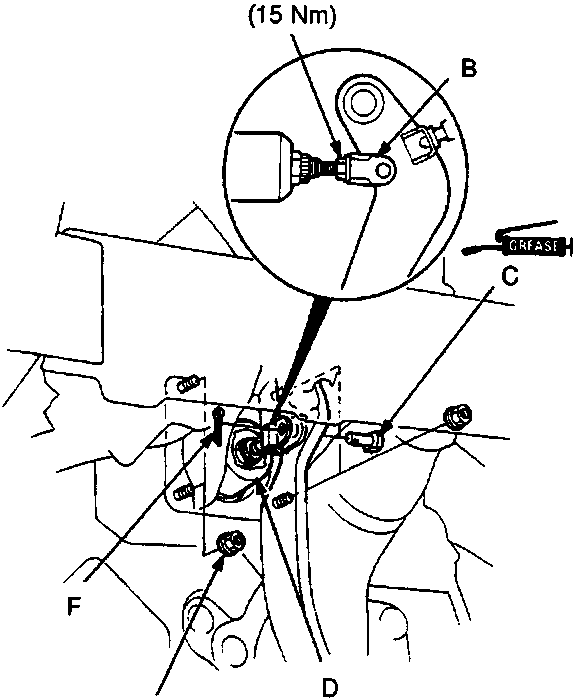
- Pushrod locknut
- Clevis
- Joint pin
- Brake booster
- Booster mounting nut
- Cotter pin
- Loosen the pushrod locknut.
- Remove the cotter pin and joint pin.
- Remove the clevis from the operating rod.
- Remove the four booster mounting nuts.
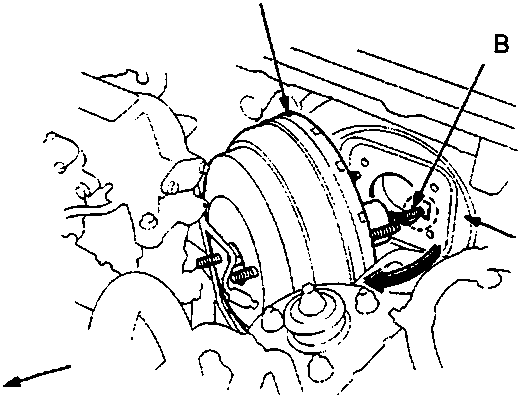
LHD illustrated
A Brake booster
B Operating rod
C Bulkhead
- Pull the brake booster forward, then turn it to the right (LHD: left) until the operating rod is clear of the bulkhead.
- Remove the brake booster from the engine compartment.
Note: Adjust the pushrod clearance before installing the booster.
- Install the brake booster in the reverse order of removal.
- Install the master cylinder.
- After installation, perform the following inspections and adjust if necessary.
- Brake pedal height.
- Brake pedal free play.
Parts & tools for this job For Rover 600
- PARTBrake padsSearch: Rover 600 brake pads
- TOOLBrake bleeder kitSearch: one man brake bleeder kit
- FLUIDBrake fluidSearch: brake fluid
Links open Amazon search results in a new tab. As an Amazon Associate I earn from qualifying purchases.