
Handbrake lever
- Make
- MG
- Model
- MGF Factory Workshop Manual
- Year
- 1995–2000
- Section
- Repairs › Handbrake lever
BrakesHandbrake lever · page 1 of 4
HANDBRAKE LEVER
Service repair no - 70.35.08
Remove
- Remove front console. See BODY, Interior trim components.
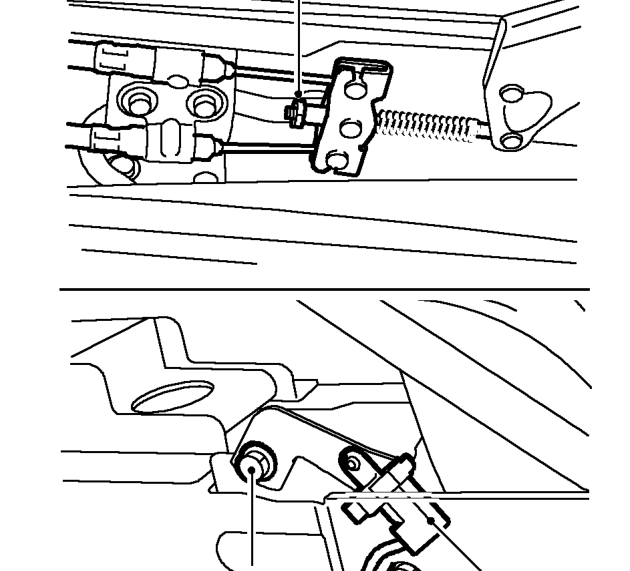
- Loosen cable adjuster nut and disconnect 2 cables from compensator.
- Remove 2 bolts securing lever to body.
- Disconnect Lucar from switch and remove handbrake lever.
Refit
- Connect Lucar to switch.
- Position handbrake lever to body, fit and tighten bolts to 25 Nm.
- Connect cables to compensator.
- Adjust handbrake cables. See Adjustments.
- Fit front console. See BODY, Interior trim components.
HANDBRAKE CABLES
Service repair no - 70.35.28
NOTE: Handbrake cables have colour coded identification bands: Purple - RH, Orange - LH.
WARNING: See RESTRAINT SYSTEMS, Precautions.
Remove
- Position vehicle on a 2 post ramp.
- Make the SRS system safe. See RESTRAINT SYSTEMS, Precautions.
- Remove engine cover. See ENGINE, Repairs.
- Remove engine compartment access panel. See BODY, Exterior fittings.
- Release handbrake to off position.
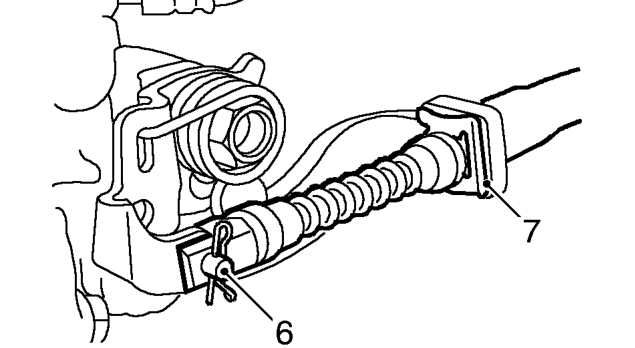
- Remove and discard 2 ’R’ clips, and remove 2 clevis pins securing handbrake cables to rear calipers.
- Remove and discard 2 clips securing handbrake cable abutments to caliper brackets and release cables.
Parts & tools for this job For 1995 MG MGF
- PARTBrake padsSearch: MG MGF 1995 brake pads
- TOOLBrake bleeder kitSearch: one man brake bleeder kit
- FLUIDBrake fluidSearch: brake fluid
Links open Amazon search results in a new tab. As an Amazon Associate I earn from qualifying purchases.