Brakes and ABSInspection and Replacement · page 2 of 2
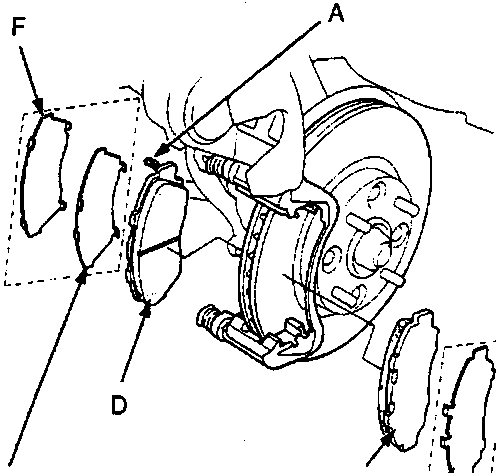
A Wear indicator
B Outer pad shim
C Outer pad
D Inner pad
E Inner shim A
F Inner shim B
12. Install the brake pads and pad shim correctly.
WARNING: When reusing the pads, always reinstall brake pads in their original positions to prevent loss of braking efficiency. Contaminated brake discs or pads reduce stopping ability. Keep grease off the discs and pads.Note: Install the inner pad with the wear indicator on the inside.
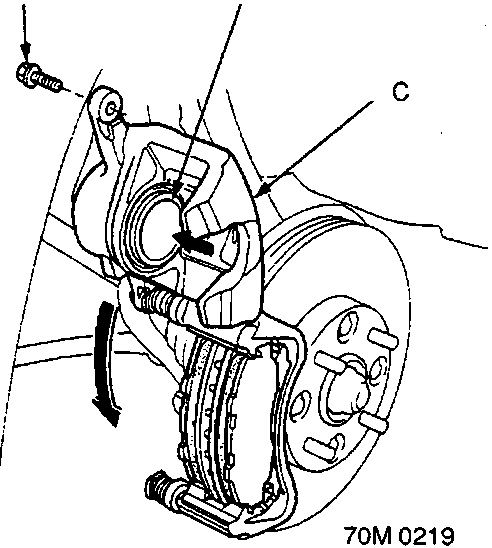
A Caliper bolt
B Piston
C Caliper body
13. Push the piston so that the caliper will fit over the pads. Make sure that the piston boot is in position to prevent damaging it when pivoting the caliper down.
14. Pivot the caliper down into position, then install caliper bolt and tighten it.
15. Depress the brake pedal several times to make sure the brakes work, then road – test.
Note: Engagement of the brake may require a greater pedal stroke immediately after the brake pads have been replaced as a set. Several applications of the brake pedal will restore the normal pedal stroke.
16. After installation, check for leaks at hose and line joints or connections, and retighten if necessary.
Links open Amazon search results in a new tab. As an Amazon Associate I earn from qualifying purchases.
Help keep workshop manuals free
workshop-manuals.com provides free online workshop manuals.
If they helped you fix your car, please consider sharing or
making a small donation to keep the servers running.