
Clearing dtcs procedures
- Make
- Mazda
- Model
- MX-5 (NC) Factory Workshop Manual
- Year
- 2006–2008
- Section
- On-Board Diagnostic (ABS) › Clearing dtcs procedures
BrakesClearing dtcs procedures
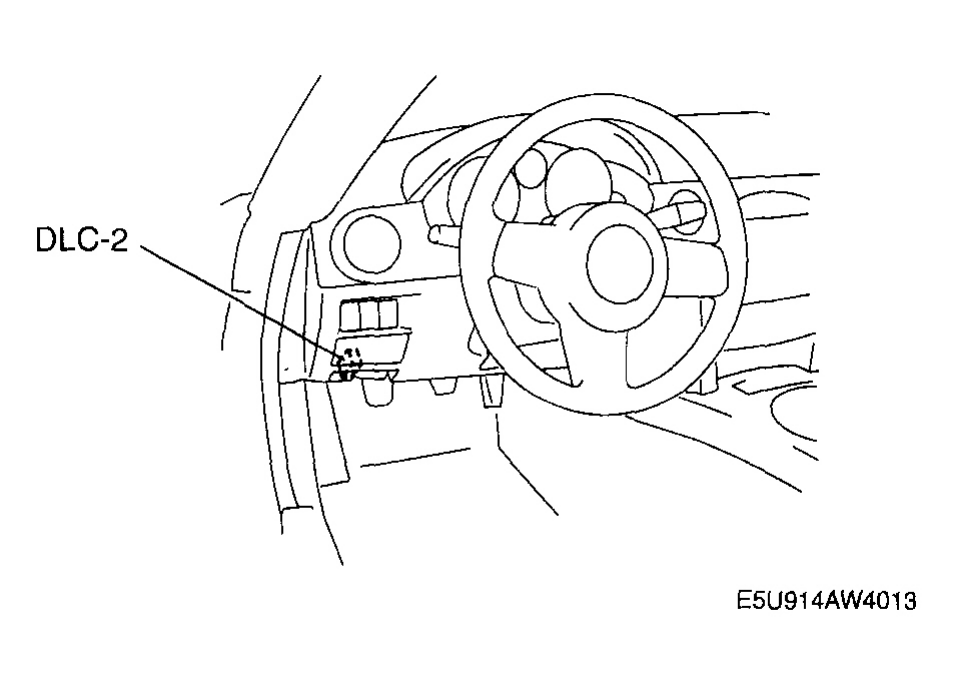
Courtesy of MAZDA MOTORS CORP.
CLEARING DTCS PROCEDURES
- Connect the M-MDS to the DLC-2.
- After the vehicle is identified, select the following items from the initial screen of the M-MDS.
- When using the IDS (laptop PC)
- Select the "Toolbox" tab.
- Select "Self Test".
- Select "Modules".
- Select "ABS".
- When using the PDS (Pocket PC)
- Select "Modules Tests".
- Select "ABS".
- Select "Self Test".
- Verify the DTC according to the directions on the screen.
- Press the clear button on the DTC screen to clear the DTC.
- Verify that no DTC are displayed.
Parts & tools for this job For 2006 Mazda MX-5
- TOOLOBD2 scannerSearch: OBD2 scanner
- TOOLDigital multimeterSearch: automotive digital multimeter
- TOOLBack-probe test leadsSearch: back probe test leads
As an Amazon Associate we earn from qualifying purchases.