
Timing belt upper front cover
- Make
- MG
- Model
- TF Factory Workshop Manual
- Year
- 2002–2005
- Section
- Repairs › Timing belt upper front cover
Engine (K Series)Timing belt upper front cover
TIMING BELT UPPER FRONT COVER
Service repair no - 12.65.41
Remove
- Remove engine cover. See this section.
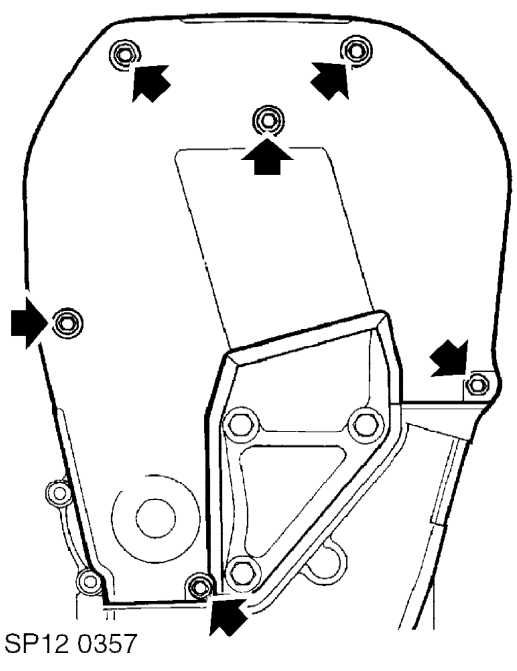
- Loosen lower fixing bolt securing timing belt upper front cover.
- Remove 5 bolts from timing belt upper front cover.
- Remove timing belt upper front cover and seal.
Refit
- Fit timing belt upper front cover, ensuring seal is located correctly.
- Fit bolts and tighten to 9 Nm .
- Fit engine cover. See this section.
CAMSHAFT TIMING BELT REAR COVER - MPi AND VVC - MANUAL GEARBOX MODELS
Service repair no - 12.65.42
Remove
- Remove camshaft timing belt gear. See this section.
- Remove bolt securing second cam gear to camshaft and remove gear.
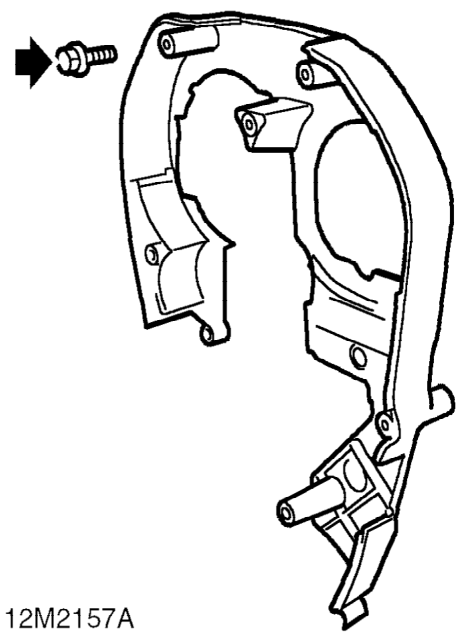
- Remove 3 bolts securing rear cover to engine.
- Remove timing belt rear cover.
Refit
- Fit timing belt rear cover.
- Fit bolts and tighten to 9 Nm.
- Fit camshaft gear and tighten bolt to 33 Nm (8mm) or 65 Nm. (10mm)
- Fit camshaft timing belt gear. See this section.
- Connect battery earth lead.
Parts & tools for this job For 2002 MG TF
- PARTTiming belt kitSearch: MG TF 2002 timing belt kit
- TOOLEngine timing tool setSearch: MG engine timing tool set
- TOOLTorque wrenchSearch: 3/8 inch torque wrench
Links open Amazon search results in a new tab. As an Amazon Associate I earn from qualifying purchases.