
Remove
- Make
- Rover
- Model
- 600 Rover 600 Repair Manual - Volumes 1 and 2 - 2nd Edition
- Section
- Repairs › Remove
Manual gearboxRemove
Remove
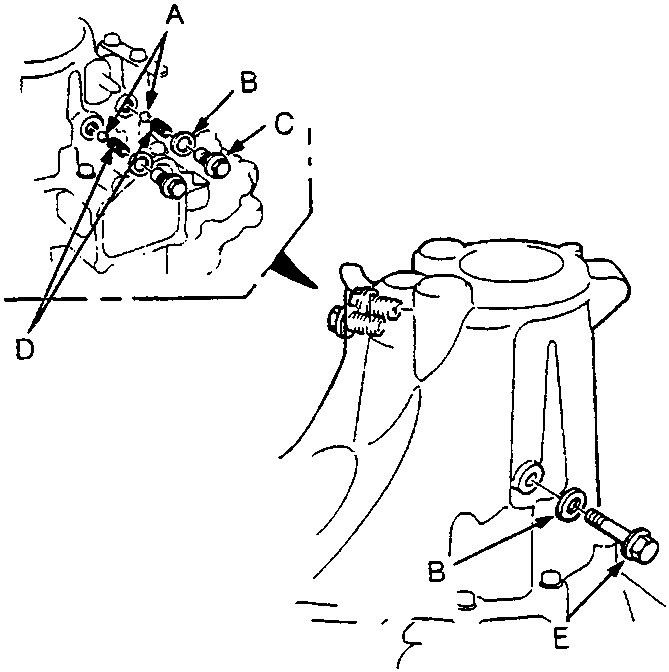
A
Steel ball
B
Washer
C
Setting screw
D
Spring
E
Reverse idler gear shaft bolt
Note:
- If the gearbox housing or clutch housing were replaced, the tapered roller bearing pre – load must be adjusted.
- Place the clutch housing on two pieces of wood thick enough to keep the mainshaft from hitting the workbench.
- Remove the shift arm assembly
- Remove the reverse idler gear shaft bolt.
- Remove the setting screws, then remove the washers and spring and steel balls. Replace washers.
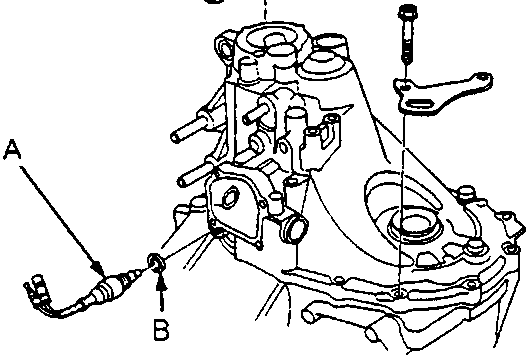
A
Reverse light switch
B
Washer
- Remove the reverse light switch – replace washer.
- Remove the 10 mm bolts and 8 mm bolts in a crisscross pattern in several steps.
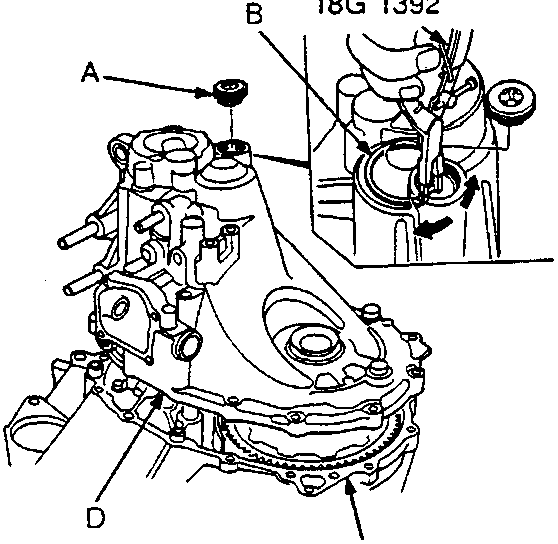
A
Sealing bolt
B
Snap ring
C
Clutch housing
D
Gearbox housing
- Remove the 32 mm sealing bolt.
- Expand the snap ring on the countershaft ball bearing and remove it from the groove using a pair of snap ring pliers.
Parts & tools for this job For Rover 600
- PARTClutch kitSearch: Rover 600 clutch kit
- TOOLClutch alignment toolSearch: clutch alignment tool
- FLUIDGear oilSearch: Rover 600 manual gearbox oil
Links open Amazon search results in a new tab. As an Amazon Associate I earn from qualifying purchases.