
Audio system
- Make
- Fiat
- Model
- 500 Factory Service Manual
- Year
- 2007–2024
- Section
- Accessories › Audio system
AUDIO SYSTEM
AUDIO SYSTEM
There are two different levels of acoustic system available for the vehicle:
- standard audio system (with CD / MP3 player), complete with 6-speaker audio system;
- HI-FI audio system (with CD / MP3 player), complete with audio system with 6 speakers, subwoofer and amplifier.
There is also the option of a Blue&Me telematic system with Bluetooth radio telephone function and Mediaplayer.
See descriptions 5580M ON-BOARD NAVIGATOR
The complete system consists of:
- two 165 mm diameter 40 W mid-woofer speakers, in the front doors;
- two 38 mm diameter 30 W tweeter speakers, in the front pillars;
- two 165 mm diameter 40 W full range speakers, in the rear side panels;
- an aerial on the vehicle roof;
- a radio with CD MP3 player.
Where the HiFi system is fitted (if requested):
- two 165 mm diameter 60 W mid-woofer speakers;
- two 40 W tweeter speakers in the front pillars;
- two 40 W max full range speakers in the rear side panels;
- a 60 W subwoofer under the right-hand front seat;
- a 4x30 W amplifier in the right-hand rear side panel;
- an aerial on the roof;
- a car radio with CD MP3 player
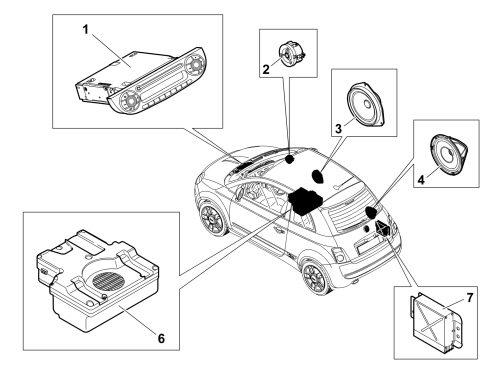
1. Radio
2. Front tweeter speakers
3. Front door mid-woofer speakers
4. Rear full range speakers
5. Aerial
6. Subwoofer
7. Amplifier
Components
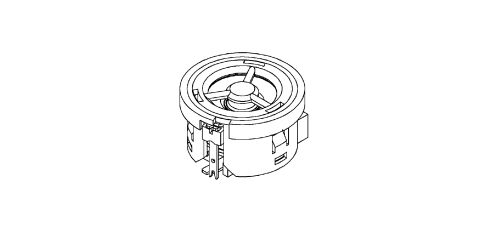
Front tweeters
These are 38 mm diameter 30 W (40 W for the HI-FI system) tweeter speakers, positioned behind the front pillar covers and designed to reproduce the higher frequencies.
This is a dome tweeter with a polycarbonate cone, plastic support, ferrite magnet and copper coil support, with crossover: 4.7 µF condenser.
Front speakers
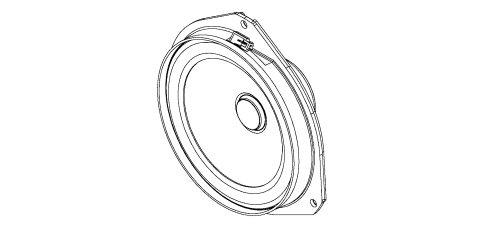
These are 165 mm diameter 40W mid-woofer speakers (60W for the HI-FI system), located in the front doors.
They are designed to reproduce medium-low frequencies.
The (water resistant) technology used for these components allows them to withstand possible sprays of water inside the door without being damaged.
There is a speaker with a paper cone, polyurethane support, ferrite magnet and aluminium/paper coil support.
Rear speakers
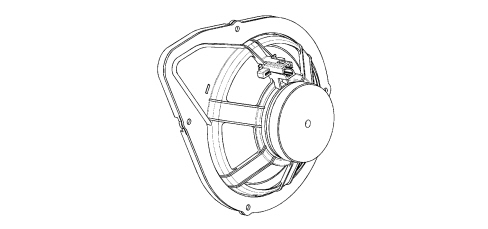
These are 165 mm diameter full-range 40W speakers, located in the rear side panels, capable of reproducing the entire audio frequency spectrum.
Water resistant technology has been adopted for these components as well.
There is a dual cone speaker with a paper cone, plastic (ABS) support, ferrite magnet and aluminium coil support.
Box sub-woofer ( hi-fi version )
The Subwoofer is located under the right-hand front seat. It is designed to boost the lower frequencies of the audio signal.
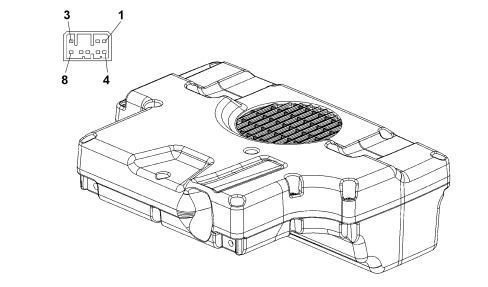
| Sub-Woofer PIN-OUT | |
|---|---|
| Pin | Description |
| 1 | Left audio input (+) |
| 2 | Right audio input (+) |
| 3 | +12 |
| 4 | Left audio input (-) |
| 5 | Right audio input (-) |
| 6 | n.c. |
| 7 | Earth |
| 8 | On enablement |
Audio amplifier ( hi-fi version )
4x30 Watt audio amplifier, fitted in the right-hand rear side panel, designed to amplify the audio signal from the car radio for the front and rear speakers.
The sub-woofer has its own built-in amplifier.
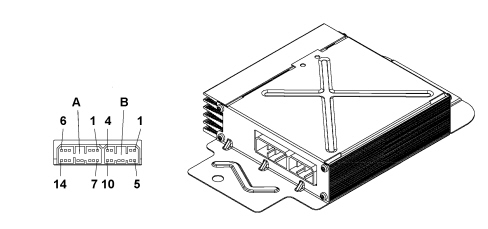
Amplifier pin-out
| Connector A: 14-way | |
|---|---|
| Pin | Description |
| 1 | Right-hand front speaker input (-) |
| 2 | Left-hand front speaker input (-) |
| 3 | n.c. |
| 4 | Left-hand rear speaker output (+) |
| 5 | Left-hand rear speaker output (-) |
| 6 | Left-hand front speaker output (+) |
| 7 | Right-hand front speaker input (+) |
| 8 | Left-hand front speaker input (+) |
| 9 | n.c. |
| 10 | Right-hand front speaker output (-) |
| 11 | Right-hand front speaker output (+) |
| 12 | Right-hand rear speaker output (-) |
| 13 | Right-hand rear speaker output (+) |
| 14 | Left-hand front speaker output (-) |
| Connector B: 10-way | |
|---|---|
| Pin | Description |
| 1 | Battery + |
| 2 | Earth (GND) |
| 3 | Right-hand rear speaker input (-) |
| 4 | Left-hand rear speaker input (-) |
| 5 | n.c. |
| 6 | n.c. |
| 7 | n.c. |
| 8 | Remote control |
| 9 | Right-hand rear speaker input (+) |
| 10 | Left-hand rear speaker input (+) |
Steering wheel controls (opt)
Some radio functions can be controlled by buttons on the steering wheel.
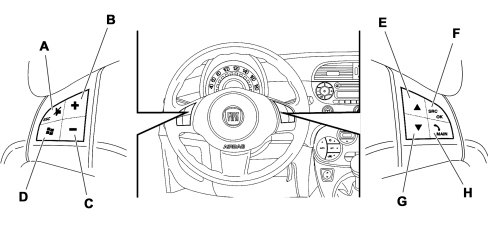
A. Audio Mute on/off (with radio on)
B. Increase volume
C. Decrease volume
D. This button is only active where the Blue&Me system is fitted
E. Radio: recall pre-selected stations (from 1 to 6), CD player: select next track
F. Radio frequency range selection button (FM1, FM2, FMA, MW, LW) and listening sources (Radio - CD - MP3)
G. This button is only active where the Blue&Me system is fitted
H. Radio: recall pre-selected stations (from 6 to 1), CD player: select previous track
Aerial
There are two aerial versions, based on whether the OPT sunroof has been fitted or not.
Aerial with sunroof:
- 36 cm aerial rod
- Aerial mount, angled at 75°
Aerial without sunroof:
- 36 cm aerial rod
- Aerial mount, angled at 60°
RADIO
Introduction
The audio system essentially consists of a car radio with a single CD-ROM player compatible with MP3 compressed audio files.
Depending on the vehicle version ( Basic or sport ) a car radio with a light or dark front panel is fitted to match the vehicle dashboard colour.
Technical specifications
The main technical specifications of the radio are:
- Music audio power: 4x40W.
- 7 Band graphic equalizer (only CD and CD MP3).
- Large integrated alphanumeric display (20 characters per RDS function + control flags) with negative contrast for CD and CD MP3 radio.
- Wiring for attachment to hands-free kit (external telephone).
- Easy-to-manage menu for the adjustment of the radio settings and any external interfaces (CD-Changer, telephone).
- Remote control from the steering wheel.
- Possibility of interface with external CD-Changer via ASCI-BUS line.
Operational description of the controls on the front panel
The following diagram shows the radio front panel screen-printing and associated operational descriptions.
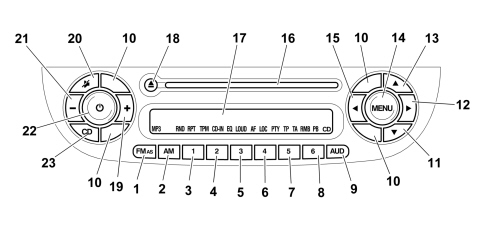
1. FM1, FM2, FM frequency reception enablement button.
2. AM frequency reception enablement button.
3. Radio station recall button. Memory 1.
4. Radio station recall button. Memory 2.
5. Radio station recall button. Memory 3.
6. Radio station recall button. Memory 4.
7. Radio station recall button. Memory 5.
8. Radio station recall button. Memory 6.
9. Audio settings button. ( Bass, Treble, Fader, Balance, Loudness ).
10. Plug for car radio extraction hole.
11. Continuous backwards search button.
12. Forwards and backwards manual search button.
13. Continuous forwards search button.
14. Settings menu activation button.
15. Manual backwards search button.
16. CD-ROM insertion/extraction slot.
17. Display.
18. CD-ROM eject button.
19. Increase audio volume button (+).
20. Mute button.
21. Decrease audio volume button (-).
22. Radio On-Off button.
23. CD-ROM player enablement button.
Some buttons also perform other functions depending on the radio operation mode.
Radio mode
Buttons: 11, 12, 13, 15
Radio station search:
- Automatic search: press buttons 12, 15 (long press for fast forward)
- Manual search: press buttons (long press for fast forward)
Buttons 3, 4, 5, 6, 7, 8, 9
Programming current radio station: long press on keys for preset/memory from 1 to 6
- Stored station recall: brief press on keys for preset/memory from 1 to 6
Cd player mode
Buttons: 12, 15
- Play previous/next track: short press
- CD track Fast forward / Rewind: long press
Buttons: 11, 13
- Play previous / next folder (for CD-MP3): short press
Radio display
The radio display is divided into two parts:
- A - Area showing information.
- B - Area showing the symbol (icon) relating to the active function.
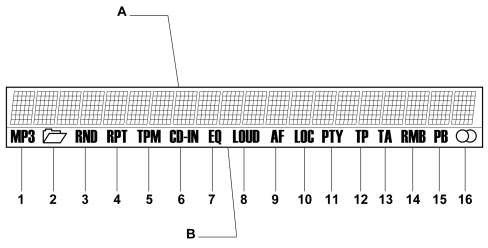
The following symbols (icons) are displayed in area (B):
1. MP3.
2. Folder.
3. RDN.
4. RPT.
5. TPM.
6. CD-IN.
7. EQ.
8. LOUD.
9. AF.
10. LOC.
11. PTY.
12. TP.
13. TA.
14. FM1, FM2, FM, AM.
15. Selected memory ( P1…P6 ).
16. Stereo station symbol.
Rear view of car radio
The following connectors are located at the back of the radio for connection to the vehicle wiring:
- Two 8-way connectors for the radio power supply and driving the speakers, respectively.
- One 20-way connector (composed of three elements, yellow, green and blue in colour) for connection to the steering wheel controls (if fitted as OPT) and for sub-woofer box enablement (only fitted on the Hi-Fi specification).
- One radio aerial connector.
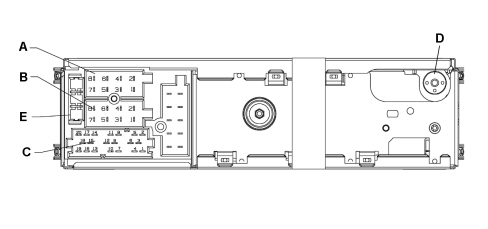
E. Fuse
D. Aerial connector
RADIO PIN OUT
| Connector A | |
|---|---|
| Pin | Description |
| 1 | B CAN ( B ) - H |
| 2 | Sub-woofer ( input ) |
| 3 | B CAN ( A ) - L |
| 4 | + 30 |
| 5 | Automatic aerial |
| 6 | n.c. |
| 7 | n.c. |
| 8 | Earth (GND) |
| Connector B | |
|---|---|
| Pin | Description |
| 1 | LS RR + |
| 2 | LS RR - |
| 3 | LS RF + |
| 4 | LS RF - |
| 5 | LS LF + |
| 6 | LS LF - |
| 7 | LS LR + |
| 8 | LS LR - |
| 9 | Maus Bus ( output ) |
| 10 | Maus Bus ( input ) |
| Connector C | |
|---|---|
| Pin | Description |
| 1 | Aux AF ( L ) |
| 2 | Aux AF ( R ) |
| 3 | Aux AF ( GND ) |
| 4 | n.c. |
| 5 | n.c. |
| 6 | Sub-woofer ( 12V ) |
| 7 | Telephone AF in + |
| 8 | Telephone AF in - |
| 9 | Telephone mute |
| 10 | n.c. |
| 11 | n.c. |
| 12 | Mute ( GND ) |
| 13 | CDC Data ( input ) |
| 14 | CDC Data ( output ) |
| C 15 | + 30 CDC |
| C 16 | + 15 CDC |
| C 17 | CDC Data ( GND ) |
| C 18 | CDC AF ( GND ) |
| C 19 | CDC AF ( L ) |
| C 20 | CDC AF ( R ) |
Introduction
The equipment offers the following functions:
Radio section
- PLL tuning with FM/AM/MW/LW frequency bands;
- RDS (Radio Data System) with TA function (traffic information) - TP (traffic programmes) - EON (Enhanced Other Network) - REG (regional programmes);
- AF: selection of search for alternative frequencies in RDS mode;
- emergency alarm wiring;
- automatic/manual tuning of stations;
- FM Multipath detector;
- manual programming of 36 stations: 18 on FM band (6 on FM1, 6 on FM2, 6 on FMA), 6 on MW band and 6 on LW band;
- automatic programming (AUTOSTORE function) of 6 stations on dedicated FM band;
- SPEED VOLUME function: automatic adjustment of volume depending on vehicle speed;
- automatic Stereo/Mono selection.
CD and CD MP3 section
- Direct selection of the disc;
- Track selection (forward/back);
- Fast advance (forward/back) through tracks;
- MP3-Info function (ID3-TAG);
- Folder selection (previous/next);
- Track selection (forward/back);
- Fast advance (forward/back) through tracks;
- MP3 display function: display of name of folder, ID3-TAG information, time elapsed since the start of the track, name of the file);
- Reading of audio or data CD, CD-R and CD-RW.
Audio section
- Mute/Pause function;
- Soft-Mute function;
- Loudness function;
- 7 band graphic equalizer;
- Separate bass/treble adjustment;
- Right/left channel balance
Antitheft protection
The radio is equipped with an anti-theft protection system based on the exchange of information between the radio and the Body Computer Node.
This system guarantees maximum safety and means the secret code need not be re-entered every time the radio power supply is disconnected.
If the check has a positive outcome, the radio will start to function, however, if the comparison codes are not the same or if the Body Computer Node is replaced, the unit will ask the user to enter the secret code according to the procedure described below.
Entering the secret code
When the radio is switched on, if there is a code request, the word CODE will appear on the display for about 2 seconds followed by four dashes "----".
The secret code is made up of four digits between 1 and 6, each corresponding to one of the dashes.
To enter the first digit of the code, press the button corresponding to the pre-selection stations (from 1 to 6). Enter the other digits of the code in the same way.
If the four figures are not entered within 20 seconds, the display again shows the message CODE for 2 seconds and then the four dashes "---".
This is not considered as incorrect entering of the code.
After entering the fourth digit (within 20 seconds), the car radio will start to work.
If an incorrect code is entered, the radio will give out an acoustic warning, the word CODE will appear on the display for 2 seconds and then four dashes "----" to indicate that the user needs to enter the correct code.
Each time the user enters an incorrect code, the waiting time gradually increases (1 min, 2 min, 4 min, 8 min, 16 min, 30 min, 1h, 2h, 4h, 8h, 16h, 24h) to a maximum of 24 hours. The waiting time is shown on the display with the word WAIT. After the writing has disappeared it is possible to start the code entering procedure again.
Code card
This document certifies ownership of the car radio. The Code Card shows the radio model, serial number and secret code.
Keep this Code Card in a safe place so that you can give the information to the relevant authorities if the car radio is stolen.
Parts & tools for this job For 2007 Fiat 500
- TOOLDigital multimeterSearch: automotive digital multimeter
- PARTAssorted fuse kitSearch: car fuse assortment kit
- TOOLWire crimper and connector kitSearch: wire crimper connector kit
Links open Amazon search results in a new tab. As an Amazon Associate I earn from qualifying purchases.