
Blu & me nav control panel operation check
- Make
- Fiat
- Model
- 500 Factory Service Manual
- Year
- 2007–2024
- Section
- Accessories › Blu & me nav control panel operation check
BLU & ME NAV CONTROL PANEL OPERATION CHECK
| STEP | CHECK TO BE PERFORMED | REMEDIAL ACTION IF THE CHECK IS NOT OK |
|---|---|---|
| 1 | Control panel circuit continuity check Disconnect the wiring from the control panel Connect an Examiner in Ohmmeter mode between pins 1 and 2. The resistance value should read 4860 Ohms ±10% at 20°C | Replace the control panel |
| 2 | SOS button check Disconnect the wiring from the control panel Connect an Examiner in Ohmmeter mode between pins 1 and 2 Press the SOS button. The resistance value should read 49 Ohms ±10% at 20°C | Replace the control panel |
| 3 | NAV button check Disconnect the wiring from the control panel Connect an Examiner in Ohmmeter mode between pins 1 and 2 Press the NAV button. The resistance value should read 440 Ohms ±10% at 20°C | Replace the control panel |
| 4 | INFOMOBILITY button check Disconnect the wiring from the control panel Connect an Examiner in Ohmmeter mode between pins 1 and 2 Press the INFOMOBILITY button. The resistance value should read 177 Ohms ±10% at 20°C | Replace the control panel |
| 5 | Control panel power supply check Connect the wiring for the control panel Turn the key to the MAR position Using an Examiner in Voltmeter mode, check for a battery voltage of 12 Volts between pins 5 and 6 | Replace fuse F49 from the dashboard control unit after finding out what caused it to blow. Restore or, if necessary, replace the electrical wiring between the control panel and the dashboard control unit. Replace the control panel for the navigator Op. 5580M20 ON BOARD NAVIGATION SYSTEM CONTROLS - R.R. if the previous checks have not revealed any faults |
| 6 | Button power supply check Connect the wiring for the control panel Turn the key to the MAR position Using an Examiner in Voltmeter mode, check for a voltage of around 3.5 Volts between pins 1 and 2 | Replace the control panel for the navigator |
| 7 | Voltage signal check Connect the wiring for the control panel Turn the key to the MAR position Using an Examiner in Voltmeter mode, check the voltage signals between pins 1 and 2 as in the table below: Press the SOS button and read a voltage of around 0.6 Volts Press the NAV button and read a voltage of around 2.2 Volts Press the INFOMOBILITY button and read a voltage of around 1.4 Volts | Replace the control panel for the navigator |
| 8 | Check the wiring Check the continuity of the wiring between the control panel and the convergence node | Restore the continuity of the wiring between the control panel and the convergence node check for any errors on the CAN If no faults have been found during the previous checks, replace the convergence node |
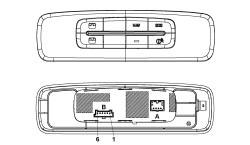
Convergence control panel
| Connector pin out | |
|---|---|
| Pin | Function |
| 1 | Negative signal |
| 2 | Reference earth |
| 3 | N.C. |
| 4 | LED control signal |
| 5 | Earth |
| 6 | +12 key |
Parts & tools for this job For 2007 Fiat 500
- TOOLDigital multimeterSearch: automotive digital multimeter
- PARTAssorted fuse kitSearch: car fuse assortment kit
- TOOLWire crimper and connector kitSearch: wire crimper connector kit
Links open Amazon search results in a new tab. As an Amazon Associate I earn from qualifying purchases.