
Manual station programming
- Make
- Fiat
- Model
- Bravo /Brava (182) Factory Service Manual
- Year
- 1995–2001
- Section
- Radio equipment › Manual station programming
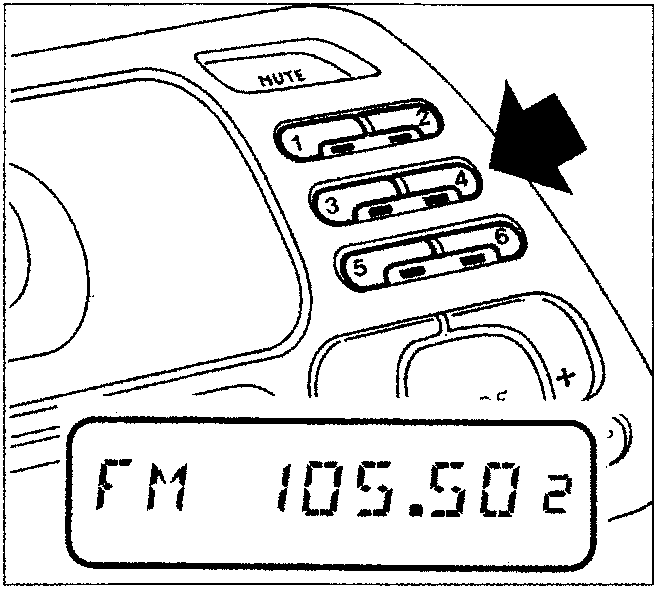
Manual station programming
The station to which you are listening can be programmed in the range selected using buttons (1), (2), (3), (4), (5) and (6).
Keep the button pressed with which you wish to programme the station until transmitter is audible again. The LED under the switch will come on and the number corresponding to the switch will appear on the display.
Even if the supply voltage is interrupted, the memories remin active.
Listening to stations programmed
Proceed as follows:
- Select the band desired using switchs (11), (12) and (13) (see page 50/7);
- pressone of the six station programming buttons briefly;
The LED under the switch will come on and the number corresponding to that switch will appear on the display. For bands RDS1 and RDS2, if the reception is not gooe, an alternative frequency is automatically searched for (the word "SRC" will appear on the display during the search).
TP Function (Traffic Programme)
Several stations belonging to the RDS1, RDS2 bands also transmit information on traffic conditions.
With the TP function (Traffic Programme) it is possible:
- a) to search only for RDS stations which transmit traffic information;
- b) to receive traffic information even if the cassette player or CD player function is selected;
- c) to receive traffic information at a minimum pre-set volume even with the radio volume at zero.
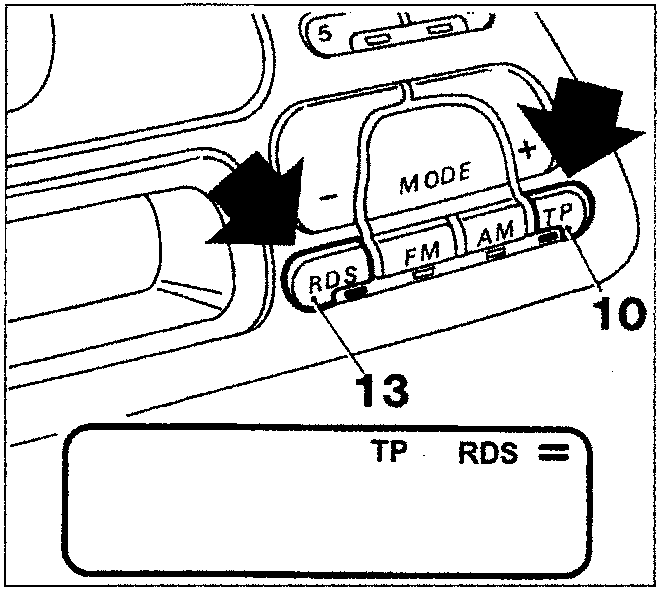
NOTE There follows instructions for carrying out each of the operations illustrated for points a), b) and c) described previously.
Point a)
- Select an RDS1, RDS2 band by pressing the "RDS" switch (13) briefly (the LED under the switch will come on);
- press the "TP" switch (10) briefly so that the word "TP" appears on the display (the LED under the switch will come on).
If the transmitter is not enabled to supply traffic information, then the radio will automatically tune into the closest one able to transmit it.
Parts & tools for this job For 1995 Fiat Bravo
- TOOLDigital multimeterSearch: automotive digital multimeter
- PARTAssorted fuse kitSearch: car fuse assortment kit
- TOOLWire crimper and connector kitSearch: wire crimper connector kit
Links open Amazon search results in a new tab. As an Amazon Associate I earn from qualifying purchases.