
Original page (page 4 of 4)
- Make
- Rover
- Model
- 600 Rover 600 Repair Manual - Volumes 1 and 2 - 2nd Edition
- Section
- Brakes: repairs
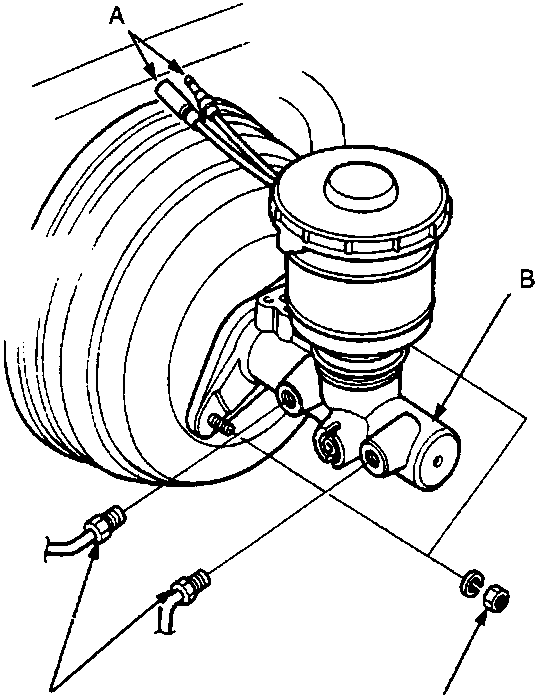
19 Nm
15 Nm
A Wires
B Master cylinder
CAUTION: Do not allow brake fluid to come into contact with the paintwork as it will cause surface damage. If brake fluid is spilled on the paintwork, wash it off immediately with water.
Be careful not to bend or damage the brake pipes when installing the master cylinder.
Make sure no dirt or other foreign matter is allowed to contaminate the brake fluid.
Do not mix different brands of brake fluid as they may not be compatible.
Do not reuse the drained fluid. Use only clean DOT 4 brake fluid.
When connecting the brake pipes, make sure that there is no interference between the brake pipes and other parts.
Note: Before installing the master cylinder, check and adjust the pushrod clearance.
- Install the master cylinder on the brake booster with the mounting nuts.
- Connect the brake pipes to the master cylinder.
- Fill the master cylinder reservoir up and bleed the brake system.
- Install the reservoir cap and connect the fluid level switch wires.
- Perform the following inspections and adjust if necessary.
Brake pedal height.
Brake pedal free play.
Parts & tools for this job For Rover 600
- PARTBrake padsSearch: Rover 600 brake pads
- TOOLBrake bleeder kitSearch: one man brake bleeder kit
- FLUIDBrake fluidSearch: brake fluid
Links open Amazon search results in a new tab. As an Amazon Associate I earn from qualifying purchases.