
Wheel alignment - front (Steering)
- Make
- Land Rover
- Model
- Discovery II (UK)
- Section
- Adjustments › Wheel alignment - front
‹ Prev Hydraulic system - bleed Steering linkage - centraliseNext › Power steering pressure check - diesel models
SteeringWheel alignment - front
- Adjust drag link so that taper joint is centralised in drop arm, then tighten drag link clamp bolts: Tighten M8 bolts to 22 Nm (16 lbf.ft) and M10 bolts to 33 Nm (24 lbf.ft).
- Connect drag link to drop arm and tighten nut to 80 Nm (59 lbf.ft).
- Remove steering box centralising bolt.
- Remove stand(s) and lower vehicle.
- Road test the vehicle and check that the steering wheel is centralised. If steering wheel is not centralised, proceed as follows.
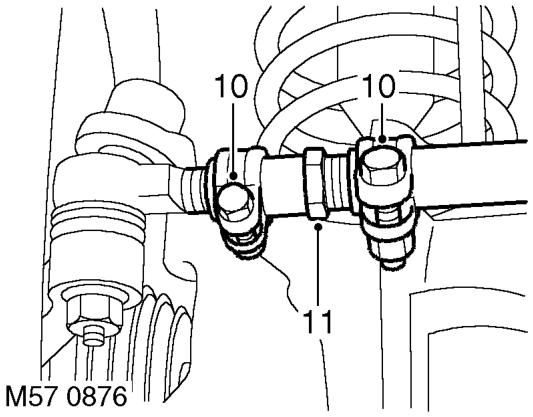
- Slacken drag link adjuster clamp bolts.
- Without disconnecting drag link from drop arm, adjust the length of the drag link to bring the steering wheel to the central position.
CAUTION: Repositioning the steering wheel on its splines cannot correct small (less than 5°) errors in steering wheel alignment. Always rectify small errors in alignment by adjusting the drag link as detailed above, ensuring that steering box centralisation is maintained.
- Tighten drag link clamp bolts: Tighten M8 bolts to 22 Nm (16 lbf.ft) and M10 bolts to 33 Nm (24 lbf.ft)
Wheel alignment - front
$% 57.65.01
The following is the only wheel alignment equipment which has been approved. l Beissbarth ML 4600 wheel alignment computer (6 sensor). l Beissbarth ML 4600-8 wheel alignment computer (8 sensor). l Beissbarth ML 4000 wheel alignment computer (8 sensor wireless). l Hunter S411-14.
Check
- Ensure tyre pressures are correct and vehicle is at kerbside weight.
- Roll vehicle backwards and forwards to relieve stresses in steering and suspension.
- Ensure road wheels are positioned straight ahead.
- Ensure that wheel alignment equipment is properly calibrated.
- Following the equipment manufacturer's instructions, measure the front wheel alignment. Compare with the figures given in General Data. GENERAL DATA, Steering.
Adjust
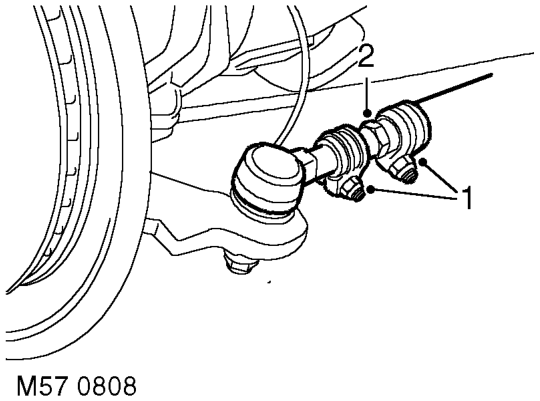
- Loosen track rod and adjuster clamp bolts.
- Rotate adjuster to obtain correct alignment. GENERAL DATA, Steering.
- Tighten track rod and adjuster clamp bolts: Tighten M8 bolts to 22 Nm (16 lbf.ft) and M10 bolts to 33 Nm (24 lbf.ft).
- Recheck front wheel alignment.
‹ Prev Hydraulic system - bleed Steering linkage - centraliseNext › Power steering pressure check - diesel models
Parts & tools for this job For Land Rover Discovery
- TOOLTie rod end toolSearch: tie rod end puller
- TOOLBall joint separatorSearch: ball joint separator
- FLUIDPower steering fluidSearch: Land Rover power steering fluid
Links open Amazon search results in a new tab. As an Amazon Associate I earn from qualifying purchases.