
Battery - ’l’ series
- Make
- Rover
- Model
- 600 Repair Manual Supplement
- Year
- 1993–1999
- Section
- Repairs › Battery - ’l’ series
ElectricalBattery - ’l’ series
BATTERY - ’L’ SERIES
Service repair no - 86.15.01
Remove
- Disconnect both battery leads, earth lead first.
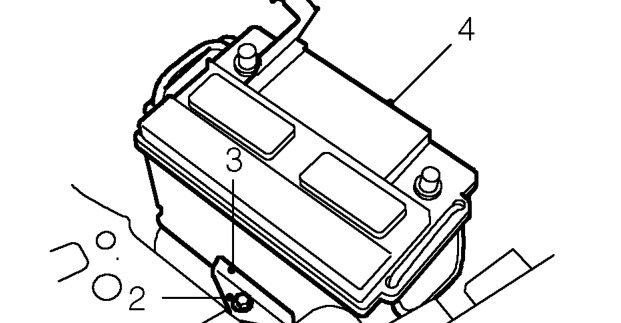
- Remove bolt securing battery clamp to battery tray.
- Remove battery clamp.
- Release and remove battery from vehicle.
Refit
- Clean battery terminals and coat with petroleum jelly.
- Position battery to battery tray.
- Fit battery clamp and secure with bolt.
- Position and connect battery leads, earth lead last
AUXILIARY DRIVE BELT - ’L’ SERIES
Service repair no - 86.10.03
Remove
- Remove front centre underbelly panel. See BODY, Exterior fittings.
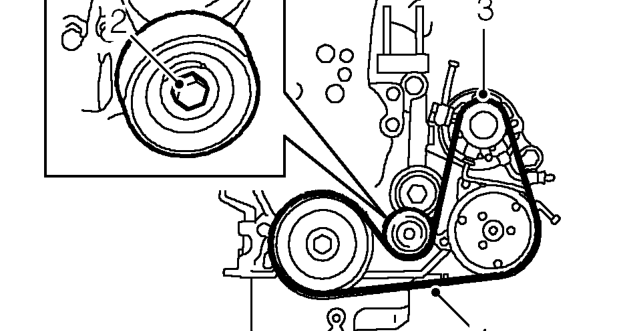
- Using a 15 mm ring spanner on drive belt tensioner pulley bolt, rotate pulley fully clockwise and hold.
- With assistance, release drive belt from alternator pulley.
- Remove drive belt from remaining pulleys and remove from vehicle.
Refit
- Clean drive belt pulley grooves and ensure grooves are not damaged.
- Fit new drive belt around pulleys, except alternator pulley, ensure belt is correctly aligned in pulley grooves.
- Hold tensioner pulley fully clockwise, using assistance fit drive belt around alternator pulley.
- Remove ring spanner from tensioner pulley bolt.
- Fit front centre underbelly panel. See BODY, Exterior fittings.
Parts & tools for this job For 1993 Rover 600
- TOOLBattery testerSearch: car battery tester
- TOOLDigital multimeterSearch: automotive digital multimeter
- TOOLBattery terminal cleanerSearch: battery terminal cleaner
Links open Amazon search results in a new tab. As an Amazon Associate I earn from qualifying purchases.