
Original page (page 4 of 7)
- Make
- Rover
- Model
- 600 Rover 600 Repair Manual - Volumes 1 and 2 - 2nd Edition
- Section
- Brakes: repairs
Brakes and ABSOriginal page · page 4 of 7
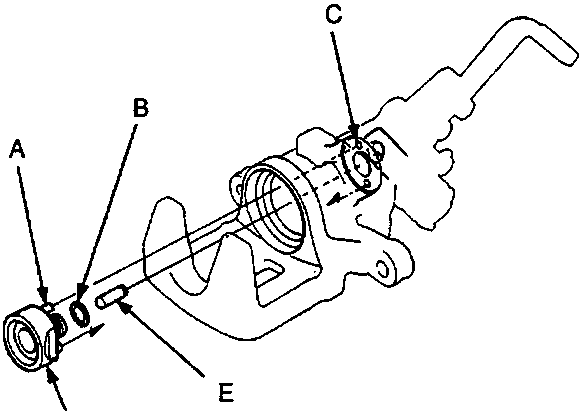
A Pins
B O-Ring
C Holes
D Sleeve piston
E Pin
- Install the pin in the cam.
- Install a new O-ring on the sleeve piston.
- Install the sleeve piston so the hole in the bottom of the piston is aligned with the pin in the cam, and two pins on the piston are aligned with the holes in the caliper.
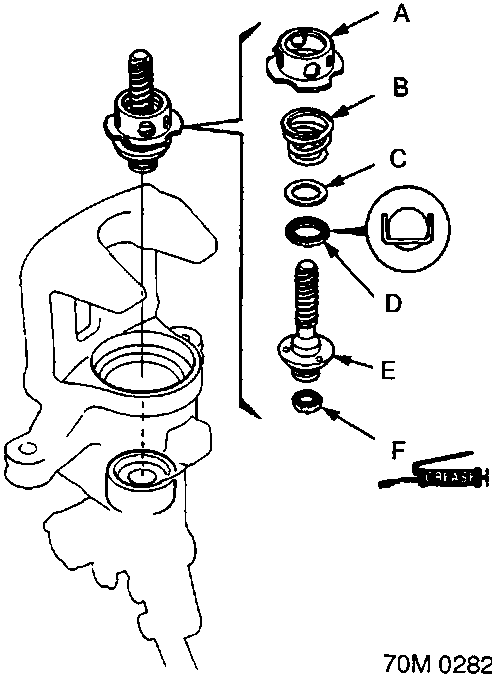
A Spring cover
B Adjusting spring B
C Spacer
D Bearing A
E Adjusting bolt
F Cup
- Coat a new cup with recommended grease in the caliper seal set, and install it with its groove facing the bearing A side of the adjusting bolt.
- Fit the bearing A, spacer, adjusting spring B and spring cover on the adjusting bolt, and install them in the caliper cylinder.
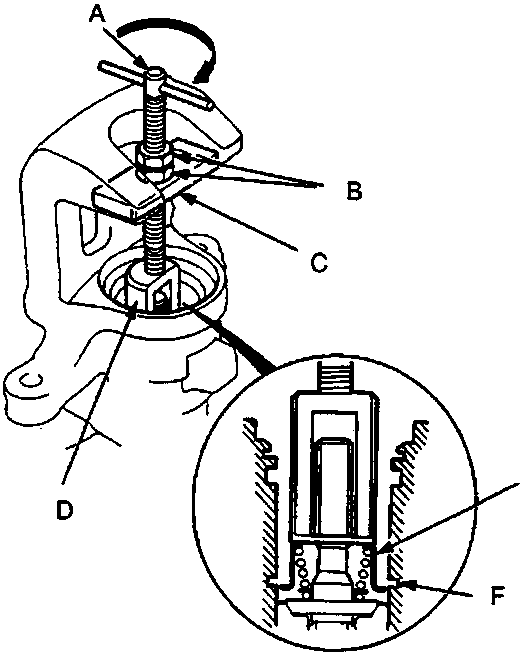
A Shaft
B Locknuts
C Plate
D Brake spring compressor
E Spring cover
F Circlip groove
- Install the special tool on the spring cover and turn the shaft until the locknut contacts the plate.
Parts & tools for this job For Rover 600
- PARTBrake padsSearch: Rover 600 brake pads
- TOOLBrake bleeder kitSearch: one man brake bleeder kit
- FLUIDBrake fluidSearch: brake fluid
Links open Amazon search results in a new tab. As an Amazon Associate I earn from qualifying purchases.