
1. Manual Trigger
- Make
- Aston Martin
- Model
- DB7 Factory Workshop Manual Volume 2: Electrics, Body and Air Conditioning
- Year
- 1994–1998
- Section
- Operating instructions › 1. Manual Trigger
Only the data within the selected time period will be stored. A trigger is used to define the zero time point on any waveform display. This is used to make it easier to locate the actual point at which the fault occurred on the waveform display. Triggers may take three forms.
1. Manual Trigger
A manual trigger would be used in circumstances where the technician can clearly identify the point when the fault occurs and has access to the PDU at this point.
The trigger icon should be pressed on the waveform / bargraph display (or the on-road trigger icon) at the instant the fault occurs. This will then become the zero point for the waveform/bargraph display. The waveform/bargraph display up to this point would have a negative form.
2. Fault Code Trigger
The fault code trigger is used when the first indication of a fault is normally by the appearance of a warning lamp within the instrument pack. For some vehicle systems DataLogger can trigger on specific fault codes, this type of triggering is more precise than simply triggering on the warning lamp.
This trigger is selected during the parameter customisation process. To select a fault code to trigger 'on', set the fault code (parameter) to record.
Assign the display order by touching the rectangle below the Eye icon repeatedly until the desired display order number is shown.
Press the rectangle in the trigger column.
Highlight the fault code parameter again and select the magnifying glass icon. The trigger customisation screen will be displayed.
Select the appropriate trigger style icon and select the tick icon to confirm.
Press the Tick icon again to return to the main DataLogger screen.
Select the Record icon to start data capture.
The unit will trigger when the fault code appears and will set the zero time point of the waveform / bargraph display.
3. Specific Signal Trigger
It is possible to select a specific parameter or signal to trigger DataLogger.
Triggering on specific signals is likely to be used when the vehicle system has no on-board diagnostics or when diagnostic information is not readily available at the time the fault occurs, e.g. air-conditioning.
This type of trigger should only be used when it is known that a particular signal has certain characteristics at the time the fault occurs, e.g. one signal will always go from 12 Volts to ground, bringing on a warning lamp when a particular fault occurs, as this is a known event, this signal may be used to trigger the PDU.
Trigger Selection
Any of the record enabled parameters may be used to trigger DataLogger.
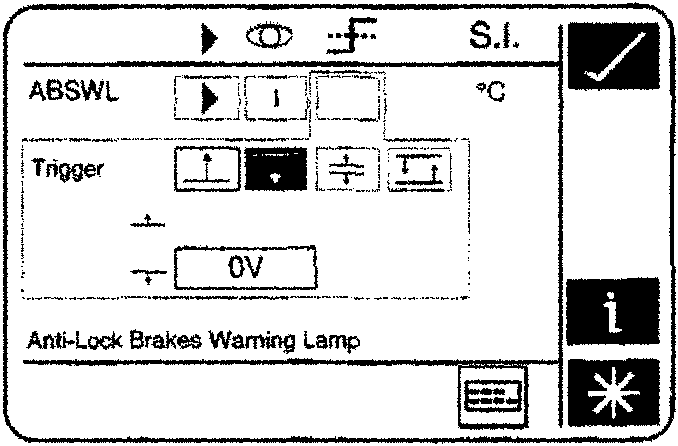
To select a trigger highlight the parameter name, a magnifying glass type icon will appear at the bottom of the screen.
Select the magnifying glass type icon.
The trigger action screen should be displayed.
Parts & tools for this job For 1994 Aston Martin DB7
- TOOLOBD2 scannerSearch: OBD2 scanner
- TOOLDigital multimeterSearch: automotive digital multimeter
- TOOLBack-probe test leadsSearch: back probe test leads
Links open Amazon search results in a new tab. As an Amazon Associate I earn from qualifying purchases.