
Cable Setup - 95 MY
- Make
- Aston Martin
- Model
- DB7 Factory Workshop Manual Volume 2: Electrics, Body and Air Conditioning
- Year
- 1994–1998
- Section
- Operating instructions › Cable Setup - 95 MY
Cable Setup - 95 MY
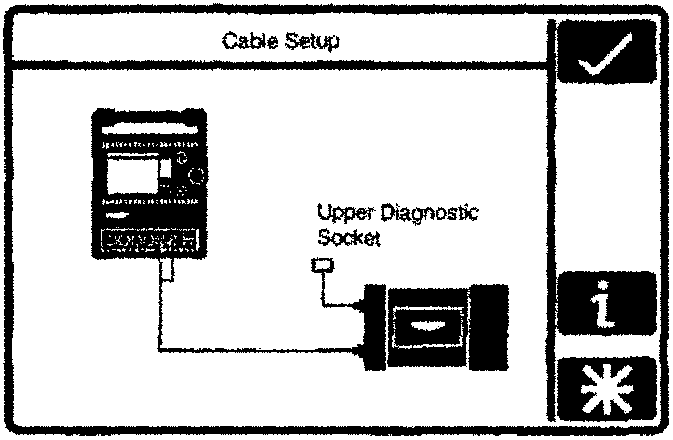
On selecting the required vehicle area, the selected software will be loaded and then the Cable Setup screen will appear.
Connections will be shown directly to the selected control unit on 95 model year vehicles using the vehicle interface adaptor (VIA) and appropriate cables from the PDU kit. Select the specified interface devices and cables from the PDU kit and connect as shown in the diagram.
Cable Setup - 97 MY
On 97 model year vehicles, connections to the vehicle are made via the Aston Martin Multi-Protocol Adaptor and two diagnostic sockets for most vehicle systems.
Diagnostics Sockets - 97 MY
The diagnostic sockets are located behind the passenger side underscute panel.
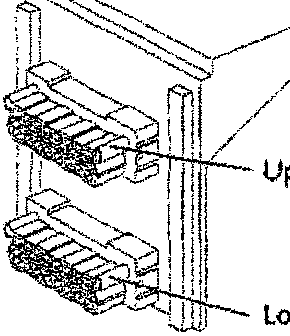
The sockets are mounted on a bracket and labelled Upper and Lower. The following lists describe the systems accessed from each socket.
Upper Diagnostic Socket
- Transmission Control Module (TCM)
- Megamoss Security System
- FMC Airbag System
- Teves Mk IV Anti-Lock Braking System
Lower Diagnostic Socket
- EEC V Powertrain Control Module (PCM)
- PATS Passive Anti-Theft System
- Autoliv Seatbelt Pretensioner System
Air Conditioning Diagnostics
The Valeo air-conditioning system uses a unique communications protocol and therefore the vehicle interface adaptor (VIA) is required and is connected directly to the air-con CPU in order to carry out diagnostics work on the system.
Parts & tools for this job For 1994 Aston Martin DB7
- TOOLOBD2 scannerSearch: OBD2 scanner
- TOOLDigital multimeterSearch: automotive digital multimeter
- TOOLBack-probe test leadsSearch: back probe test leads
Links open Amazon search results in a new tab. As an Amazon Associate I earn from qualifying purchases.