
Operation
- Make
- Aston Martin
- Model
- DB7 Factory Workshop Manual Volume 2: Electrics, Body and Air Conditioning
- Year
- 1994–1998
- Section
- Operating instructions › Operation
Operation
On selection of DMM the general screen, as shown in Fig. 1, will be displayed.
Voltage is the default selection for measurement, with red and black probes selected as sources. To choose alternatives to these options, press the relevant description for change followed by the ‘tick’ icon in the top, right-hand, corner.
If the measurement mode (Voltage) is selected for change, followed by a confirming ‘tick’, a screen as show will be displayed.
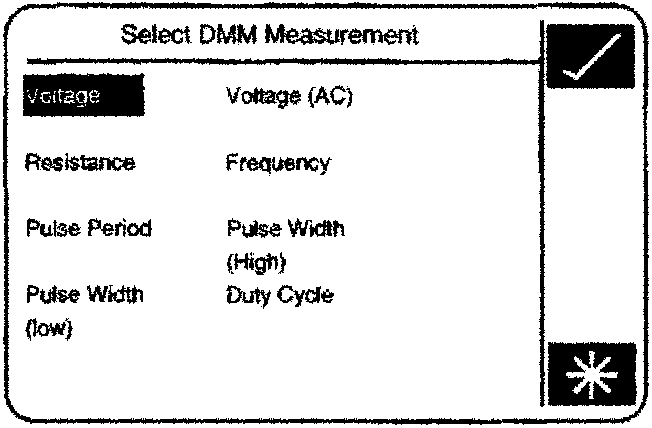
DMM Measurement Selection
Selection of any option from this screen, followed by a confirming ‘tick’, will return the operator to the general screen but with the new mode displayed against DMM.
If ‘Resistance’ is selected an additional icon, showing an audio symbol, will appear above the “EXIT” display. This icon allows the enabling / disabling of an audible signal which sounds when measured value falls below 0.5 ohms. Touch the icon to toggle the warning ON / OFF directly, no confirming ‘tick’ is necessary. A ‘cross’ is displayed over the icon when warning is turned OFF.
Measurement Source Selection
If a measurement source (either RED or BLACK PROBE) is selected, a screen as shown will be displayed. This screen may vary depending upon the various probes which can be connected to the PDU. A full list of possible sources will be displayed on the ‘Source Select’ screen.
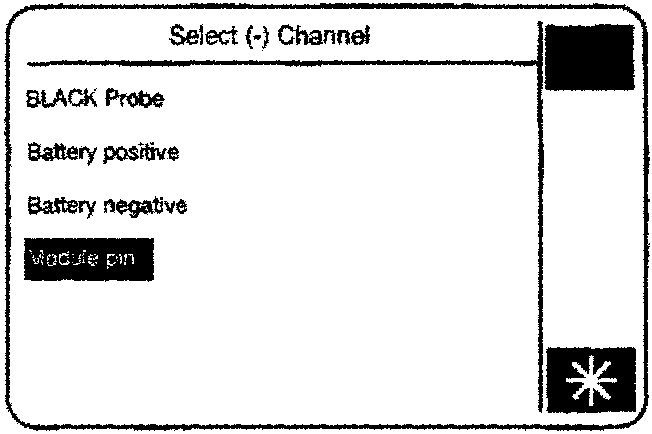
Selection of (+) and (-) measurement channels
Selection of any source option, except “Module Pin”, will return the user to the general screen, which will display the revised source.
Module Pin Selection (Air-Con only)
Selection of “Module Pin” will display a screen as shown.
Selection of one of the options displayed on this screen allows the operator to make measurements on designated pins of the air conditioning control module. When the air conditioning module is selected PDU will display a wiring connection diagram, as shown.
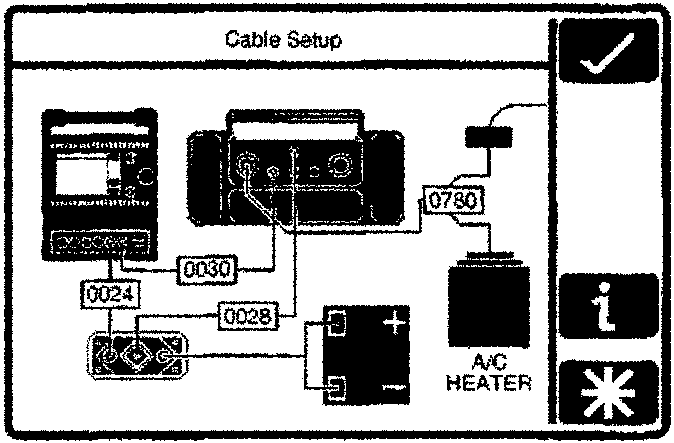
Module Connection
Parts & tools for this job For 1994 Aston Martin DB7
- TOOLOBD2 scannerSearch: OBD2 scanner
- TOOLDigital multimeterSearch: automotive digital multimeter
- TOOLBack-probe test leadsSearch: back probe test leads
Links open Amazon search results in a new tab. As an Amazon Associate I earn from qualifying purchases.