
Main Menu
- Make
- Aston Martin
- Model
- DB7 Factory Workshop Manual Volume 2: Electrics, Body and Air Conditioning
- Year
- 1994–1998
- Section
- Operating instructions › Main Menu
'Establishing connection to control module' should now be displayed on the screen.
If for any reason the PDU cannot communicate with the relevant vehicle control module a 'communications failure screen' will be displayed with a retry option.
Check all connections before retrying.
Once communications are successful 'Starting DataLogger' will appear on the screen momentarily.
DataLogger will automatically default to the waveform screen.
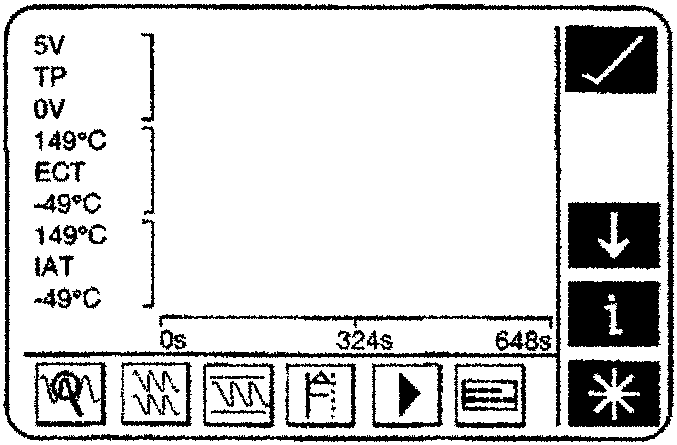
Datalogger Waveform Screen
The default waveform screen will display previous selected parameters. If these parameters are ideal for the test procedure then DataLogger can be started immediately, simply by pressing the record icon.
Select the main menu icon to go to the main menu screen.
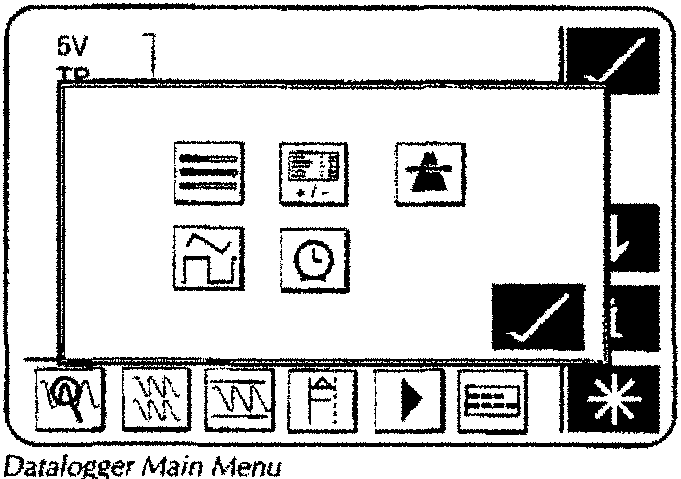
Main Menu
The datalogger main menu) is the main control screen, and can be selected from any of DataLogger's screens.
The main menu provides a single touch entry to each of DataLogger's features.
These features include (left to right, top to bottom):
- Bargraph Display
- Parameter Customisation
- On-Road Manual Trigger
- Waveform Display
- DataLogger timing
Parameter Customisation
Parameter customisation enables the selection of signals to be recorded by DataLogger. It also enables the signal units to be selected, the order in which the signals are displayed, and whether the displayed signals are to be used as a trigger.
The Parameter Customisation screen presents selections in a five column table. Each column from left to right represents:
- Parameter name or acronym.
- Record enabled.
- Display order.
- Trigger action.
- Display S.I. Units.
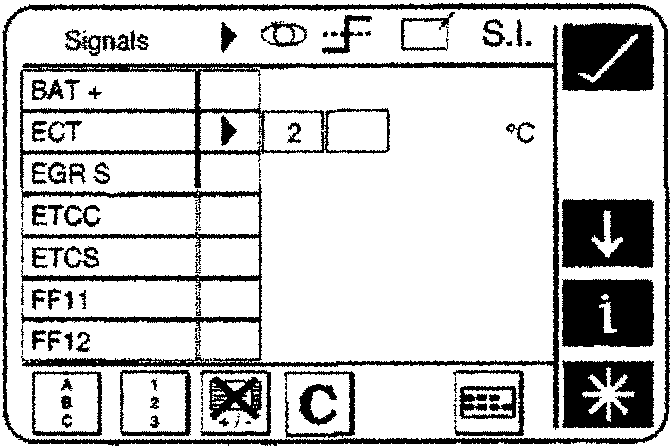
Parameter Customisation
Parts & tools for this job For 1994 Aston Martin DB7
- TOOLOBD2 scannerSearch: OBD2 scanner
- TOOLDigital multimeterSearch: automotive digital multimeter
- TOOLBack-probe test leadsSearch: back probe test leads
Links open Amazon search results in a new tab. As an Amazon Associate I earn from qualifying purchases.