
Printer Use
- Make
- Aston Martin
- Model
- DB7 Factory Workshop Manual Volume 2: Electrics, Body and Air Conditioning
- Year
- 1994–1998
- Section
- Operating instructions › Printer Use
Printer Use
Print Trace
The Trace Buffer is used to record technician use of the PDU. As the diagnostics are executed, the following information is written to trace:
- Screen Title
- Menu options selected
- Operator questions selected
- Operator actions
- Control module information
- Test limits and results
- P codes detected by the DTC monitor
- Snapshot data from the datalogger
- OBD II freeze frame data
Set up the printer and load with paper. Select Print Trace and confirm the selection. All recorded information in the above list will be printed.
Print trace is supported in English, French, German and Italian.
Print Screen
The Print Screen function dumps a bitmap image of the current screen display to the printer. This function is particularly useful for recording data such as waveforms captured by the datalogger application.
The print screen function is supported in English, French, German, Italian and Japanese.
Digital Multimeter
Introduction
The Digital Multi-Meter provides the capability to measure voltage, current, resistance, frequency, pulse width, pulse period and duty cycle using measurement probes or vehicle interface adaptor channels.
WARNING: DMM measurements must not be taken while the PDU is connected to the base station. The PDU measurement system becomes referenced to earth when connected to the base station. Serious measurement errors may be present because of any voltage difference between vehicle ground and base station earth. Operation of the PDU in this mode has both functional and safety implications and therefore must be avoided.
A digital multimeter (DMM) is resident within the PDU software toolbox.
The DMM application can be accessed from the main menu. On selection of “Digital Multimeter” from the main menu, the PDU will always display the same screen, known as the DMM general screen.
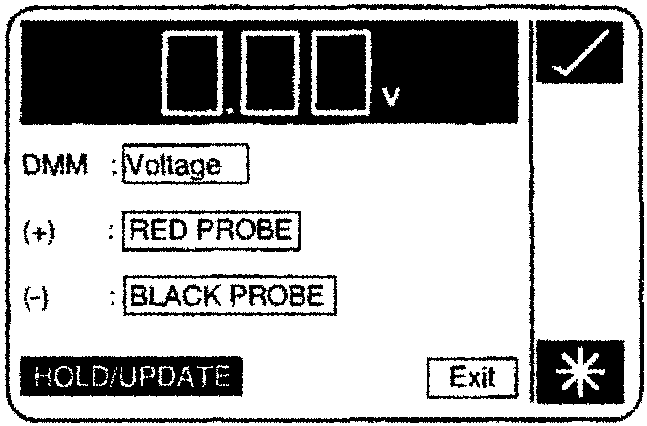
The DMM General Screen
The DMM is used to display measured values, to three significant figures, in the correct units.
Modes of measurement are Voltage, Voltage (AC), Resistance, Frequency, Pulse Period, Pulse Width (High/Low) and Duty Cycle. Current measurements up to 50A may be made using the current probe. Measurements are usually made directly using the PDU measurement probes. On the air conditioning system only, when using the VIA, measurements may be made between specific module pins. If required, this mode must be specified when specifying the measurement to be made.
Parts & tools for this job For 1994 Aston Martin DB7
- TOOLOBD2 scannerSearch: OBD2 scanner
- TOOLDigital multimeterSearch: automotive digital multimeter
- TOOLBack-probe test leadsSearch: back probe test leads
Links open Amazon search results in a new tab. As an Amazon Associate I earn from qualifying purchases.