
Datalogger
- Make
- Aston Martin
- Model
- DB7 Factory Workshop Manual Volume 2: Electrics, Body and Air Conditioning
- Year
- 1994–1998
- Section
- Operating instructions › Datalogger
Datalogger
Introduction
DataLogger is software produced to identify permanent or intermittent faults on vehicle electronics. The objective of DataLogger is to provide a view of the vehicle’s electrical behaviour, such that intermittent activity can be recorded and interpreted quickly and accurately. Running on the Portable Diagnostic Unit (PDU), the DataLogger application can capture vehicle information in three ways.
- Serial communications direct from the control unit.
- Parallel communications using the Interface Adaptor.
- Direct signal monitoring using the measurement probes.
Serial Communication
Serial Communication is a two-wire communication link between the PDU and most vehicle control modules providing digital measurements for connected components. The serial communication link allows the tester to determine the current condition of components connected to the control module, and to identify any history of faults.
On later vehicles, the PDU is connected to the vehicle diagnostic sockets via the multi Protocol Adaptor (MPA) to gather serial data from the control modules.
Parallel Communication
The Vehicle Interface Adapter (VIA) provides an interface between the PDU and the vehicle harnesses for the acquisition of multiple analogue measurements. The VIA is connected between the relevant vehicle control module and it’s harness connector. This allows the PDU to capture information from a multitude of channels entering the control module. This vehicle interface is used with control modules not equipped with a serial communication link (Teves Mk II braking system and the air conditioning system).
Measurement Probes
The measurement probes permit readings to be taken directly from any connector on the vehicle.
DataLogger Applications
DataLogger may be used to interrogate the following DB7 systems:
- ABS braking system controller
- Engine Management Controller
- Air Conditioning Controller
- Automatic Transmission Controller
- Passive Anti Theft (97 MY)
- Security System (97 MY)
Using the Datalogger
Configure the vehicle to the normal operating conditions for the system under test.
From the PDU main menu screen:
- Highlight ‘Diagnostics’.
- Press the ‘tick’ icon to confirm the selection.
- Enter the Transmission Type and confirm the selection.
- Select the Vehicle Area to be tested and confirm the selection.
The PDU tools screen should now be displayed.
- Highlight ‘DataLogger’.
- Confirm the selection with the ‘tick’ icon.
The PDU connection screen should now be displayed.
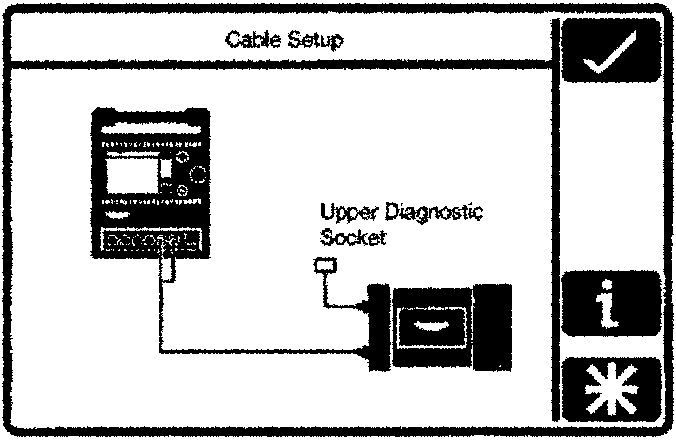
PDU Connections for Datalogger
Connect the PDU to the vehicle as described in the screen image.
Switch On the ignition and press the 'tick' icon.
Parts & tools for this job For 1994 Aston Martin DB7
- TOOLOBD2 scannerSearch: OBD2 scanner
- TOOLDigital multimeterSearch: automotive digital multimeter
- TOOLBack-probe test leadsSearch: back probe test leads
Links open Amazon search results in a new tab. As an Amazon Associate I earn from qualifying purchases.