
Datalogger Timing
- Make
- Aston Martin
- Model
- DB7 Factory Workshop Manual Volume 2: Electrics, Body and Air Conditioning
- Year
- 1994–1998
- Section
- Operating instructions › Datalogger Timing
Datalogger Timing
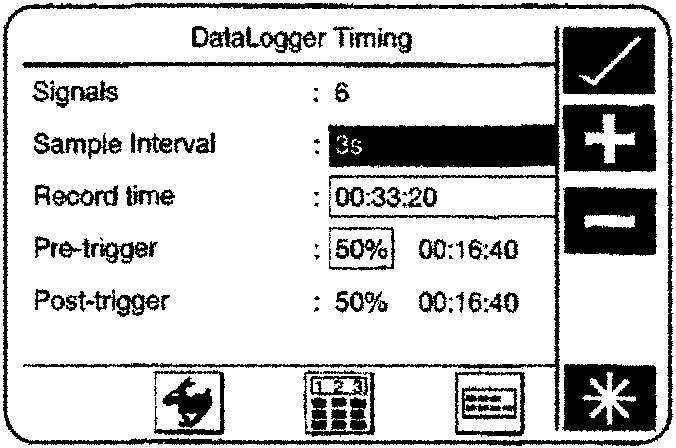
Select the ‘clock’ icon from the main menu screen. Confirm the selection using the ‘tick’ icon.
The DataLogger timing screen should now be displayed.
Datalogger Timing
The DataLogger timing screen allows customisation of the sample interval and duration of data capture.
The display will identify the number of parameters (channels) which have been selected to be recorded by DataLogger.
Timing changes can only be made while data capture is inactive. Entering DataLogger timing while vehicle data is being captured will display the current settings, but disable selection.
Signals
The signals are the number of parameters set for sampling by DataLogger.
Sample Interval
The sample interval (frequency) defines the time interval between successive block requests for all recorded parameters.
The sample interval is selectable to enable fast response to intermittent faults.
Note: Very short sample intervals may reduce test duration because the PDU memory becomes full of data.
Select the sample interval rectangle.
A calculator-style icon should now be displayed. [symbol]
As well as a calculator-style icon being displayed there will be a hare icon, selecting this icon will automatically set the fastest sample rate for the selected parameters.
Note: The fastest sample rate set using the ‘hare’ icon may be too fast for some applications.
Select the calculator-style icon.
A new screen should now be displayed.
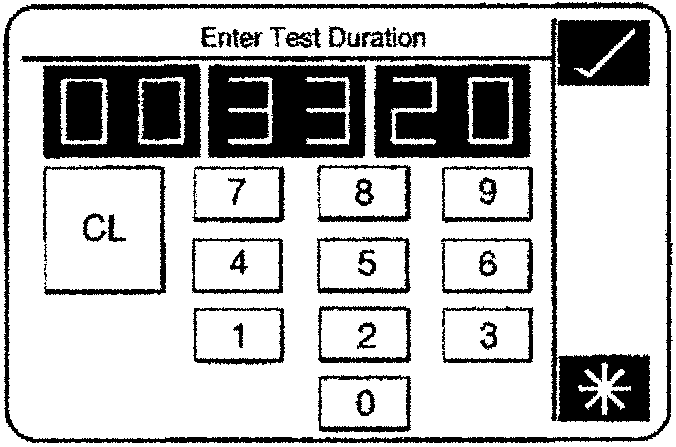
Test Duration
Enter the required value in milliseconds up to a maximum of 60,000 mS (1 min). At this stage DataLogger will not verify if the entered sample interval can be achieved.
When DataLogger is actioned to start recording vehicle data, and the sample interval is shorter than the fastest achievable capture time, a warning screen will be displayed, requesting changes to the sample interval.
Record Time
The record time (test duration) defines the length of the data slice which will be preserved for analysis after the fault occurs. The selected time will be split equally before and after the fault trigger. e.g. a 10 minutes recording will preserve data from 5 minutes before to 5 minutes after the fault.
At the end of the record time the PDU will automatically stop recording.
The record time is entered in the same way as the sample interval, by enabling the rectangle and selecting the calculator-style icon.
Parts & tools for this job For 1994 Aston Martin DB7
- TOOLOBD2 scannerSearch: OBD2 scanner
- TOOLDigital multimeterSearch: automotive digital multimeter
- TOOLBack-probe test leadsSearch: back probe test leads
Links open Amazon search results in a new tab. As an Amazon Associate I earn from qualifying purchases.