
Datalogger Example (page 3 of 3)
- Make
- Aston Martin
- Model
- DB7 Factory Workshop Manual Volume 2: Electrics, Body and Air Conditioning
- Year
- 1994–1998
- Section
- Operating instructions
The ‘tick’ icon was selected to return to the trigger screen which will then be as shown below.
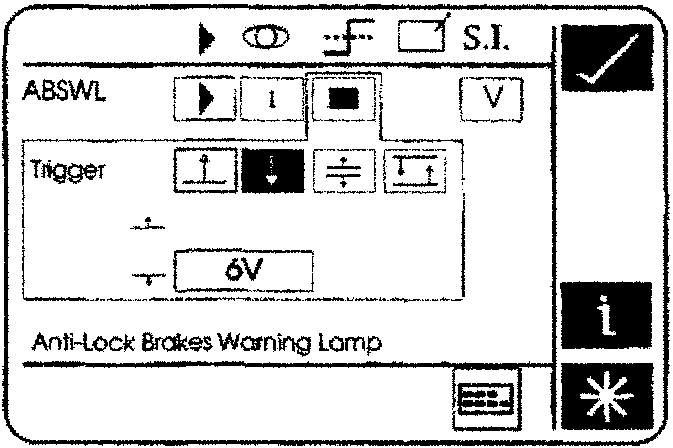
The Trigger Set-Up Screen
The ‘tick’ icon was then selected to return to the parameter customisation screen. The screen should now look similar to that below.
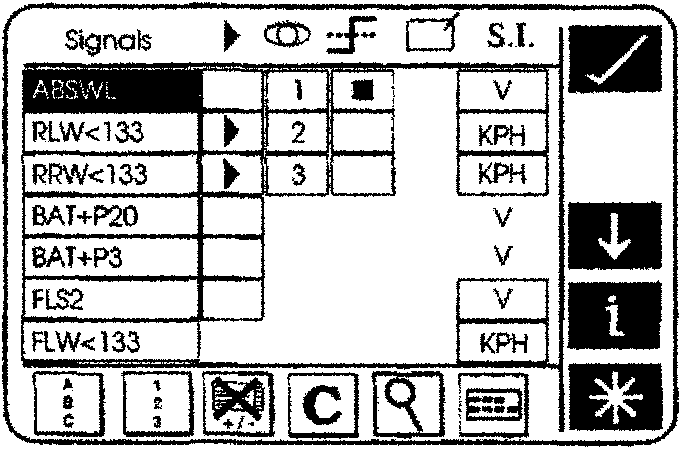
Parameter Customisation - Final Setup
The ‘tick’ icon was pressed to access the waveform display.
The PDU was now ready to start recording data.
The ‘record’ icon was selected to start recording data.
When the fault occurred, the ABS warning lamp automatically triggered the PDU. This will place a fixed cursor on the screen and set the time base to zero. The PDU will stop recording after the preset record time. If no record time has been entered, the PDU will use its default record time of 16minutes and 40 seconds. 8m20s pre-trigger and 8m20s post trigger.
The following figure indicates the typical waveform display for the wheel speed sensor fault. The dotted vertical line represents the trigger point.
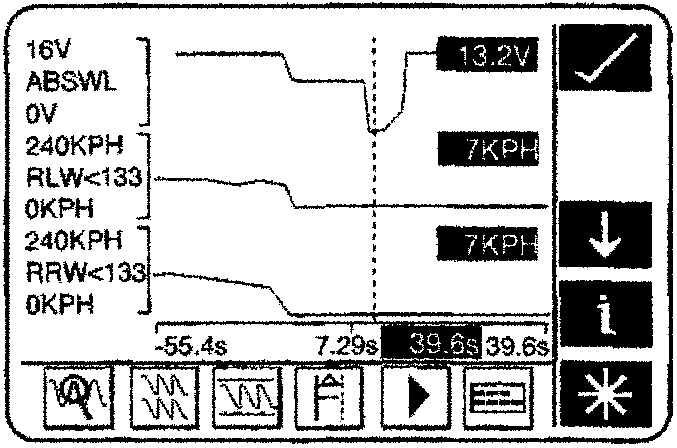
Wheel Speed Sensor Display
Parts & tools for this job For 1994 Aston Martin DB7
- TOOLOBD2 scannerSearch: OBD2 scanner
- TOOLDigital multimeterSearch: automotive digital multimeter
- TOOLBack-probe test leadsSearch: back probe test leads
Links open Amazon search results in a new tab. As an Amazon Associate I earn from qualifying purchases.