
Rear brake shoes (page 3 of 3)
- Make
- Rover
- Model
- 400 Workshop Manual
- Year
- 1995–2000
- Section
- Repairs
BrakesRear brake shoes · page 3 of 3
Refit
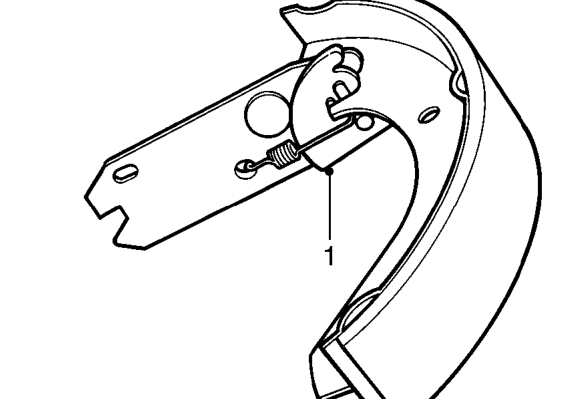
- Fully extend cam on strut and rotate leading shoe into strut slot, as illustrated.
- Fit upper return spring to leading shoe and fit trailing shoe to return spring.
- Engage trailing shoe on adjuster plate, fit adjuster spring to trailing shoe and secure spring to adjuster plate.
- Smear shoe contact points with Molykote 111 grease, ensure grease does not contact linings or dust covers.
- Manoeuvre shoe assembly into position between hub and wheel cylinder and connect hand brake cable to brake shoe lever.
- Fit lower return spring to trailing shoe and connect spring to leading shoe.
- Remove elastic band from wheel cylinder.
- Engage leading shoe in wheel cylinder slot followed by trailing shoe and align.
NOTE: During this operation the adjuster may become extended, this is not important but it must be reset prior to fitting brake drum.
- Fit trailing shoe into abutment bracket followed by leading shoe.
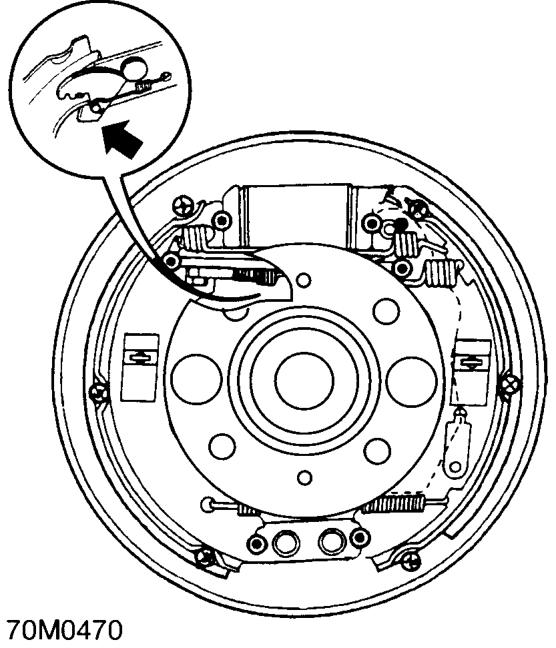
- Check adjuster cam and if necessary, set to minimum adjustment position as follows: Lever leading shoe away from wheel cylinder, move adjuster cam back fully and ease shoe back into position.
- Fit shoe steady pins through backplate, fit hold down clips and turn to lock.
- Clean brake drum, scrape ridge from edge of drum.
- Fit the brake drum and tighten screws to 7 Nm.
- Repeat procedure and fit brake shoes and drum to opposite hub.
- Fit road wheel(s) and tighten nuts to correct torque. See INFORMATION, Torque wrench settings.
- Remove stand(s) and lower vehicle.
- Apply brake pedal several times to set self adjust mechanism.
- Check and top up master cylinder.
- Check handbrake operation, adjust if necessary. See Adjustments.
Parts & tools for this job For 1995 Rover 400
- PARTRear brake padsSearch: Rover 400 1995 rear brake pads
- TOOLCaliper piston rewind toolSearch: brake caliper piston rewind tool
- FLUIDBrake fluidSearch: brake fluid
Links open Amazon search results in a new tab. As an Amazon Associate I earn from qualifying purchases.