
Front door panel/plastic cover (page 2 of 2)
- Make
- Rover
- Model
- 600 Rover 600 Repair Manual - Volumes 1 and 2 - 2nd Edition
- Section
- Doors
BodyFront door panel/plastic cover · page 2 of 2
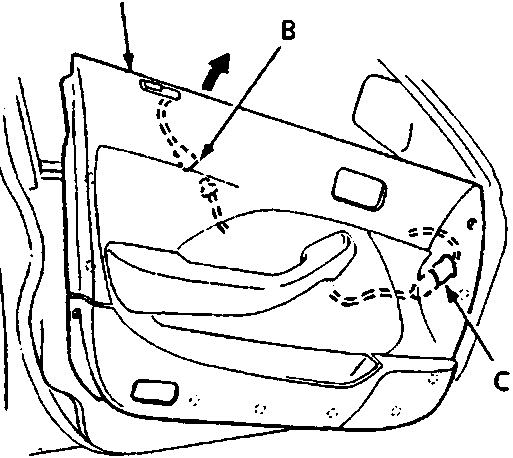
76M0762A
- A Door panel
- B Security indicator connector
- C Power door mirror switch connector
- Remove the door panel by pulling it upward. If applicable, disconnect the following:
- Power door mirror switch connector
- Security indicator connector (for some types)
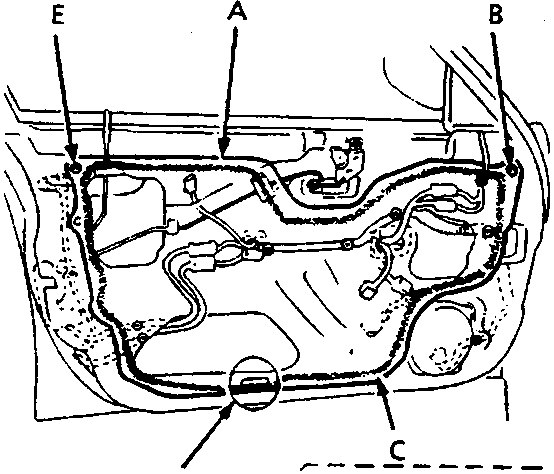
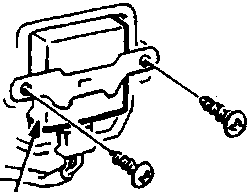
76M0763A
- A Plastic cover
- B Grommet
- C Adhesive
- D Power door lock unit
- E Grommet
- F Do not fill adhesive up to the slot
- Remove the grommets, power door lock unit and harness clips, then carefully remove the plastic cover.
- Installation is the reverse of the removal procedure.
Note:
- The power door lock unit does not apply to security system.
- Make sure the door harness and connectors are fastened correctly on the door.
- Apply adhesive along the edge where necessary to maintain a continuous seal and prevent water leaks.
- Before fastening the door panel, make sure the door harness is not trapped.
Parts & tools for this job For Rover 600
- TOOLTrim removal tool kitSearch: trim removal tool kit
- PARTTouch-up paintSearch: Rover touch up paint
- PARTPanel clip assortmentSearch: Rover panel clips assortment
Links open Amazon search results in a new tab. As an Amazon Associate I earn from qualifying purchases.