
Combined lighting and direction indicator switch
- Make
- Rover
- Model
- 800 Workshop Manual
- Year
- 1996–1999
- Section
- Repairs › Combined lighting and direction indicator switch
ElectricalCombined lighting and direction indicator switch · page 1 of 2
Refit
- Clean starter solenoid and mating face of starter motor.
- Lubricate solenoid operating plunger. See INFORMATION, Capacities, fluids and lubricants.
- Position starter solenoid to starter motor and engage solenoid operating plunger to starter lever.
- Fit and tighten starter solenoid screws
- Connect starter motor cable to starter solenoid and secure with nut.
- Fit starter motor, See this section.
COMBINED LIGHTING AND DIRECTION INDICATOR SWITCH
Service repair no - 86.65.55
WARNING: SRS procedures must be followed and ALL precautions observed. See RESTRAINT SYSTEMS, Precautions.
Remove
- Remove steering wheel. See STEERING, Repairs.
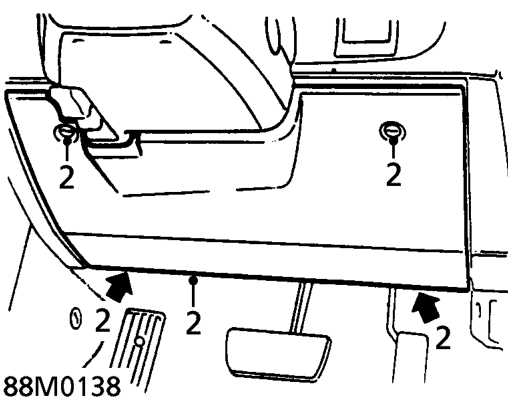
- Release 4 turnbuckles securing fuse box cover and remove cover.
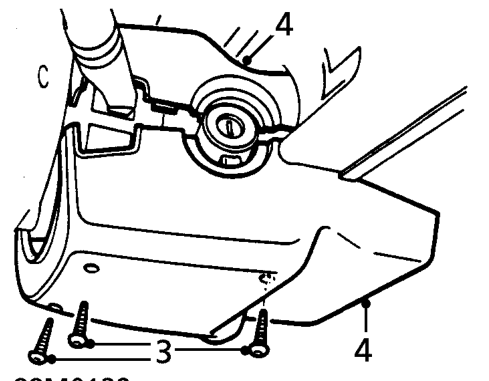
- Remove 3 screws securing lower half of steering column cowl.
- Separate and remove 2 halves of cowl.
CAUTION: Ensure road wheels are straight ahead.
Parts & tools for this job For 1996 Rover 800
- TOOLOBD2 scannerSearch: OBD2 scanner
- TOOLDigital multimeterSearch: automotive digital multimeter
- TOOLBack-probe test leadsSearch: back probe test leads
Links open Amazon search results in a new tab. As an Amazon Associate I earn from qualifying purchases.