
Mainshaft/countershaft speed sensor
- Make
- Rover
- Model
- 600 Rover 600 Repair Manual - Volumes 1 and 2 - 2nd Edition
- Section
- Repairs › Mainshaft/countershaft speed sensor
Automatic gearboxMainshaft/countershaft speed sensor
MAINSHAFT/COUNTERSHAFT SPEED SENSOR
Remove
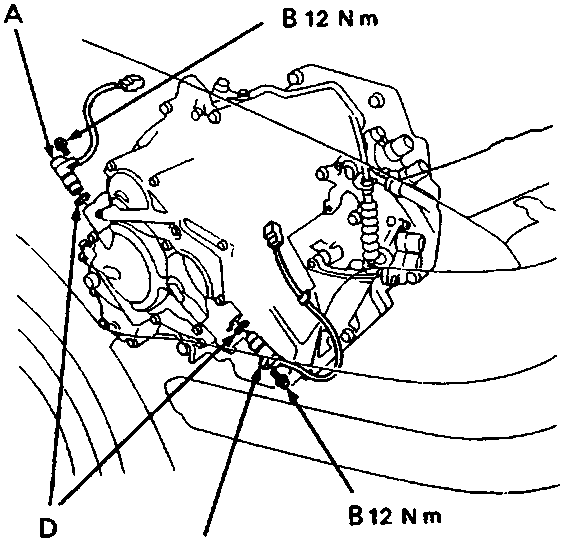
- Countershaft speed sensor
- Retaining bolt
- Mainshaft speed sensor
- 'O' ring
- Remove bolt from transmission housing and remove the mainshaft/countershaft speed sensor.
- Remove and discard 'O' ring.
Refit
- Lubricate a new 'O' ring with transmission fluid, see GENERAL INFORMATION
- Fit 'O' ring to sensor.
- Fit sensor, fit bolt and tighten to 12 Nm.
SELECTOR SWITCH
Test
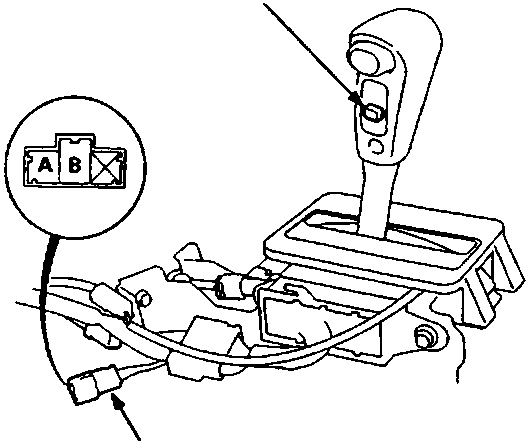
Note: Left hand drive illustrated, right hand drive is similar.
A Selector switch
B Switch harness connector
- Remove front console, see BODY – Repairs.
- Disconnect switch harness from main harness.
- Check for continuity between A and B terminals. There should be continuity when the switch is pressed, replace switch as necessary.
- Connect switch harness to main harness.
- Fit front console, see INSTRUMENTS – Repairs.
Replacement
- Remove front console, see BODY – Repairs.
- Remove 4 screws securing the gear position indicator panel, remove panel.
- Release clips securing selector switch harness, disconnect switch harness from main harness.
- Carefully prise selector switch cover from selector lever.
- Remove 2 screws securing selector switch, withdraw switch; disconnect harness from switch.
- Replace selector switch.
Parts & tools for this job For Rover 600
- TOOLOBD2 scannerSearch: OBD2 scanner
- TOOLDigital multimeterSearch: automotive digital multimeter
- TOOLBack-probe test leadsSearch: back probe test leads
Links open Amazon search results in a new tab. As an Amazon Associate I earn from qualifying purchases.