
Adjust
- Make
- Rover
- Model
- 600 Rover 600 Repair Manual - Volumes 1 and 2 - 2nd Edition
- Section
- Repairs › Adjust
Automatic gearboxAdjust · page 1 of 2
depressing and releasing the accelerator pedal.
- If the throttle control lever is not synchronized with the throttle linkage, adjust the throttle control cable.
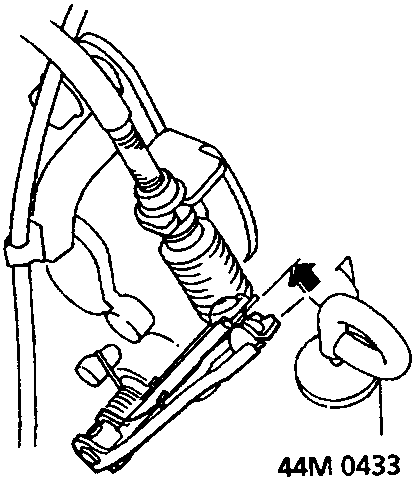
- Check that there is play in the throttle control lever while depressing the accelerator pedal to the full throttle position.
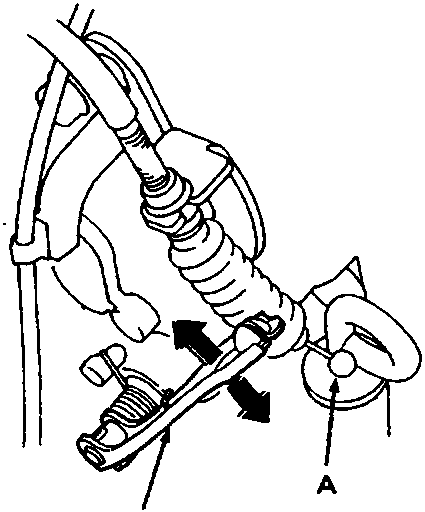
A Cable end
B Throttle control lever
- Remove the cable end of the throttle control cable from the throttle control lever.
- Check that the throttle control lever moves smoothly.
Adjust
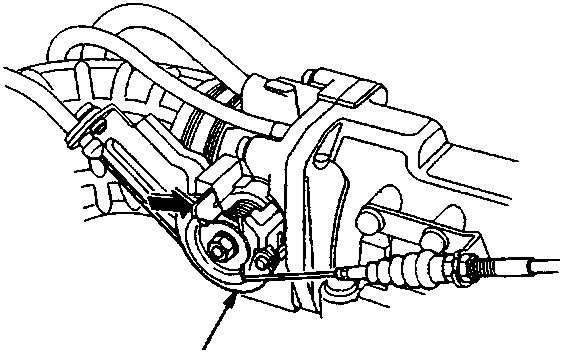
A Throttle linkage
- Before adjusting the throttle control cable, make sure that:
Throttle cable free play is correct, see ENGINE MANAGEMENT SYSTEM – PGM – Fi
Idle speed is correct. see ENGINE MANAGEMENT SYSTEM – PGM – Fi
Engine is at normal operating temperature, (the radiator cooling fan comes on). - Verify that the throttle linkage is in the fully closed position.
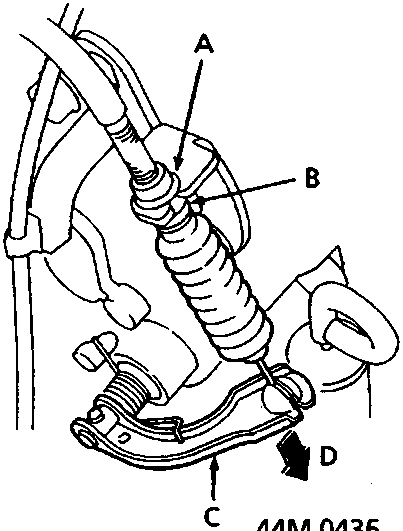
A Locknut
B Locknut
C Throttle control lever
D Fully closed position
Parts & tools for this job For Rover 600
- PARTTransmission filter kitSearch: Rover 600 transmission filter kit
- FLUIDAutomatic transmission fluidSearch: Rover automatic transmission fluid
- TOOLFluid transfer pumpSearch: fluid transfer pump
Links open Amazon search results in a new tab. As an Amazon Associate I earn from qualifying purchases.