
Adjust
- Make
- Rover
- Model
- 600 Rover 600 Repair Manual - Volumes 1 and 2 - 2nd Edition
- Section
- Repairs › Adjust
Automatic gearboxAdjust · page 1 of 2
Adjust
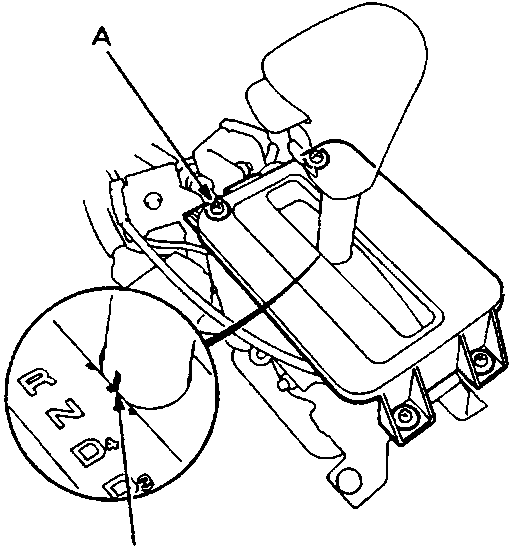
L.H.D. illustrated, R.H.D. is similar.
- With the selector in NEUTRAL, check that the index mark aligns with the N mark of the selector position indicator panel.
- If not aligned, remove the front console, see BODY
- Remove the selector position indicator panel mounting screws, and adjust by moving the panel.
- Refit front console, see BODY
SELECTOR CABLE
Remove
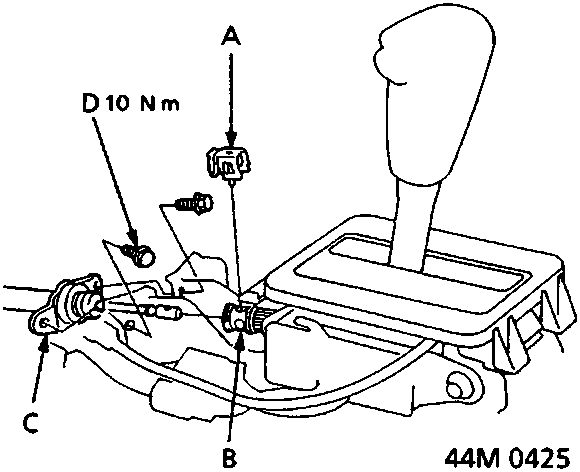
L.H.D. is illustrated, R.H.D. is similar.
- Raise front of vehicle.
WARNING: Support on safety stands.
- Remove front console, see BODY
- Select N, then remove the lock pin from the cable adjuster.
- Remove the bolts securing the bracket.
Parts & tools for this job For Rover 600
- PARTTransmission filter kitSearch: Rover 600 transmission filter kit
- FLUIDAutomatic transmission fluidSearch: Rover automatic transmission fluid
- TOOLFluid transfer pumpSearch: fluid transfer pump
Links open Amazon search results in a new tab. As an Amazon Associate I earn from qualifying purchases.