
Engine and automatic gearbox - models without air conditioning (page 9 of 10)
- Make
- Rover
- Model
- 200 Workshop Manual
- Year
- 1995–1999
- Section
- Repairs
Engine - K16Engine and automatic gearbox - models without air conditioning · page 9 of 10
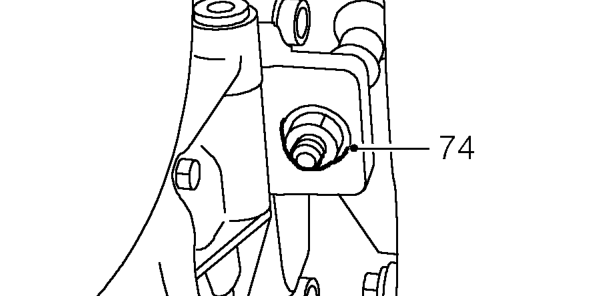
- Remove and discard nut securing gearbox mounting bracket to engine LH mounting.
- Adjust tool 18G 1598 to tilt engine with the gearbox as low as possible.
- Using assistance, manoeuvre engine and gearbox from vehicle.
CAUTION: Take care not to damage the ABS modulator or brake pipes when removing the engine.
- Lower engine and gearbox assembly and disconnect hoist from adjustable lifting bracket.
Refit
- Connect hoist to adjustable lifting bracket tool 18G 1598.
- Using assistance, raise engine and manoeuvre into position in vehicle.
- Adjust lifting bracket tool so engine is horizontal in engine compartment.
- Locate gearbox mounting bracket on engine LH mounting.
- Fit new Nyloc nut securing bracket to engine mounting and tighten to 160 Nm.
- Fit engine RH mounting bracket to engine mounting, steady bar and engine.
- Align mounting bracket to engine, fit bolts and tighten to 160 Nm.
- Fit nut securing mounting bracket to engine mounting and tighten to 85 Nm.
- Tighten nuts securing engine mounting to body, to 45 Nm.
- Fit bolt securing RH steady bar to mounting bracket and tighten to 80 Nm.
- Lower hoist and disconnect lifting bracket tool 18G 1598 from lifting brackets.
- Remove bolt securing lifting bracket tool 18G 1572/2 to cylinder head and remove lifting bracket.
- Remove 2 bolts securing lifting bracket tool 18G 1572/1 to cylinder head and remove lifting bracket.
- Clean camshaft rear cover plate.
- Position camshaft rear cover plate to cylinder head, fit bolts and tighten to 25 Nm.
- Connect engine steady bar to bracket on sump, fit through bolt and tighten to 80 Nm.
- Tighten through bolt, engine steady bar to subframe, to 80 Nm.
- Remove plugs from fluid cooler hose unions, lubricate new ’O’ rings with gearbox and fit to unions.
- Connect fluid cooler hoses to gearbox and tighten unions to 37 Nm.
- Fit selector cable to abutment bracket and push anti-vibration rubbers into position.
- Tighten selector cable lock nut to abutment bracket.
- Slide selector cable rod sleeving into position.
- Connect selector cable rod to selector rod, DO NOT tighten nut.
- Remove plugs from power steering pump and hose connections.
- Lubricate new ’O’ ring with clean power steering fluid and fit to fluid outlet hose.
- Connect fluid outlet hose to power steering pump and tighten union to 55 Nm.
CAUTION: To prevent damage to components, use two spanners when loosening or tightening unions.
- Align fluid outlet hose clamp to bracket and secure with bolt.
- Connect fluid inlet hose to power steering pump and tighten clip.
- Connect coolant feed hose to expansion tank and tighten clip.
- Connect 4 engine harness multiplugs to main harness and secure to mounting bracket on bulkhead.
- Connect multiplug to inertia switch and secure harness clip to mounting bracket.
- Connect coolant hose to thermostat housing and tighten clip.
Parts & tools for this job For 1995 Rover 200
- PARTEngine gasket setSearch: Rover 200 1995 engine gasket set
- TOOLTorque wrenchSearch: 3/8 inch torque wrench
- TOOLFeeler gauge setSearch: feeler gauge set
Links open Amazon search results in a new tab. As an Amazon Associate I earn from qualifying purchases.